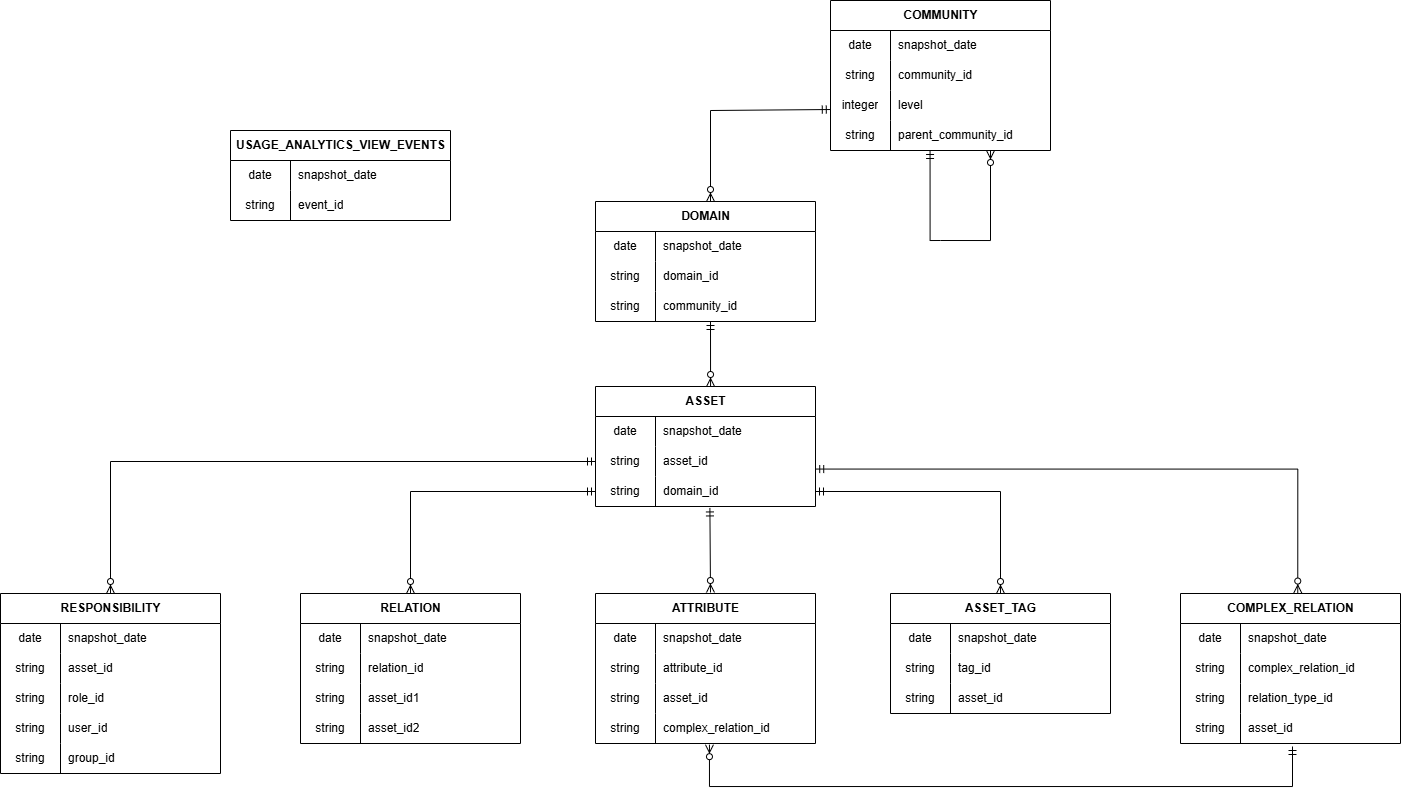
The following Entity Relationship Diagram shows how the different Insights Data Access tables can be linked. All tables contain both out-of-the-box variants and custom variants of the concept.
Note Asset types that can't be managed and viewed via the Asset Type Operating Model (for example, Roles and Workflow Definitions) aren't included in Insights Data Access. Attributes, communities, domains, and relations of such assets are also not included.
Note Nested communities can be identified via the parent-child relation. Subcommunities also have the ID of the stored community next to them.
To combine data for a given date, each table link clause must include snapshot_date.
Tables
|
table_name |
Description |
|---|---|
|
Contains all of the assets in your Collibra Platform environment, including the type of each asset and current status. |
|
|
Contains all of the tags attached to the assets in your Collibra environment. |
|
|
Contains all of the asset attributes in your Collibra environment. The attribute table has 2 parent tables: asset and complex_relation. If one has a value, then the other will be null. |
|
|
Contains all of the communities in your Collibra environment, including subcommunities. Note A single |
|
|
Contains all of the relation legs for all of the complex relations in your Collibra environment. |
|
|
Contains all of the domains in your Collibra environment that contain assets. |
|
|
Contains all of the relations in your Collibra environment, from head to tail and vice versa. |
|
|
Contains all of the responsibilities in your Collibra environment that are directly assigned at the asset level or domain level. This table does not have a primary key, but a combination of the following columns is unique:
Note Only responsibilities that are directly assigned to assets or inherited from domains are included in Insights Data Access. Responsibilities inherited from communities are excluded.
|
|
| view_events | Contains all of the view events in your Collibra environment, as measured in Usage Analytics. |
Asset
| column_name | ordinal_position | data_type | Primary Key (PK) and Foreign Key (FK) | Description |
|---|---|---|---|---|
| snapshot_date | 1 | date | PK | The date on which the snapshot was created. This is synchronized with the snapshot table. |
| asset_id | 2 | character varying | PK | The resource UUID of the asset. This is a unique identifier. |
| asset_full_name | 3 | character varying | The full name of the asset. | |
| asset_display_name | 4 | character varying | The display name of the asset. | |
| domain_id | 5 | character varying | FK | The resource UUID of the domain. This is a unique identifier. |
| asset_type_id | 6 | character varying | The resource UUID of the asset type. This is a unique identifier. | |
| asset_type_name | 7 | character varying | The name of the asset type. | |
| status_id | 8 | character varying | The resource UUID of the status. | |
| status_name | 9 | character varying | The name of the status. | |
| articulation | 10 | double precision | The articulation score of the asset. | |
| ratings_average | 11 | double precision | The aggregated average of the ratings of the asset. | |
| ratings_count | 12 | integer | The number of ratings of the asset. | |
| is_asset_system | 13 | boolean | An indicator of whether the asset is a system asset. | |
| creator_user_id | 14 | character varying | The UUID of the user who created the asset. | |
| creator_username | 15 | character varying | The username of the user who created the asset. | |
| creation_date | 16 | timestamp with time zone | The date on which the asset was created. | |
| editor_user_id | 17 | character varying | The UUID of the user who last edited the asset. | |
| editor_username | 18 | character varying | The username of the user who last edited the asset. | |
| edited_date | 19 | timestamp with time zone | The date on which the asset was last edited. |
Asset_tag
| column_name | ordinal_position | data_type | Primary Key (PK) and Foreign Key (FK) | Description |
|---|---|---|---|---|
| snapshot_date | 1 | date | PK | The date on which the snapshot was created. |
| tag_id | 2 | character varying | PK | The resource UUID of the tag attached to the asset. |
| asset_id | 3 | character varying | PK, FK | The resource UUID of the asset to which the tag is attached. |
| tag_name | 4 | character varying | The display name of the tag attached to the asset. | |
| creator_user_id | 5 | character varying | The UUID of the user who created the tag. | |
| creator_username | 6 | character varying | The username of the user who created the tag. | |
| creation_date | 7 | timestamp with time zone | The date on which the tag was created. | |
| editor_user_id | 8 | character varying | The UUID of the user who last edited the tag. | |
| editor_username | 9 | character varying | The username of the user who last edited the tag. | |
| edited_date | 10 | timestamp with time zone | The date on which the tag was last edited. | |
| is_tag_system | 11 | boolean | An indicator of whether the tag is a system tag. |
Attribute
| column_name | ordinal_position | data_type | Primary Key (PK) and Foreign Key (FK) | Description |
|---|---|---|---|---|
| snapshot_date | 1 | date | PK | The date on which the snapshot was created. This is synchronized with the snapshot table. |
| attribute_id | 2 | character varying | PK | The UUID of the attribute. |
| asset_id | 3 | character varying | FK | The UUID of the related asset |
| asset_type_name | 4 | character varying | The name of the asset type of the relation asset. | |
| attribute_type_id | 5 | character varying | The UUID of the attribute type. | |
| attribute_type_name | 6 | character varying | The name of the attribute type. | |
| attribute_type_description | 7 | character varying | The description of the attribute type. | |
| kind | 8 | character varying | The kind of attribute. | |
| is_attribute_integer | 9 | boolean | An indicator of whether the attribute is an integer. | |
| expression_long | 10 | character varying | The value of the attribute. | |
| boolean_value | 11 | boolean | The value of the attribute converted to a Boolean value. | |
| datetime_value | 12 | datetime | The value of the attribute converted to a date_time value. | |
| numeric_value | 13 | numeric | The value of the attribute converted to a numeric value. | |
| creator_user_id | 14 | character varying | The UUID of the user who created the attribute. | |
| creator_username | 15 | character varying | The username of the user who created the attribute. | |
| creation_date | 16 | timestamp with time zone | The date on which the attribute was created. | |
| editor_user_id | 17 | character varying | The UUID of the user who last edited the attribute. | |
| editor_username | 18 | character varying | The username of the user who last edited the attribute. | |
| edited_date | 19 | timestamp with time zone | The date on which the attribute was last edited. | |
|
complex_relation_id |
20 |
character varying |
FK |
The UUID of the complex relation for which the attribute is defined. |
Community
| column_name | ordinal_position | data_type | Primary Key (PK) and Foreign Key (FK) | Description |
|---|---|---|---|---|
| snapshot_date | 1 | date | PK | The date on which the snapshot was created. This is synchronized with the snapshot table. |
| community_id | 2 | character varying | PK | The UUID of the community. |
| community_name | 3 | character varying | The name of the community. | |
| community_description | 4 | text | The description of the community. | |
| is_community_system | 5 | boolean | An indicator of whether the community is a system community. | |
| uri (deprecated) | 6 | character varying |
The URI of the community. Note This field was available in API v1, but is not supported in API v2. |
|
| parent_community_id | 7 | character varying | FK | The UUID of the community containing this community. |
| level | 8 | integer | PK | The level of the community containing this community. The top level starts at 1. |
| level_community_id | 9 | character varying | The UUID of the community containing this community at a certain level. | |
| level_community_name | 10 | character varying | The name of the community containing this community at a certain level. | |
| level_community_description | 11 | text | The description of the community containing this community at a certain level. | |
| level_community_uri (deprecated) | 12 | character varying |
The URI of the community containing this community at a certain level. Note This field was available in API v1, but is not supported in API v2. |
|
| creator_user_id | 13 | character varying | The UUID of the user who created the community. | |
| creator_username | 14 | character varying | The username of the user who created the community. | |
| creation_date | 15 | timestamp with time zone | The date on which the relation was edited. | |
| editor_user_id | 16 | character varying | The UUID of the user who last edited the community. | |
| editor_username | 17 | character varying | The username of the user who last edited the community. | |
| edited_date | 18 | timestamp with time zone | The date on which the community was last edited. |
Complex_relation
| column_name | ordinal_position | data_type | Primary Key (PK) and Foreign Key (FK) | Description |
|---|---|---|---|---|
| snapshot_date | 1 | date | PK | The date on which the snapshot was created. This is synchronized with the snapshot table. |
| complex_relation_type_id | 2 | character varying | The UUID of the complex relation type. | |
| complex_relation_type_name | 3 | character varying | The name of the complex relation type. | |
| complex_relation_type_description | 4 | character varying | The description of the complex relation type. | |
| complex_relation_id | 5 | character varying | PK | The UUID of the complex relation. |
| relation_type_id | 6 | character varying | PK | The UUID of the relation leg type. |
| relation_role | 7 | character varying | The role of the relation leg. | |
| asset_id | 8 | character varying | FK | The UUID of the related asset. |
| creator_user_id | 9 | character varying | The UUID of the user who created the complex relation. | |
| creator_username | 10 | character varying | The username of the user who created the complex relation. | |
| creation_date | 11 | timestamp with time zone | The date on which the complex relation was created. | |
| editor_user_id | 12 | character varying | The UUID of the user who last edited the complex relation. | |
| editor_username | 13 | character varying | The username of the user who last edited the complex relation. | |
| edited_date | 14 | timestamp with time zone | The date on which the complex relation was last edited. |
Domain
| column_name | ordinal_position | data_type | Primary Key (PK) and Foreign Key (FK) | Description |
|---|---|---|---|---|
| snapshot_date | 1 | date | PK | The date on which the snapshot was created. This is synchronized with the snapshot table. |
| domain_id | 2 | character varying | PK | The UUID of the domain. |
| domain_name | 3 | character varying | The name of the domain. | |
| domain_description | 4 | text | The description of the domain. | |
| domain_uri (deprecated) | 5 | character varying |
The URI of the domain. If you create a community or domain in a development environment and you restore a backup of the development environment on your production environment, the URI for the community or domain in the report will reflect that of the development environment, not the production environment. Note This field was available in API v1, but is not supported in API v2. |
|
| is_domain_system | 6 | boolean | An indicator of whether the domain is a system domain. | |
| domain_type_id | 7 | character varying | The UUID of the domain type. | |
| domain_type_name | 8 | character varying | The name of the domain type. | |
| domain_type_description | 9 | character varying | The description of the domain type. | |
| community_id | 10 | character varying | The UUID of the community. | |
| creator_user_id | 11 | character varying | The UUID of the user who created the domain. | |
| creator_username | 12 | character varying | The username of the user who created the domain. | |
| creation_date | 13 | timestamp with time zone | The date on which the domain was created. | |
| editor_user_id | 14 | character varying | The UUID of the user who last edited the domain. | |
| editor_username | 15 | character varying | The username of the user who last edited the domain. | |
| edited_date | 16 | timestamp with time zone | The date on which the domain was last edited. |
Relation
| column_name | ordinal_position | data_type | Primary Key (PK) and Foreign Key (FK) | Description |
|---|---|---|---|---|
| snapshot_date | 1 | date | PK | The date on which the snapshot was created. This is synchronized with the snapshot table. |
| relation_id | 2 | character varying | PK | The UUID of the relation. This column, in combination with the direction column, is a unique identifier and can be used to uniquely identify each row. |
| relation_type_id | 3 | character varying | The UUID of the relation type. | |
| role_or_corole | 4 | character varying | The role of the relation in the direction from head to tail, co-role of the relation in the direction from head to tail. | |
| direction | 5 | character varying |
The direction of the relation, which can be either:
|
|
| asset_id1 | 6 | character varying | FK | The UUID of the first asset in the relation. |
| asset_type_id1 | 7 | character varying | The UUID of the asset type of the first asset in the relation. | |
| asset_type_name1 | 8 | character varying | The name of the asset type of the first asset in the relation. | |
| asset_id2 | 9 | character varying | FK | The UUID of the second asset in the relation. |
| asset_type_id2 | 10 | character varying | The UUID of the asset type of the second asset in the relation. | |
| asset_type_name2 | 11 | character varying | The name of the asset type of the second asset in the relation. | |
| is_relation_generated | 12 | boolean | An indicator of whether the relation is generated. | |
| creator_user_id | 13 | character varying | The UUID of the user who created the relation. | |
| creator_username | 14 | character varying | The username of the user who created the relation. | |
| creation_date | 15 | timestamp with time zone | The date on which the relation was created. | |
| editor_user_id | 16 | character varying | The UUID of the user who last edited the relation. | |
| editor_username | 17 | character varying | The username of the user who last edited the relation. | |
| edited_date | 18 | timestamp with time zone | The date on which the relation was last edited. |
Responsibility
| column_name | ordinal_position | data_type | Primary Key (PK) and Foreign Key (FK) | Description |
|---|---|---|---|---|
| snapshot_date | 1 | date | The date on which the snapshot was created. This is synchronized with the snapshot table. | |
| role_id | 2 | character varying | The UUID of the role of the responsible user or user group. | |
| role_name | 3 | character varying | The name of the resource role of the responsible user or user group. | |
| asset_id | 4 | character varying | FK | The UUID of the asset. If null, this is a global permission. |
| user_id | 5 | character varying | The UUID of the responsible user. This field is used only if the responsibility is assigned to a user. The permission is set for either a user or group. If the permission is null, it defaults to being set for the group. | |
| username | 6 | character varying | The username of the responsible user. This field is used only if the responsibility is assigned to a user. | |
| user_firstname | 7 | character varying | The first name of the responsible user. This field is used only if the responsibility is assigned to a user. | |
| user_lastname | 8 | character varying | The last name of the responsible user. This field is used only if the responsibility is assigned to a user. | |
| user_email | 9 | character varying | The username of the responsible user. This field is used only if the responsibility is assigned to a user. | |
| user_language | 10 | character varying | The language of the responsible user. This field is used only if the responsibility is assigned to a user. | |
| is_user_guest | 12 | boolean | An indicator of whether the responsible user is a guest user. | |
| is_user_api | 13 | boolean | An indicator of whether the responsible user is an API user. | |
| is_user_activated | 14 | boolean | An indicator of whether the responsible user's account is activated. | |
| is_user_enabled | 15 | boolean | An indicator of whether the responsible user's account is enabled. | |
| is_responsibility_system | 16 | boolean | An indicator of whether the responsibility is a system responsibility. | |
| creator_user_id | 17 | character varying | The UUID of the user who created the responsibility. | |
| creator_username | 18 | character varying | The username of the user who created the responsibility. | |
| creation_date | 19 | timestamp with time zone | The date on which the responsibility was created. | |
|
editor_user_id |
20 |
character varying |
The UUID of the user who last edited the responsibility. |
|
|
editor_username |
21 |
character varying |
The username of the user who last edited the responsibility. |
|
|
edited_date |
22 |
timestamp with time zone |
The date on which the responsibility was last edited. |
|
|
group_id |
23 |
character varying |
The UUID of the user group to which the responsibility is assigned. The permission is set for either a user or group. If the permission is null, it defaults to being set for the user. |
|
|
group_name |
24 |
character varying |
The name of the user group to which the responsibility is assigned. |
|
| user_licensetype | 11 | character varying | The license type of the responsible user. This field is used only if the responsibility is assigned to a user. |
View_events
| column_name | ordinal_position | data_type | Primary Key (PK) and Foreign Key (FK) | Description |
|---|---|---|---|---|
| snapshot_date | 1 | date | PK | The date when the view event occurred. |
| event_id | 2 | UUID | PK | The UUID of the view event. |
| user_id | 3 | UUID | The UUID of the person who created the view event. | |
| username | 4 | character varying | The username of the person who created the view event. | |
| event_time | 5 | timestamp | The time when the view event occurred, in UTC timezone. | |
| session_id | 6 | UUID | The UUID of the http session that the person who created the view vent was logged into in JSSSIONID format. | |
| asset_id | 7 | UUID | The UUID of the asset that was viewed during the view event. | |
| asset_full_name | 8 | character varying | The full name of the asset that was viewed during the view event. | |
| asset_display_name | 9 | character varying | The display name of the asset that was viewed during the view event. | |
| domain_id | 10 | UUID | The UUID of the domain that was viewed during the view event. | |
| domain_name | 12 | character varying | The name of the domain that was viewed during the view event. | |
| community_id | 13 | UUID | The UUID of the community that was viewed during the view event. | |
| community_name | 14 | character varying | The name of the community that was viewed during the view event. | |
| diagram_id | 15 | UUID | The UUID of the diagram that was viewed during the view event. | |
| diagram_name | 16 | character varying | The name of the diagram that was viewed during the view event. | |
| dashboard_id | 17 | UUID | The UUID of the dashboard that was viewed during the view event. | |
| dashboard_name | 18 | character varying | The name of the dashboard that was viewed during the view event. | |
| view_id | 19 | UUID | The UUID of the view that was viewed during the view event. | |
| view_name | 20 | character varying | The name of the view that was viewed during the view event. | |
| page_parameters | 21 | character varying | The query parameters part of the URL for the page where the view event occurred. Example: '?tabbar=ResourceRoles’ | |
| page_path | 22 | character varying | The page path of the URL for the page where the view event occurred. For example: '/apps/usage-analytics‘ or ‘/community/5aa77065-af23-4cb5-a887-5b41294607fd’ | |
| tab_name | 23 | character varying | The tab on the asset or domain page where the view event occured. Example: ‘Overview’ or ’History’ |