 Only show release notes of Collibra Platform for Government-certified features
Release 2023.08
Release information
- Publication dates:
- Release notes: July 20, 2023
- Documentation Center: August 3, 2023
- Release date of Collibra 2023.08.0: August 6, 2023
- Upgrade non-production environments: August 6, 2023
- Upgrade production environments: August 27, 2023
- Upgrade GovCloud environments: Approximately end of September. Please check with your Customer Success Manager for more information.
- Release date of Collibra 2023.08.1: August 27, 2023
- Release date of Collibra 2023.08.2: On demand only
- Release date of Edge 2023.08.1: August 20, 2023
- Release date of Edge 2023.08.2: September 10, 2023
- Release date of Edge 2023.08.3: October 1, 2023
- Release date of Edge 2023.08.4: October 8, 2023
- Release date of Edge 2023.08.5: October 15, 2023
- Release date of Edge 2023.08.6: October 22, 2023
- Release date of Edge 2023.08.7: October 29, 2023
- Release date of Edge 2023.08.8: November 5, 2023
- Relevant Jobserver version: 2023.08.0-28
Highlights
- Data Catalog
- Required JDBC driver updates:
- Due to Snowflake JDBC driver changes introduced in version 3.13.19 and 3.13.22, we have updated the Snowflake meta data synchronization process. If you are using a driver older than 3.13.22, make sure to update the driver in your Edge connection to version 3.13.22 or higher. (ticket #102862)
- If you are using a CDATA driver older than 21.0.7970 (released on October 2021) on Edge for metadata synchronization and profiling, you must update the driver to a higher version to be compatible with Java 17.
- In an effort to reduce the overall duration of the profiling activity, we have made several changes:
- The database profiling via Edge now allows to profile multiple schemas at the same time. By default, four schemas are processed in parallel. You can configure the parallel profiling process via the new setting "Parallel schema profiling via Edge". As a consequence, the "Parallel database profiling via Edge" setting has been removed.
Note that running multiple schemas also means that your database can be queried multiple times. - You can define the scope of the profiling via Edge by including or excluding tables based on Name or Type. This allows you to register all data metadata and only profile high-priority tables. Note that your Edge version must be upgraded as well.(Idea #DCC-I-1347, DCC-I-118)
- The database profiling via Edge now allows to profile multiple schemas at the same time. By default, four schemas are processed in parallel. You can configure the parallel profiling process via the new setting "Parallel schema profiling via Edge". As a consequence, the "Parallel database profiling via Edge" setting has been removed.
- Data Governance
- The new import wizard is now enabled by default. The improved import wizard uses version 2 of the Import API for better performance, with a refreshed interface and more intuitive mapping. To switch this feature off, contact Collibra Support.
- You can now manage who can import or export data with two new Import and Export global roles and global permissions. Collibra users that don't have a role with the Import or Export permissions do not have the option to import or export assets and complex relations. (Idea #DGCPLAT-I-494)
- Data Lineage
- The new MicroStrategy integration method, via the lineage harvester, is now generally available. The new integration method has the following benefits:
- Supports technical lineage with stitching
- Supports the latest MicroStrategy APIs.
- Supports project filtering.
- Allows you to view the source code for all tables and transformations.
- Power BI integration via the Power BI harvester will reach end-of-life on August 1, 2023. If necessary, migrate to Power BI via the lineage harvester
- With the optimization of CollibraData Lineage for Informatica PowerCenter, it is now four times faster to create technical lineage for Informatica PowerCenter.
- Edge
-
You can now control when your Edge site is upgraded with the new Manual upgrade mode. This feature is available for new and existing Edge installations starting from the 2023.08 version. If enabled, your Edge site alerts you when an upgrade is available and if the upgrade is required. Edge sites that require an upgrade will be in read-only mode until the upgrade has been successfully completed. Additionally, with Manual upgrade you can:
- Retrieve a software bill of materials to review and perform security evaluations on the images included in a new Edge site version.
- Setup your own custom repository that can pull from and mirror the Edge repository in the Cloud to scan images from available version upgrades.
- We no longer provide support for Edge sites installed before 2022.08 with k3s 1.20. If your Edge site is impacted, you will be notified on the relevant Edge site pages. These Edge sites may continue to work, but will be at risk for incompatibility issues and bugs. We recommend reinstalling your Edge site to the latest Edge site version, which includes the latest Edge supported Kubernetes version.
- API
-
As part of our preview program, Collibra is launching the Knowledge Graph API, a new GraphQL API, which simplifies the retrieval of Knowledge Graph data, including communities, domains, assets, and complex relations, in a synchronous manner.
With the adoption of GraphQL, an industry standard language for querying data, integrating data retrieval into applications becomes much easier, resulting in faster integration and reduced development time.
While the new API is a better alternative to the current REST Core APIv2 Assets resource, which requires making multiple calls to different endpoints, and the Output Module resource, which is based on a custom query language, the Knowledge Graph API is not intended to replace existing REST APIs. There are specific use cases where the Output Module may still be the preferred choice due to its support for certain types and sizes of data.
- For your security, you can allow or block GraphQL introspection through a new configuration option: "Enable schema introspection for public GraphQL APIs".
- Workflow Designer
Note Workflow Designer features become available with the upgrade of production environments.
-
The Workflow Designer is now generally available on two GCP clouds: GCP US East 1 and GCP EU West 1! You can use the Workflow Designer to build and manage workflows. This is a powerful visual tool that provides drag and drop functionality and full control over the layout and behavior of workflow forms. The Workflow Designer makes it easier for teams to work together to create and use new workflows that allow you to automate business processes. Workflow Designer contains more than 20 ideas supported by over a 100 organizations. (Idea #DGCPLAT-I-162, DGCPLAT-I-674, DGCPLAT-I-586, DP-I-12, DCC-I-1196)
New features
Data Catalog
- Database profiling via Edge now allows you to profile multiple schemas at the same time, which reduces the overall duration of the profiling activity. By default, four schemas are processed in parallel. You can configure the parallel profiling process via the new setting "Parallel schema profiling via Edge". As a consequence, the "Parallel database profiling via Edge" setting has been removed.
Note Running multiple schemas also mean that your database can be queried multiple times.
- The configuration of database profiling via Edge allows you to include or exclude tables based on Name or Type. This allows you to register all data metadata and only profile high-priority tables. (Idea #DCC-I-1347, DCC-I-118)
- You can now define the maximum duration of a profiling job via Edge.
-
By default, profiling results processed via Edge are anonymized for columns of data type Text and Geo. To make sure that sensitive data is anonymized, an administrator can now decide to anonymize the profiling results for all columns.
Data Lineage and BI integrations
Note Data Lineage is a cloud-only feature.
- The new MicroStrategy integration method, via the lineage harvester, is now generally available. The new integration method has the following benefits:
- Supports technical lineage with stitching
- Supports the latest MicroStrategy APIs.
- Supports project filtering.
- Allows you to view the source code for all tables and transformations.
- The Tableau hostname mapping feature is now generally available. When integrating Tableau, you can use the optional “hostnameMapping” section in your <source ID> configuration file, to map Tableau technical database, server and schema names to the respective real names, to preserve stitching.
- CollibraData Lineage support for creating technical lineage for Azure Data Factory via Edge is now generally available.
Edge
- You can now control when your Edge site is upgraded with the new Manual upgrade mode. This feature is available for new and existing Edge installations starting from the 2023.08 version. Additionally, with Manual upgrade you can:
- Retrieve a software bill of materials to review and perform security evaluations on the images included in a new Edge site version.
- Setup your own custom repository that can pull from and mirror the Edge repository in the Cloud to scan images from available version upgrades.
Collibra Console
- You can now allow or block GraphQL introspection through a new security configuration option: "Enable schema introspection for public GraphQL APIs".
Enhancements
Data Catalog
- Due to Snowflake JDBC driver changes introduced in version 3.13.19 and 3.13.22, we have updated the Snowflake meta data synchronization process. If you are using a driver older than 3.13.22, make sure to update the driver in your Edge connection to version 3.13.22 or higher. (ticket #102862)
- If you are using a CDATA driver older than 21.0.7970 (released on October 2021) on Edge for metadata synchronization and profiling, you must update the driver to a higher version to be compatible with Java 17.
- When registering a database via Edge, you can now select assets with a child asset type of System. Previously, this resulted in an error. (ticket #94964, 108449)
- You can now start the Request Assets Access workflow for reports and data sets with inherited groups assigned as the Owner. You can download the latest version of the out-of-the-box workflows from the Resource Center. (ticket #107024)
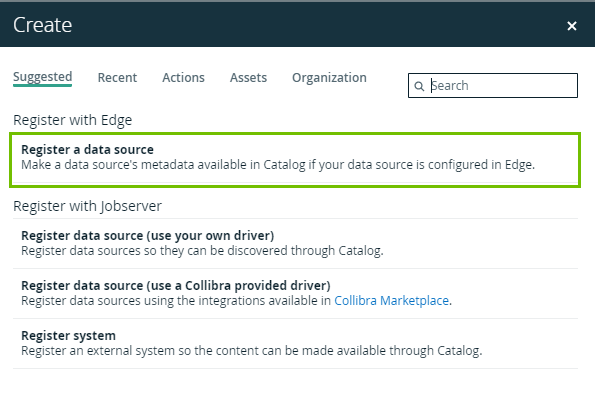
- The S3 integration is now available via the "Register a data source" link in the "Register with Edge" section of the Catalog "Create" dialog box.
- When you create a capability for an S3 integration, you can now define how you want to handle assets that are removed from the S3 data source. By default, such assets get the status 'Missing from source' in Collibra. You can now define whether you want to ignore those assets or delete them in Collibra. (ticket #111295)
- If you move Table and Column assets that were integrated from Databricks to another domain and you run the integration again, we now recognize the originally integrated assets and move them back to their initial domain. If you would want to move assets to another domain permanently, you need to update the existing synchronization configuration or create a new capability that integrates the data in the new location.
- You can now integrate an AWS EC2 instance that is configured with role based authentication via Edge. If you create an AWS connection via Edge, you now see the “Authentication type” drop-down list with the options “EC2” or “IAM”. (Idea #DCC-I-1500)
Data Lineage and BI integrations
Note Data Lineage is a cloud-only feature.
- The relation type “BI Folder contains / contained in Data Asset” (UUID: 00000000-0000-0000-0000-120000000014) is now available between all Tableau Data Model and Tableau Project assets.
- When integrating MicroStrategy via the new integration method:
- You can now view the source code for all tables and transformations, in the technical lineage Sources tab page. The source code shows information about the processes visible in the technical lineage and shows warnings and errors where a process has failed. This enhancement does not affect the success rate of metadata analysis.
- The Source Type attribute is now included on MicroStrategy Data Entity and Data Attribute asset pages, to identify the MicroStrategy data object type, for example Attribute, Fact, Table, or Column.
- The Power BI and MicroStrategy global assignments are updated to show more details on respective asset pages.
- When you integrate Tableau:
- Tableau Dashboard, Worksheet and Workbook asset pages now show the number of views in the Visits count attribute type.
- The Tableau API analysis documentation is updated with the visits count.
- When integrating Power BI, datamart metadata is now ingested in Collibra as assets of the new asset type Power BI Data Mart.
- Collibra Data Lineage now supports the following Power Query M functions:
- AnalysisServices.Databases
- AnalysisServices.DatabaseNote
- This function is fully supported if no MDX queries are used.
- If MDX queries are used and they resemble SQL, they will be parsed by the SQL parser.
- We don't currently support this function if used with MDX queries that resemble DAX, as the Collibra Data Lineage service instances can't parse such queries.
- When ingesting Snowflake data sources, the Collibra Data Lineage service instances now support LEVEL and CONNECT BY keywords. (ticket #115393)
- When ingesting PostgreSQL data sources, the Collibra Data Lineage service instances now support "x::typename" cast constructs, where "typename" contains a dot (.), for example "SELECT 'null'::qwerty.qwerty". (ticket #116821)
- Previously, when creating technical lineage for SQL Server Integration Services, CollibraData Lineage filtered out some queries due to legacy limitations. CollibraData Lineage no longer filters out queries. You may find increased successful lineage as well as increased parsing or analysis errors, as CollibraData Lineage tries to parse more queries. This is a backend change, and the new behavior will be seen during the next synchronization of the technical lineage for SQL Server Integration Services.
- CollibraData Lineage now processes and generates technical lineage for Informatica PowerCenter four times faster with the following changes:
- Data Lineage now pre-processes data into pydantic models instead of using the slower xpath solution that existed previously.
- Shortcuts are handled faster, by keeping necessary objects in memory on the Collibra Data Lineage service instances.
- The Analysis Error messages are enhanced by adding information that is related to rejected files and unresolved parameters.
- CollibraData Lineage now provides improved processing for sequence jobs, enhancing the technical lineage for DataStage.
- The new analyzeTemporaryTables property is added to the Snowflake SQL-API source ID file. With this property, you can decide whether CollibraData Lineage should analyze the CREATE TEMPORARY TABLE statement.
Data Governance
- The new import wizard is now enabled by default. To switch this feature off, contact Collibra Support.
- The import wizard now defaults the asset type to Business Asset or a calculated value if the asset type or the asset ID are not mapped. (Idea #DCC-I-1825)
- You can now map the asset type when importing complex relations. This allows you to create new assets during a complex relations import.
- You can now tailor the notifications you get, with five additional notification preference options added to your profile. (ticket #115127)
- You can now search for all email addresses in comments without having to consider casing. (ticket #116444)
Data Marketplace
- The Data Marketplace search now allows for brackets (), [], {}. We also reviewed and optimized the search error messages to create more transparency for you.
- The look and feel of multi-select attributes in Data Marketplace asset previews has been updated.
- To align Data Marketplace and Catalog, we now sort columns by column position in the "Columns" tab of a Table asset preview. In other tabs ("Details") and in Data Set assets, columns are sorted alphabetically.
- When you delete a custom relation index, we start the relation reindexing instead of the full reindexing.
- In asset previews that show a table of columns or report attributes, we now also show the Description of the columns or attributes.
- When you create a custom relation index, you can now add other attribute types than text to your relation index path. The newly supported attribute types are Selection, Multiple Selection, Numbers, and Boolean (True/False). The attribute types Date and Script are still not supported.
Note If the attribute type included in the relation index has a cardinality higher than 1, we only show the first alphabetically sorted occurrence of the attribute as a filter option in the Data Marketplace Filters pane. This limitation applies to Selection, Multiple Selection, Numbers, and Text.
Workflow Designer
Note Workflow Designer features become available with the upgrade of production environments.
- The Documentation field of the process now holds the description of your workflow that is also visible in Collibra. This field replaces the Description field.
Edge
- We no longer provide support for Edge sites installed before 2022.08 with k3s 1.20. If your Edge site is impacted, you will be notified on the relevant Edge site pages. These Edge sites may continue to work, but will be at risk for incompatibility issues and bugs. We recommend reinstalling your Edge site to the latest Edge site version, which includes the latest Edge supported Kubernetes version.
- A diagnostics file is now automatically generated if an Edge installation fails. To access the file, follow the file path found in the installation log Creating diagnostics file, in the following format:
Create /path/to/diagnostics/<diagnostics_file>.tgz. - An Edge Service Account, which is used by an Edge site to communicate with Collibra Platform, has now increased password security. The default password length is now 40 characters, unless the password length is defined otherwise in Collibra Console.
- If, in Collibra Console, the minimum password length is greater than 40, the Edge Service Account's password length will be set to that minimum length. For example, if the minimum password length is 45, then the Edge Service Account's password length will be 45.
- If, in Collibra Console, the maximum password length is smaller than 40, the Edge Service Account's password length will be set to that maximum length. For example, if the maximum password length is 32, then the Edge Service Account's password length will be 32.
- In all other cases, the Edge Service Account's password length will be 40.
Search
- Search relevance is now improved by allowing search results that contain special characters and prioritizing search results that match the search keywords. This includes improved matching of URLs, matching with CamelCase and with words linked by underscores, as well as, improved ranking of partial matches.
- Indexing is now performed asynchronously, and as a result, the "Asynchronous indexing" field is removed from the configuration settings.
Browser Extension
Note The current version of Collibra Browser Extension, which is a cloud-only feature, is 1.3.1.
- To enable you to easily distinguish between an attribute and its value, attribute labels are now shown in bold formatting.
- To make it easier for you to understand and use the extension, we have now made changes to the text that appears on the interface.
- In the configuration dialog box, the "Not sure what to do?" button is now changed into a question mark icon. In addition, when you install or update the extension, the Welcome page is no longer shown by default. You can, however, choose to show the Welcome page by default by selecting the "Show This Page Upon Update" option on the page.
Fixes
Data Catalog
- If you were using the Snowflake 13.3.13 driver version or older to profile columns of type TIMESTAMPTZ in Snowflake, you need to upgrade to at least version 3.13.22 for profiling to work correctly. (ticket #104898, 112896)
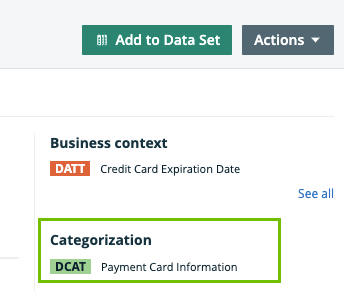
- The "Privacy Context" section, introduced in 2023.05, has been renamed to "Categorization". (Idea PE-I-1400)
- Modifications to Jobserver driver configuration properties that are already used by ingested schemas, no longer cause an error when opening the "Refresh Schema" dialog for a schema. (ticket #110125, 113195)
- The error message displayed when we cannot get a list of databases or schemas now shows the correct Edge job ID. (ticket #105407)
- The database synchronization via Edge no longer runs indefinitely if it contains a schema with the status "Removed from Source". (ticket #117090, 117356, 119213)
- The database registration via Edge now synchronizes the descriptions for tables and columns from Microsoft SQL server data sources. Before, these descriptions were not synchronized. (ticket #111287, 112765)
- We now synchronize the Snowflake Tags via Edge in Schema assets, even if the Schema doesn't contain tables.
- We now synchronize Snowflake Tags via Edge for tables created with lower case characters in the table name. (ticket #118665)
- If you create a synchronization schedule, you can only schedule on the hour, from the available hours. For example, you can add a synchronization schedule at 8, but not at 8:45. If you try to add it at 8:45, we will default it to 8. (ticket #114153)
If you don't want to schedule on the hour, you can use a cron expression. - Regional settings now impact the profiling charts. This has an impact on, for example, date formats. (ticket #117075)
- The Databricks Unity Catalog Metadata integration now supports the ingestion of the STREAMING_TABLE tables in addition to EXTERNAL, VIEW, MANAGED tables. (ticket #118679)
Data Lineage and BI integrations
Note Data Lineage is a cloud-only feature.
- When integrating MicroStrategy, you can now use the optional "microStrategyLibraryUrl" property in your configuration file, if you need to specify a custom URL for your MicroStrategy Library.
- Fixed Datastage lineage harvester bug where table-level lineage wasn't being generated appropriately if CollibraData Lineage did not have column-level information. Now, you can see more lineage in the Objects view where appropriate. (ticket #117233)
- Previously, data objects would be put into incorrect schemas, so they wouldn't stitch, and the technical lineage graph would stop where there should be more lineage. After this bug fix, stitching is improved and technical lineage is shown in full. (ticket #120439)
- Technical lineage for PowerCenter now includes an ANALYZE_ERROR called CONFIGURATION if there are undefined connection values in the source_id.conf file if you use the lineage harvester or the Source Configuration field in the technical lineage for Informatica PowerCenter capability on Edge.
Data Governance
- Fixed an issue where validation rules with a backslash in the name weren't executed correctly.
- You will be notified on Collibra Platform (CDIC) if a restore is unsuccessful and informed that you can't start CDIC until a successful restore is applied.
- Fixed a performance issue when removing a single responsibility from a group with more than 50k users. (ticket #104366)
- You can now unassign a group that has up to 100k users from any global role.
- If you disable a user account, they will now be logged out and no longer able to access Collibra. (Idea #DCC-I-1665) (ticket #109162)
- We have fixed an issue that, in specific circumstances, made assets disappear from search after Tableau ingestion. (ticket #110002)
- All action buttons, more buttons, pop-over icons buttons, and other buttons with drop-down options now work as expected, by opening on the first click and closing on the second click. (ticket #109814)
- When adding a characteristic on an asset page you can now search all characteristics, even if they are not shown in the initial 300 displayed options. (ticket #112406)
- Switching off the Detailed Relation Export Format configuration option no longer causes incorrect relation column headers in the exported file. (ticket #118302, 118366)
- You can again correctly import complex relations. (ticket #117465, 117888, 118366, 119350, 119424)
-
You will now see the correct message depending on whether the asset type has subtypes with inherited assignments or not. (ticket #104922)
-
Migration report links for attribute types and complex relation types now point to respective list views in the operating model.
-
You will no longer see asset types in the suggestion tab of the Global Create for domains where that asset type can't be added.
-
Scoped assignments are now properly taken into account in filters and column picker for Domain Asset Table
-
You can once again upload a new license file through Collibra Console without getting an error from EdgeBootstrap. (ticket #85999, 95969, 110232, 114938, 115018, 115108)
-
Improved permission checking on the asset types shown in Global Create for users with System Administration permissions.
Data Marketplace
- A link in an asset description to another asset now opens the correct page instead of a dashboard.
- Filter names can no longer contain the characters [, ], and >.
Note If you have created relation indexes with these characters in their name, we will replace them with a - during the upgrade. For example, "hello>world" will change to "hello-world". If this change results in a duplicate filter name, the name won't be updated. We recommend you to verify the filter names after the upgrade.
Diagrams
- When the loading time for a diagram exceeds the backend limit, a notification is now shown to indicate that the diagram could not be loaded.
Workflows
- Workflows that start when a user is added, no longer prevent the creation of new SSO users when the start event is asynchronous. (ticket #115184, 117201, 117202, 117209, 117337, 117422, 117568, 117689, 117813)
- You can again deploy workflows that you could previously deploy in 2023.04 or older but not in 2023.05, 2023.06, or 2023.07. (ticket #114720)
- If you have multiple pages in your list of workflows and you delete a workflow on any page other than the first, you now remain on the page from which you deleted the workflow, instead of being returned to the first page.
Also, if your pagination is set to show more than 50 workflows per page and you delete a workflow on any page other than the first, you now remain on the page from which you deleted the workflow. Previously, the system would return you to the first page and reset the number of workflows per page to 50. (ticket #108747)
Workflow Designer
Note Workflow Designer features become available with the upgrade of production environments.
- The Workflow Designer is now protected against Cross-Site Scripting (XSS) attacks.
- The secret key to decode the JWT token is now always provided. The JWT token is used to keep track of the user's session.
- A malformed command in a workflow now shows a clean and more readable error instead of the full details of the error, including the workflow's subroutines.
- Users can now sign in to the Workflow Designer via single sign-on (SSO), regardless of whether their first name and/or last name are provided in their SSO data. (ticket #112884, 113672)
Edge
- We have improved the security of Edge.
- The diagnostics script can now run regardless of whether the remote script is available or not. If the remote script is unavailable, the local script runs instead.
Search
- Assets from the Metamodel Community are no longer shown in any search results. (ticket #110259)
- The count of results of a search filter in the left pane now matches the count of results returned. (ticket #113832)
Usage Analytics
- In the Active Visitors subsection, if the Previous Visits column contains 0 and you sort the column values in descending order, the values are now shown in the expected descending order. (ticket #105325)
- The "Participated in workflows" column in the file downloaded from a Visitors section now shows the correct participation status for each entry (that is, Yes or No), instead of showing FALSE for all entries. (ticket #116912)
Browser Extension
Note The current version of Collibra Browser Extension, which is a cloud-only feature, is 1.3.1.
- The Browser Extension now shows the images stored within the Collibra platform on the asset pages. (ticket #117790)
Collibra Console
- In the email configuration settings of Collibra Console, the host, port, and email fields are now required.
- For descriptions of backups and backup schedules, we now remove dangerous HTML content (for example <script> tags). For user names, backups, backup schedules, environments, nodes, repo clusters, and diagnostics files, the following special characters are not allowed: <>:"/\|?*$'&. (ticket #114107, #116646)
- Any non-basic characters ("[^a-zA-Z0-9-_.]",) in file names will be replaced by an underscore ( _ ) when the file is either uploaded as a backup or downloaded. (ticket #115045)
- We have updated Swagger specs to support direct API calls to Collibra Console APIs, and no longer require a cookie to be present, as a part of the implementation of Spring CSRF. (ticket #117023)
API
- If you attempt to update an attribute type, via REST API, using a non-existing ID a 404 error code is now returned.
- Relation type direction errors will now be returned as expected when adding or changing an assignment using REST API.
-
We’ve changed the 500 error to a 403 error if you try to update a system asset type assignment via REST API, you will also see improved wording to make the problem clearer and more actionable.
-
Added validation for startDate and endDate in GET /activities REST API method, so that only startDate values lower than endDate are accepted.
-
The responses of workflow steps now contain the necessary information according to the Collibra swagger file. For example, in earlier versions, resourceType, which was a required field, was not included in the response. (ticket #108992)
-
When you make an API call to update a domain, but there is nothing that needs to be changed (all parameters that are passed in the request have the same value as before the update call), the assets in that domain no longer disappear from the search.
-
You can now delete a user who still has incomplete workflow user tasks. (ticket #113703)
Miscellaneous
- The global views for Data Sources now load properly when the Data Classification column is enabled. (ticket #117424)
- The page titles of the Homepage and landing pages of Usage Analytics and Data Marketplace now show Data Intelligence Cloud instead of Data Governance Center. (Idea #DCC-I-1614)
Features in preview
Data Catalog
Databricks Unity Catalog provides a "properties" field for Catalog, Schema, and Table objects that contains a map of arbitrary key-values. We already allowed for the integration of these properties in Table assets. With 2023.08, you can now ingest the values from the Catalog and Schema objects into Database and Schema assets. If you use this feature, make sure to set up all required characteristic assignments for the asset type.
Data Marketplace
Data consumers can now create collections in Data Marketplace. A collection is an ad hoc list of assets. Examples are:
- A list of favorite assets.
- A list of assets to review.
- A list of assets that are important in the context of a specific project.
Collections can be enabled in your environment via the "Collections" beta feature setting.
(Idea #COOL-I-35)
Knowledge Graph API
- Collibra is launching the Knowledge Graph API, a new GraphQL API, which simplifies the retrieval of Knowledge Graph data, including communities, domains, assets, and complex relations, in a synchronous manner.
SCIM API
SCIM API serves as a standardized mechanism that enables you to seamlessly automate user provisioning and deprovisioning between your Identity Providers (IDPs) and Collibra's platform. By adopting this standardized approach, the user management process is streamlined and the overall user experience is significantly improved. It also leads to increased efficiency, reduced administrative overhead, and lowers IT development and management costs for your organization. We are going to start our public beta testing with the 2023.08 release.
If you are interested in participating in this public preview, please contact your customer success manager or access our Beta Platform community in order to join the SCIM API testers pool, where you can share your feedback (such as, issues and ideas) directly with the Product Manager.
Collibra maintenance updates
Collibra 2023.08.1
- Fixed a Remote Code Execution vulnerability in workflows.
- Existing custom Import or Export global roles are renamed "Import - renamed for 2023.08" and "Export - renamed for 2023.08" to accommodate the introduction of new Collibra out-of-the-box roles with the same name.
- Migrating from Jobserver to Edge no longer duplicates the migrated data. (ticket #122099)
- Restoring a backup as a user with the ADMIN role in Collibra Console no longer causes an unauthorized exception error. (ticket #121841, 122098, 122105, 122139, 122172, 122188, 122209, 122212, 122216, 122228, 122263, 122294, 122329, 122332, 122348, 122393, 122413, 122421, 122422, 122430, 122441, 122458, 122479, 122487, 122517, 122555, 122557, 122609, 122630, 122636, 122652, 122661, 122716, 122798, 122830, 122932)
Collibra 2023.08.2
- We have improved the security of our authentication, authorization, cryptography, and session management.
Edge and Data Lineage updates
Edge 2023.08.1
- We have improved one or more private preview features.
Edge 2023.08.2
- EKS 1.22 is no longer supported for new Edge installations starting from the 2023.09 release. If you plan to install a new Edge site on 2023.09 or later, you must use an EKS cluster with Kubernetes version 1.23 or higher.
- We have improved the security of Edge.
- When integrating with Databricks Unity Catalog, in Column assets that have a structured technical data type, Array or Struct, you can now click the “More” button to see the structure of the data.
Edge 2023.08.3
- The technical lineage for dbt Cloud (in preview) on Edge is using a new API to get information, as the previous API used is deprecated.
Edge 2023.08.4
- We have improved the security of Edge.
- You can now configure a proxy connection when integrating Power BI.
- The Edge Classification capability has been updated to handle empty spaces around data. (ticket #114742)
- Advanced configuration options are now available for the following integration capabilities: S3, GCS, ADLS, and Databricks Unity Catalog. The advanced configuration, Memory (MiB), Logging configuration, and JVM arguments, can help when investigating issues and should only be completed on request of or together with Collibra Support.
- It is now possible to use the GCS synchronization with MITM proxy with basic authentication.
- If the current S3 synchronization crawler configuration doesn’t meet your needs, we now provide a way to integrate an AWS Glue database for which you defined crawlers in AWS Glue itself. This allows you to use all crawler options from the AWS Glue Console.
The new “Glue database configuration” parameter is available in the S3 Synchronization capability. There, you can enter the Glue database name, region, and Collibra domain ID in which you want to add the assets, in JSON format.Note If you use the "Glue database configuration" parameter, you will still need to create a dummy crawler in DIC. This dummy crawler configuration will be ignored by the S3 synchronization. In a future release, we'll improve the process and remove the need for a dummy crawler.
- The Databricks Unity Catalog integration now integrates both the Primary key and Foreign key information from Databricks Unity Catalog.
Edge 2023.08.5
- Fixed several harvester issues that were causing Power BI integration to fail. (ticket #124899, 125669, 126040, 127166, 127350, 127384, 127409)
Edge 2023.08.6
- To improve profiling performance of the profiling capability on Edge, we no longer perform a dedicated query for a row count when you profile all rows in a table. (ticket #121338)
Edge 2023.08.7
- We have improved security for Data Classification via Edge.
Edge 2023.08.8
- The Databricks Unity Catalog Synchronization capability has been updated to use a generated external ID for assets based on the full name. Previously, the external ID was set to the asset Databricks ID.
This change was made to accommodate the use case where an asset, for example a table, was deleted and recreated with the same name in Databricks Unity Catalog. This resulted in multiple Databricks IDs for the same asset which caused the integration to fail.
(ticket #126352, 126606, 126608, 127194, 128382)