You can run a control on demand, outside its scheduled run. This is useful, for example, when you want to:
- Validate a fix without waiting for the next scheduled run.
- Generate up-to-date results ahead of an audit or reporting deadline.
Requirements and permissions
- You have a global role with the Product Rights > Control Tower global permission.
- You have one of the following:
- A global role with the Resources > Manage all resources global permission.
- A resource role with the Asset > Control > Activate and Run resource permission on the relevant community or domain:
- The control has a configured and enabled query.
Steps
- Open the Managed Control asset page of the control that you want to run.
- Scroll down to the Control configuration section and click the Run icon, as shown in the following image.
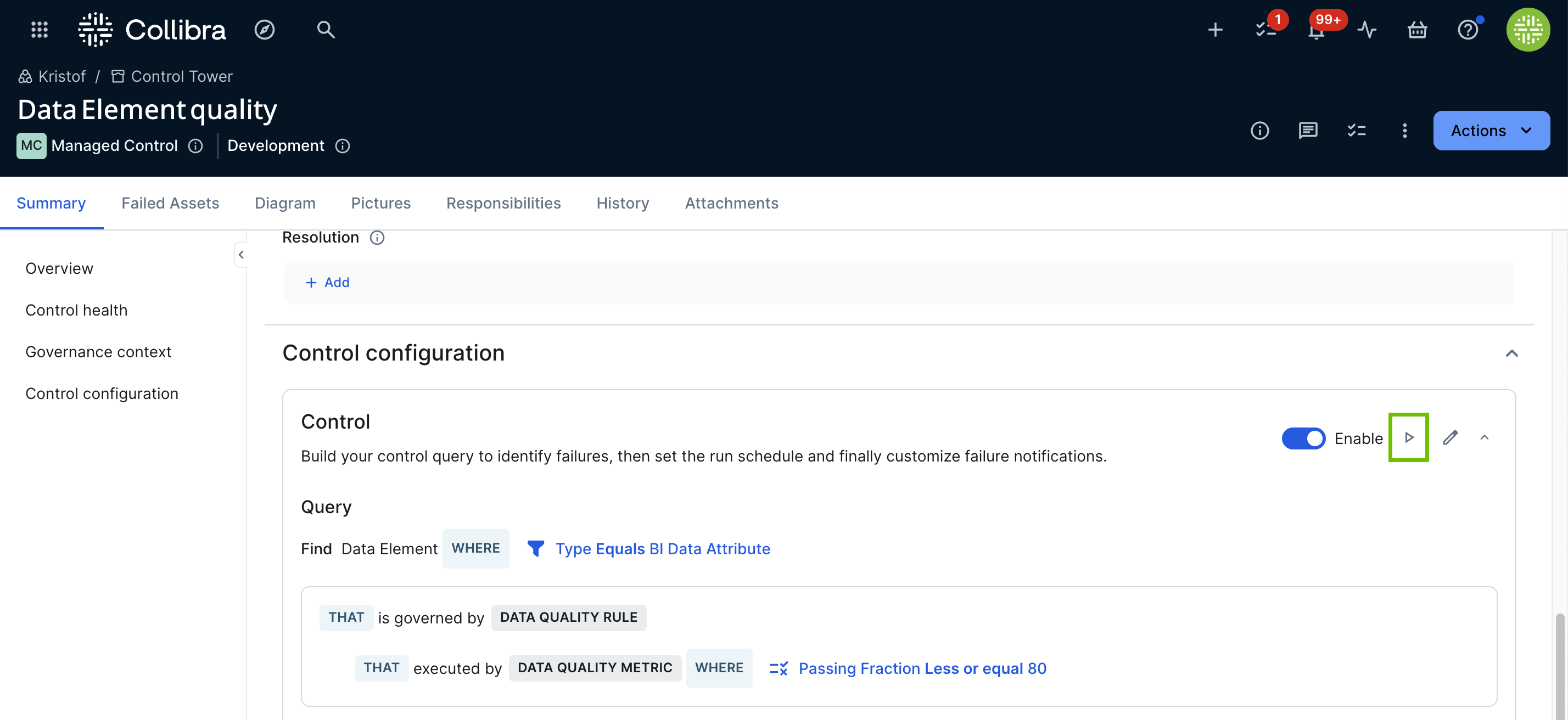
The control run starts immediately. When the run is complete, the following fields on the asset page update automatically: Control Status, Failed Asset Count, Failed Since, and Last Successful Job Run.
When the query is run:
- All failed assets are listed on the Failed assets tab of the Managed Control asset.
- The Managed Control asset is shown on the respective asset page of each failed asset.