This guide helps you choose the right combination of identity and access management options for your organization. The three flows below are independent choices, each answering a different question:
| Flow | Topic | Question it answers |
|---|---|---|
| 1 | Authentication | How do people prove who they are when they sign in? |
| 2 | Provisioning | How do user and group records get into Collibra, and how are they removed? |
| 3 | Programmatic access | How do scripts, integrations, and other systems authenticate? |
Authentication and provisioning are separate choices. You can authenticate with SAML while provisioning with SCIM, or authenticate with SAML while provisioning from LDAP. The SSO mode setting bundles an authentication method together with a provisioning method.
Authentication
The following diagram helps you choose the authentication method for your environment.
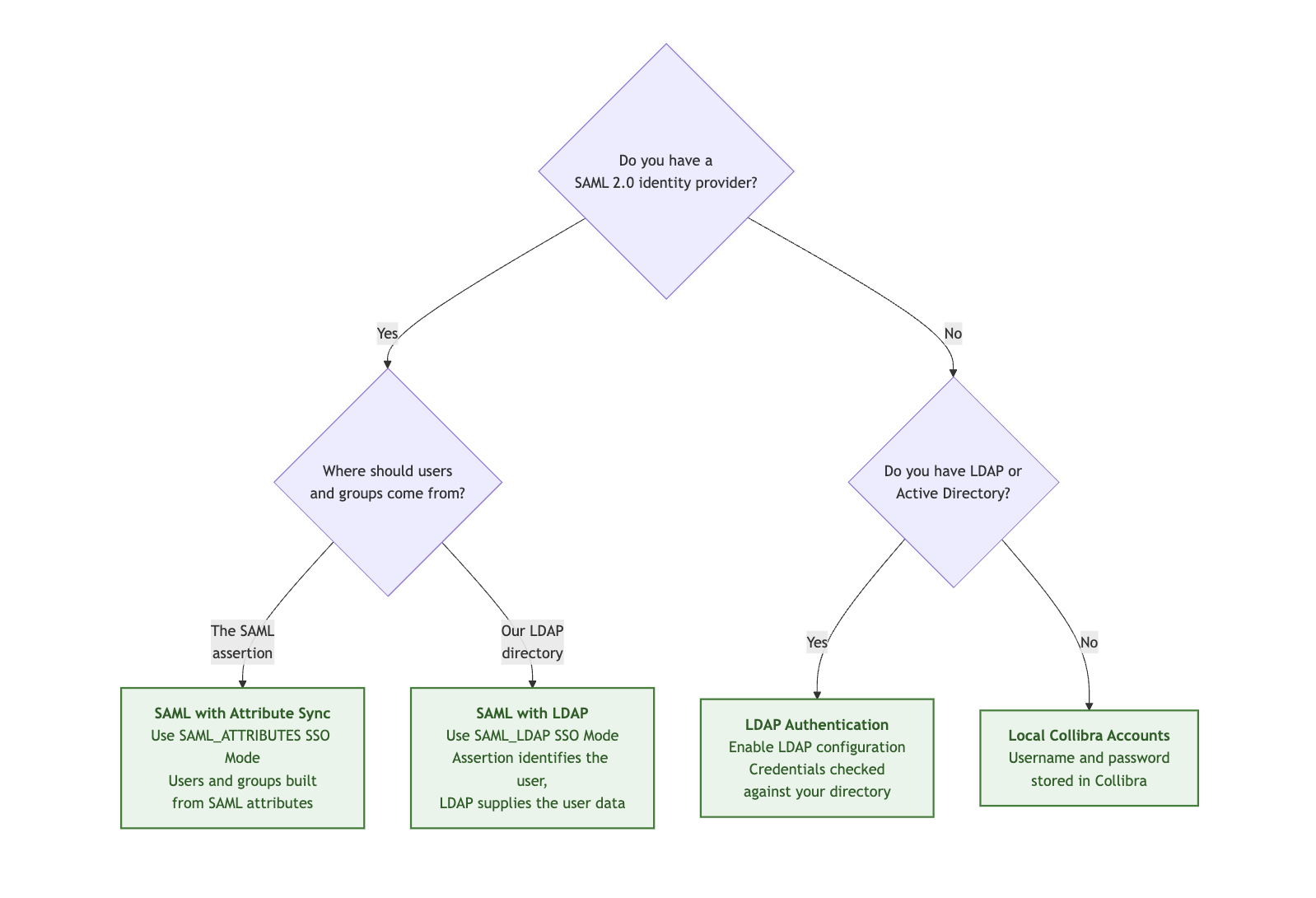
Warning If you are considering SSO Header, note its limitations and security requirements. Involve your security team while configuring it.
- The LDAP-backed authentication options require Collibra to reach your directory. For self-hosted environments this is typically available within your network. On Collibra Platform Cloud, it means exposing your directory to the internet.
- Collibra Platform Cloud only supports SAML with Attribute Sync.
- Only one SSO mode is supported per environment. You cannot register two identity providers on one environment.
- Local accounts remain available as an emergency access mechanism. Collibra checks the local account store before LDAP, but falls back to LDAP when that fails, so if the same username exists in both places the directory password is accepted. Enabling Disable the Collibra DGC signin page hides the sign-in page while SSO is active, but the login API stays open, so emergency access still works.
- Choosing a SAML mode is not the complete setup. Both SAML modes require your IdP metadata, an application base URL, and either a signed SAML response or a signed assertion. See Working with SAML.
- Interactive sign-in requires at least one product permission, whichever authentication mode you choose. Users without one cannot sign-in as there is no empty application.
Provisioning
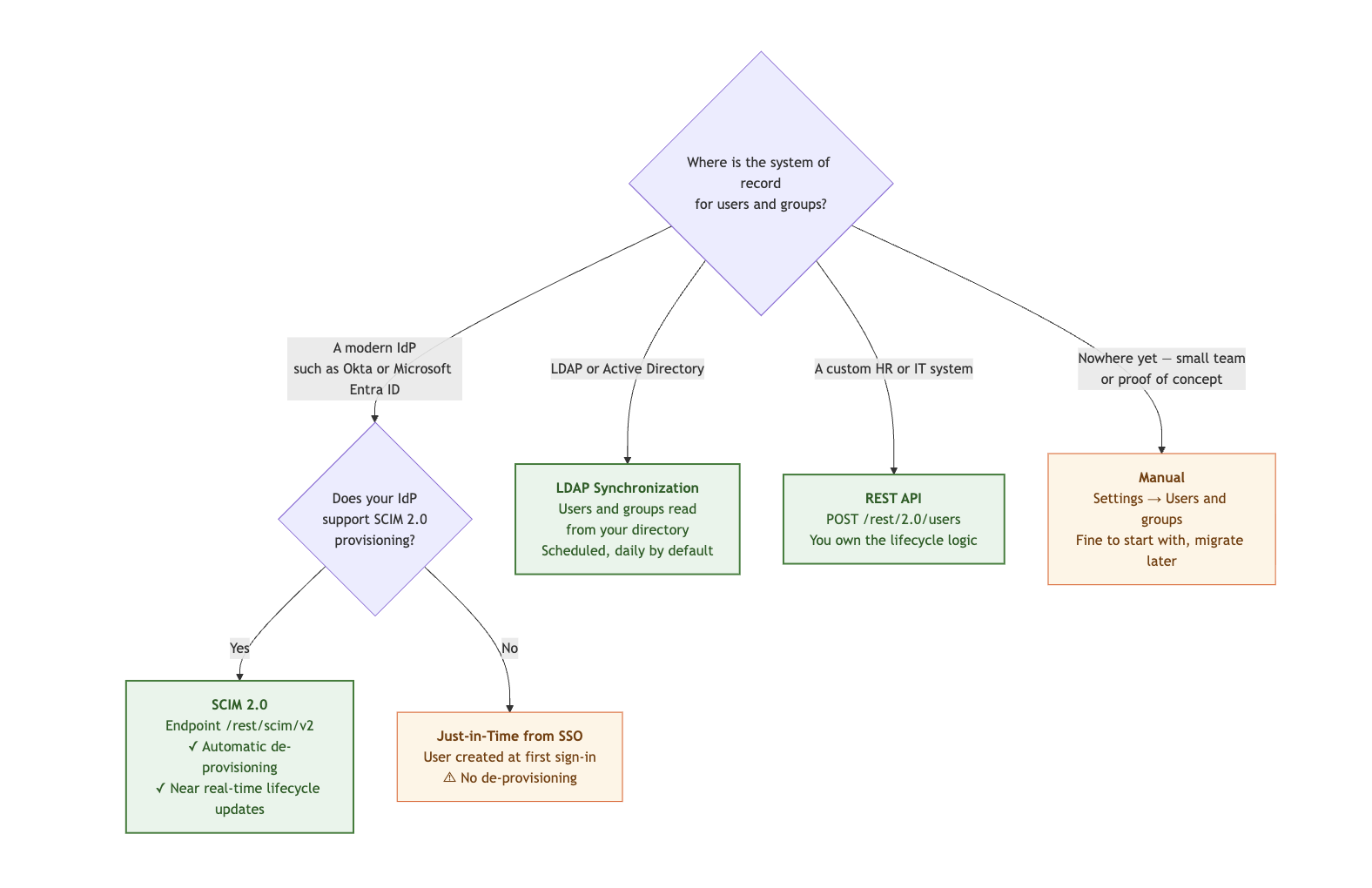
The following diagram helps you choose where user and group records come from.
- A single SCIM PATCH can carry several operations, which is how identity providers such as Okta and Entra ID apply a batch of group membership changes in one request.
- What happens when someone leaves depends on the provisioning mechanism. SCIM applies the change as soon as your IdP pushes it, either deactivating the user or deleting the record. LDAP synchronization disables users at the next scheduled run, or at their next sign-in attempt if that comes first, but never deletes, so the license seat stays attached until you remove the account. Just-in-time provisioning does nothing at offboarding: users appear at first sign-in and stay indefinitely, leaving stale accounts and consumed seats. Removal is your responsibility, either via the REST API or manual administration.
- Externally provisioned users cannot change their password in Collibra. Account activation and password recovery emails do not apply to them, since the password is managed by your IdP or directory.
LDAP group mapping and SCIM
LDAP synchronization reads group membership one of two mutually exclusive ways: from an attribute on each user entry such as memberOf, or by enumerating group entries that list their members. Use whichever your directory actually populates. Active Directory maintains memberOf automatically, whereas OpenLDAP does so only with the memberof overlay enabled. If you map the user attribute, group-structure sync is silently skipped, so configuring both does not give you both.
If SCIM and LDAP synchronization both run, each LDAP sync strips group membership from every user that LDAP does not manage, including your SCIM-provisioned users, and then deletes every non-system group it has left without members, regardless of how that group was created. Nothing in the product prevents this combination, so avoid it by design: choose SCIM or LDAP as the system of record for groups, not both.
Note SAML with Attribute Sync rewrites group membership on every sign-in. Groups you assign manually do not survive a subsequent user sign-in unless you enable Groups DGC managed, which tells Collibra to manage group membership internally instead of rebuilding it from each assertion. This applies to SAML with Attribute Sync only. Under SAML with LDAP, groups come from LDAP synchronization.
Programmatic access
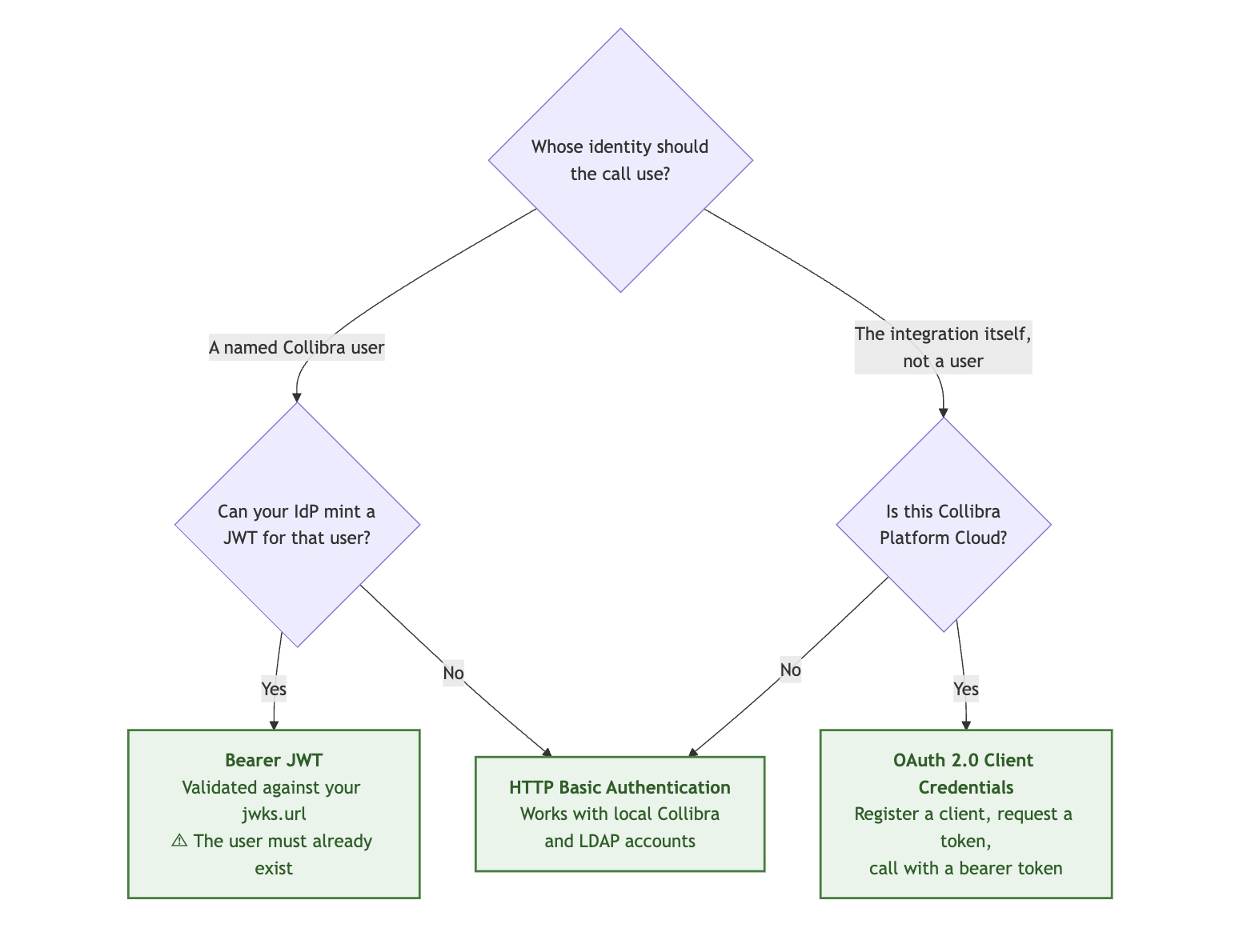
The following diagram helps you choose how scripts and integrations should authenticate.
- When possible, use a token rather than basic authentication. Replaying a cookie from a signed-in browser is not a supported integration pattern.
- Bearer JWT does not create users. The claim you use as the principal, which defaults to sub, must resolve to an existing, enabled account. Scopes inside a customer-minted JWT are ignored, and permissions come from the user roles in Collibra.
- OAuth 2.0 client credentials carry permissions through token scopes, not through a user account.
Common scenarios
The following table shows recommended configuration combinations for typical deployment situations.
| Your situation | Authentication | Provisioning | API access |
|---|---|---|---|
| Collibra Platform Cloud, Okta or Entra ID | SAML with Attribute Sync | SCIM 2.0 | OAuth 2.0 client credentials |
| Collibra Platform Cloud, IdP without SCIM support | SAML with Attribute Sync | Just-in-time from SSO | OAuth 2.0 client credentials |
| Self-hosted, Active Directory only | LDAP authentication | LDAP synchronization | HTTP basic authentication or Bearer JWT |
| Self-hosted, SAML IdP with Active Directory as the user store | SAML with LDAP | LDAP synchronization | Bearer JWT |
| Pilot or proof of concept | Local Collibra accounts | Manual | HTTP basic authentication |
What Collibra does not offer
The following table lists features that Collibra does not support, and what to use instead.
| Not available | What to use instead |
|---|---|
| OpenID Connect (OIDC) sign-in | SAML 2.0 for browser sign-in. JWTs from an OIDC provider can still be used for API access through the provider's JWKS URL. |
| Kerberos or SPNEGO desktop sign-in | SAML 2.0, with the Kerberos handshake performed by your identity provider. |
| Personal access tokens | Bearer JWT from your IdP, or OAuth 2.0 client credentials. |
| SAML Single Logout | Sign-out ends the Collibra session. You can configure a redirect to your IdP's logout page. |
| Multi-factor authentication inside Collibra | Enforce MFA at your identity provider. |
| More than one identity provider per environment | One SSO mode and one identity provider per environment. |
| SCIM 1.1, the SCIM /Bulk endpoint, SCIM ETags | SCIM 2.0 with per-resource operations. A single PATCH can carry several operations. |
| CSV or file-based user import | The REST API, SCIM, or LDAP synchronization. |
| Mapping IdP groups directly to Collibra roles | IdP groups map to Collibra groups. Assign roles to those groups in Collibra as responsibilities. |