The following image shows the relations between Sigma asset types.
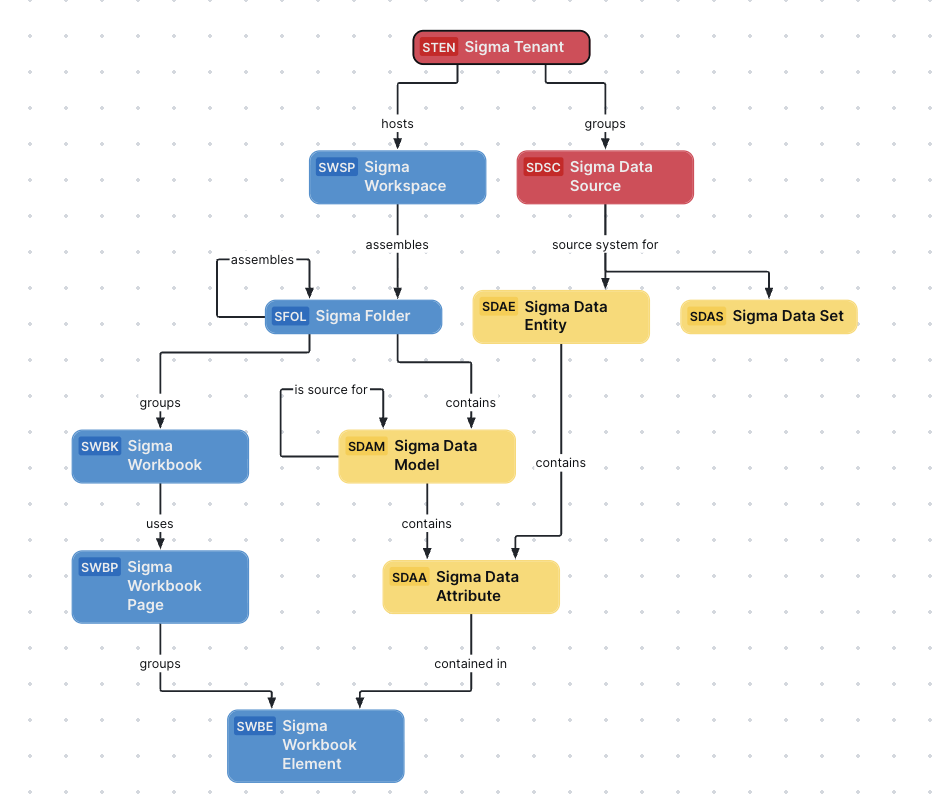
You can easily recreate this diagram view in your Collibra environment. See Create a Sigma operating model diagram view.
Create a Sigma operating model diagram view
You can create a Sigma-specific diagram view, to visualize the operating model. The following procedure provides instructions on how to quickly create a new diagram view by copying and pasting the JSON code in the diagram view text editor.
Steps
- Open the asset page.
- Click the
Diagram tab.
The diagram is shown in the default diagram view. - Click
 to add a new view.
 - Select the Text option below the diagram view name.
The diagram view text editor is shown. - Copy the code from the Show JSON code section below and paste it in the diagram view text editor.
- Click Save.
- Edit the name and description of the diagram view as needed.
Show JSON code
Copy
{
  "nodes": [
    {
      "id": "Sigma Tenant",
      "type": {
        "id": "00000000-0000-0000-0000-100000000091"
      }
    },
    {
      "id": "Sigma Workspace",
      "type": {
        "id": "00000000-0000-0000-0000-100000000093"
      }
    },
    {
      "id": "Sigma Data Source",
      "type": {
        "id": "00000000-0000-0000-0000-100000000092"
      }
    },
    {
      "id": "Sigma Folder",
      "type": {
        "id": "00000000-0000-0000-0000-100000000094"
      }
    },
    {
      "id": "Sigma Workbook",
      "type": {
        "id": "00000000-0000-0000-0000-100000000095"
      }
    },
    {
      "id": "Sigma Workbook Page",
      "type": {
        "id": "00000000-0000-0000-0000-100000000096"
      }
    },
    {
      "id": "Sigma Workbook Element",
      "type": {
        "id": "00000000-0000-0000-0000-100000000097"
      }
    },
    {
      "id": "Sigma Data Entity",
      "type": {
        "id": "00000000-0000-0000-0000-100000000101"
      }
    },
    {
      "id": "Sigma Data Set",
      "type": {
        "id": "00000000-0000-0000-0000-100000000100"
      }
    },
    {
      "id": "Sigma Data Model",
      "type": {
        "id": "00000000-0000-0000-0000-100000000099"
      }
    },
    {
      "id": "Sigma Data Attribute",
      "type": {
        "id": "00000000-0000-0000-0000-100000000102"
      }
    }
  ],
  "edges": [
    {
      "from": "Sigma Tenant",
      "to": "Sigma Workspace",
      "label": "",
      "style": "arrow",
      "type": {
        "id": "00000000-0000-0000-0000-120000000000"
      },
      "roleDirection": true
    },
    {
      "from": "Sigma Tenant",
      "to": "Sigma Data Source",
      "label": "",
      "style": "arrow",
      "type": {
        "id": "00000000-0000-0000-0000-000000007054"
      },
      "roleDirection": true
    },
    {
      "from": "Sigma Workspace",
      "to": "Sigma Folder",
      "label": "",
      "style": "arrow",
      "type": {
        "id": "00000000-0000-0000-0000-120000000001"
      },
      "roleDirection": true
    },
    {
      "from": "Sigma Folder",
      "to": "Sigma Folder",
      "label": "",
      "style": "arrow",
      "type": {
        "id": "00000000-0000-0000-0000-120000000001"
      },
      "roleDirection": true
    },
    {
      "from": "Sigma Folder",
      "to": "Sigma Workbook",
      "label": "",
      "style": "arrow",
      "type": {
        "id": "00000000-0000-0000-0000-120000000002"
      },
      "roleDirection": true
    },
    {
      "from": "Sigma Workbook",
      "to": "Sigma Workbook Page",
      "label": "",
      "style": "arrow",
      "type": {
        "id": "00000000-0000-0000-0000-120000000007"
      },
      "roleDirection": true
    },
    {
      "from": "Sigma Workbook Page",
      "to": "Sigma Workbook Element",
      "label": "",
      "style": "arrow",
      "type": {
        "id": "00000000-0000-0000-0000-120000000004"
      },
      "roleDirection": true
    },
    {
      "from": "Sigma Data Source",
      "to": "Sigma Data Entity",
      "label": "",
      "style": "arrow",
      "type": {
        "id": "00000000-0000-0000-0000-000000007050"
      },
      "roleDirection": true
    },
    {
      "from": "Sigma Data Source",
      "to": "Sigma Data Set",
      "label": "",
      "style": "arrow",
      "type": {
        "id": "00000000-0000-0000-0000-000000007050"
      },
      "roleDirection": true
    },
    {
      "from": "Sigma Folder",
      "to": "Sigma Data Model",
      "label": "",
      "style": "arrow",
      "type": {
        "id": "00000000-0000-0000-0000-120000000014"
      },
      "roleDirection": true
    },
    {
      "from": "Sigma Data Model",
      "to": "Sigma Data Attribute",
      "label": "",
      "style": "arrow",
      "type": {
        "id": "00000000-0000-0000-0000-000000007196"
      },
      "roleDirection": true
    },
    {
      "from": "Sigma Data Attribute",
      "to": "Sigma Workbook Element",
      "label": "",
      "style": "arrow",
      "type": {
        "id": "00000000-0000-0000-0000-000000007058"
      },
      "roleDirection": true
    },
    {
      "from": "Sigma Data Entity",
      "to": "Sigma Data Attribute",
      "label": "",
      "style": "arrow",
      "type": {
        "id": "00000000-0000-0000-0000-000000007047"
      },
      "roleDirection": true
    },
    {
      "from": "Sigma Data Model",
      "to": "Sigma Data Model",
      "label": "",
      "style": "arrow",
      "type": {
        "id": "00000000-0000-0000-0000-120000000022"
      },
      "roleDirection": true
    }
  ],
  "showOverview": false,
  "enableFilters": true,
  "showLabels": true,
  "showFields": true,
  "showLegend": false,
  "showPreview": true,
  "visitStrategy": "directed",
  "layout": "HierarchyTopBottom",
  "maxNodeLabelLength": 50,
  "maxEdgeLabelLength": 30,
  "layoutOptions": {
    "compactGroups": false,
    "componentArrangementPolicy": "topmost",
    "edgeBends": true,
    "edgeBundling": true,
    "edgeToEdgeDistance": 5,
    "minimumLayerDistance": "auto",
    "nodeToEdgeDistance": 5,
    "orthogonalRouting": true,
    "preciseNodeHeightCalculation": true,
    "recursiveGroupLayering": true,
    "separateLayers": true,
    "webWorkers": true,
    "nodePlacer": {
      "barycenterMode": true,
      "breakLongSegments": true,
      "groupCompactionStrategy": "none",
      "nodeCompaction": false,
      "straightenEdges": true
    }
  }
}