Power Query M functions are the building blocks of the Power Query M formula language. They are mapping values that take a set of input values (arguments) and produce a single output value. Every transformation step you perform in the Power Query editor (like "Remove Columns" or "Filter Rows") is actually a function call happening behind the scenes in the M script.
Collibra Data Lineage uses Power Query M functions to interpret complex transformations within Power BI. This analysis allows BI Admins to view column-level lineage and automated stitching for report assets.
Not all functions have an impact on the technical lineage, so even though an error is raised for any unsupported functions, it might not mean that your lineage is incomplete. We are working to support the most common Power Query functions. If you have a Power Query function that is not yet supported and it’s very important to you, please create an Ideation ticket.
Collibra Data Lineage performs lexical and syntax analysis of M. It currently support the following functions.
For complete information on these functions, see the Microsoft documentation on accessing data functions.
Backend-accessing data functions that impact the lineage diagram
- AmazonRedshift.Database
- AnalysisServices.DatabaseNote
- This function is fully supported if no MDX queries are used.
- If MDX queries are used and they resemble SQL, they are parsed by the SQL parser.
- We don't currently support this function if used with MDX queries that resemble DAX, as the Collibra Data Lineage can't parse such queries.
- AnalysisServices.Databases
- Binary.Decompressa
- Binary.FromTexta
- Csv.Documenta
- Databricks.Contents
- Databricks.Catalogs
- Excel.Workbooka
- File.Contents
- GoogleBigQuery.Database
- Json.Documenta
- Odbc.DataSource
- Odbc.Query
- Oracle.Database
- PostgreSQL.Database
- SapBusinessWarehouse.cubesNote Lineage can't be generated if you use the
Table.SelectRowsfunction in conjunction with theSapBusinessWarehouse.cubesfunction, because theTable.SelectRowsfunction requires atableparameter, not asourceparameter. - SapHana.Database
- SharePoint.Filesa
- Snowflake.Database
- Sql.Database
- Sql.Databases
- Sybase.Database
- Teradata.Database
- Web.Contents
Transformations that impact the lineage diagram
- #table() Note Collibra Data Lineage now identifies the named columns, numeric count, null columns, typed columns defined in the manual tables.
- Cube.AddAndExpandDimensionColumn
- Cube.Transform
- Date.ToText
This function is supported for placeholder shape tracking. - DateTime.ToText
This function is supported for placeholder shape tracking. - List.Zip
- PowerBI.DataflowsNote We only support dataflows without parameters that contain the following information:
- workspace ID
- dataflow ID
- entity (Power BI Table) ID
- PowerPlatform.DataflowsNote We only support dataflows without parameters that contain the following information:
- workspace ID
- dataflow ID
- entity (Power BI Table) ID
- Replacer.ReplaceText
- Replacer.ReplaceValue
- Table.AddColumn
- Table.AddIndexColumn
- Table.CombineAdditional information
If Collibra Data Lineage can’t determine the column names in a source file or database, but the Power BI column names are known and there is only one source file or database, then corresponding database and file columns are created and technical lineage is preserved. However, if column names can’t be determined and there are multiple source files or databases, as is the case when the Table.Combine function is used, then it’s not possible to know which source column corresponds to the Power BI column. This results in an error and the technical lineage is broken.
To resolve this issue, a dummy column with the value “*” is created in the source table and the Power BI table:
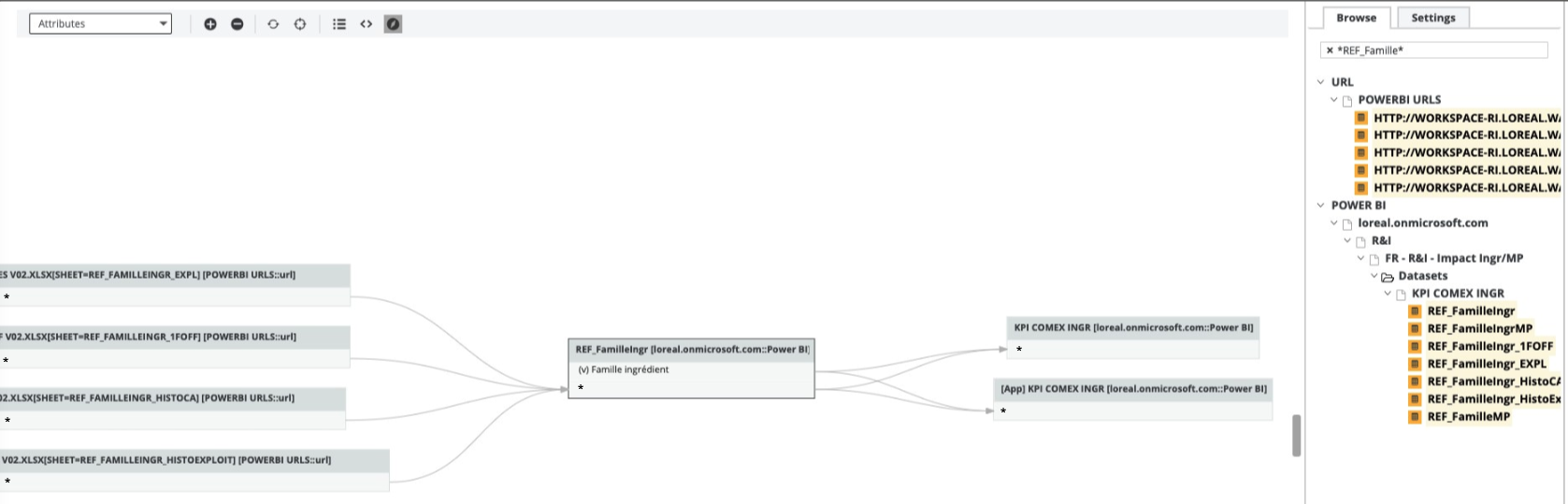
This preserves the technical lineage at the table level:
- Table.CombineColumns
- Table.DuplicateColumn
- Table.ExpandTableColumn
- Table.FromList
- Table.FromRows
- Table.Group
- Table.NestedJoin
- Table.Pivot Note If the values of the pivot column are not known during parsing, Collibra Data Lineage cannot determine the names of the resulting columns. As a result, column-level lineage is not generated for the pivoted columns.
- Table.PromoteHeaders
- Table.RemoveColumns
- Table.RenameColumns
- Table.ReorderColumns
- Table.ReplaceValue
- Table.SelectColumns
- Table.SplitColumn
- Table.Unpivot
- Table.UnpivotOtherColumnsNote When the source table has implicit columns, for example, from a
Value.NativeQueryquery that usesSELECT *, Collibra Data Lineage preserves table-level lineage to the source but doesn't resolve individual columns. - Table.TransformColumnNamesNote
- Only the following parameters are supported: Text.Upper, Text.Lower, and Text.Proper.
- If columns in Power BI are renamed before they are transformed via this function (Text.Upper, Text.Lower or Text.Proper), the original column names are now shown in the database node in the technical lineage.
- Value.NativeQueryNote
- Query parameters are supported. Core parameters are not supported.
- This function determines the appropriate SQL dialect based on the database source type. This ensures that manual SQL queries are accurately analyzed for the following sources:
- Athena uses the native Athena dialect.
- Databricks use the Hive dialect.
- Sybase & ODBC uses the T-SQL dialect as a fallback.
- Text.AfterDelimiter
- Text.BeforeDelimiter
- Text.BetweenDelimiters
- Text.Clean
- Text.Combine
- Text.Contains
- Text.End
- Text.EndsWith
- Text.FromBinary
- Text.Length
- Text.Middle
- Text.PadStart
- Text.PositionOf
- Text.Range
- Text.Split
- Text.Start
- Text.StartsWith
- Text.Trim
- Text.TrimEnd
- Text.TrimStart
- Time.ToText
This function is supported for placeholder shape tracking.
Transformations that don't impact the lineage diagram
- Table.AddKey
- Table.AlternateRows
- Table.Buffer
- Table.Distinct
- Table.ExpandListColumn
- Table.FillDown
- Table.FillUp
- Table.FindText
- Table.FirstN
- Table.InsertRows
- Table.IsEmpty
- Table.LastN
- Table.MaxN
- Table.MinN
- Table.Range
- Table.RemoveFirstN
- Table.RemoveLastN
- Table.RemoveMatchingRows
- Table.RemoveRows
- Table.RemoveRowsWithErrors
- Table.Repeat
- Table.ReplaceErrorValues
- Table.ReplaceKeys
- Table.ReplaceMatchingRows
- Table.ReplaceRows
- Table.ReverseRows
- Table.SelectRows
- Table.SelectRowsWithErrors
- Table.Skip
- Table.Sort
- Table.TransformColumns
- Table.TransformColumnTypes
- Table.First
- Table.Last
- Table.Max
- Table.Min
- Table.SingleRow
- Text.From
Unsupported transformations
- DB2.Database
- Folder.Files
- Parquet.Document
- PowerBIRESTAPI.Navigation
- SharePoint.Contents
- SharePoint.Tables
- Table.ExpandRecordColumn
- Table.FromRecords
- Table.ToColumns