The SAP Signavio integration for metadata uses a specific subset of asset types. These are available out of the box. For more information on asset attributes or metadata synchronized per asset type, go to Integrated SAP Signavio data.
To use the SAP Signavio integration, you need Edge 2026.03.84 or newer.
| Asset type | Description |
|---|---|
|
Business Asset
 Business Dimension Business Dimension Signavio Dictionary |
A structured representation of SAP Signavio dictionary categories and subcategories, used to classify and organize business terms. |
|
Business Asset
Business Dimension Signavio Folder |
A hierarchical container in SAP Signavio used to structure and manage related assets such as processes and diagrams. |
|
Business Asset
Business Dimension Business Process |
A set of activities and tasks that, once completed, produces value to the business. Examples: campaign management, talent recruitment |
SAP Signavio diagram view
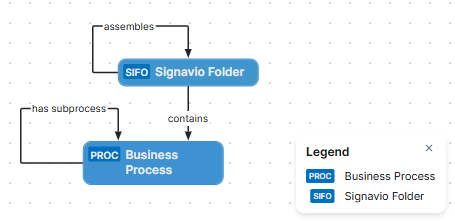
The following image shows the relations between SAP Signavio asset types and cardinality of the relation types in the assets' assignment. For information on the integrated data from SAP Signavio, go to Integrated SAP Signavio data.
Steps
- Open the asset page.
- Click the
Diagram tab.
The diagram is shown in the default diagram view. - Click
 to add a new view.
 - Select the Text option below the diagram view name.
The diagram view text editor is shown. - Copy the code from the Show JSON code section below and paste it in the diagram view text editor.
- Click Save.
- Edit the name and description of the diagram view as needed.
{
  "nodes": [
    {
      "id": "Signavio Folder",
      "type": {
        "id": "00000000-0000-0000-0011-000002000036"
      },
      "fields": []
    },
    {
      "id": "Business Process",
      "type": {
        "id": "00000000-0000-0000-0000-000000031103"
      },
      "fields": []
    }
  ],
  "edges": [
    {
      "from": "Signavio Folder",
      "to": "Signavio Folder",
      "label": "assembles",
      "style": "arrow",
      "type": {
        "id": "00000000-0000-0000-0011-000500000066"
      },
      "roleDirection": true
    },
    {
      "from": "Signavio Folder",
      "to": "Business Process",
      "label": "contains",
      "style": "arrow",
      "type": {
        "id": "00000000-0000-0000-0011-000500000058"
      },
      "roleDirection": true
    },
    {
      "from": "Business Process",
      "to": "Business Process",
      "label": "has subprocess",
      "style": "arrow",
      "type": {
        "id": "00000000-0000-0000-0011-000500000055"
      },
      "roleDirection": true
    }
  ],
  "showOverview": false,
  "enableFilters": true,
  "showLabels": true,
  "showFields": true,
  "showLegend": true,
  "showPreview": true,
  "visitStrategy": "directed",
  "layout": "HierarchyLeftRight",
  "maxNodeLabelLength": 50,
  "maxEdgeLabelLength": 30,
  "layoutOptions": {
    "compactGroups": false,
    "componentArrangementPolicy": "topmost",
    "edgeBends": true,
    "edgeBundling": true,
    "edgeToEdgeDistance": 5,
    "minimumLayerDistance": "auto",
    "nodeToEdgeDistance": 5,
    "orthogonalRouting": true,
    "preciseNodeHeightCalculation": true,
    "recursiveGroupLayering": true,
    "separateLayers": true,
    "webWorkers": true,
    "nodePlacer": {
      "barycenterMode": true,
      "breakLongSegments": true,
      "groupCompactionStrategy": "none",
      "nodeCompaction": false,
      "straightenEdges": true
    }
  }
}