The Fabric integration uses a specific subset of asset types. These are available out of the box. For more information on asset attributes or metadata synchronized per asset type, go to Integrated Microsoft Fabric data.
| Asset type | Description |
|---|---|
|
Technology Asset Microsoft Tenant Server Server |
A Microsoft Tenant is a dedicated instance of Microsoft Cloud Services for an organization. |
|
Technology Asset Fabric Capacity
Storage Container |
A Fabric Capacity is a dedicated set of resources in Microsoft Fabric for running workloads. |
|
Technology Asset Fabric Workspace Storage Container |
A collaborative environment where teams work on data projects, creating and managing data items like lakehouses, warehouses, and reports. |
|
Technology Asset Fabric Warehouse |
A data warehouse in Microsoft Fabric for storing and analyzing structured data. |
|
Technology Asset Fabric Lakehouse
Storage Container |
A data storage and analytics environment in Microsoft Fabric. |
|
Technology Asset
File |
A collection of data that is treated by a computer as a unit, for the purposes of input and output. Examples: businessGlossary.xls, dataDictionary05220.csv, datacatalogv25.txt |
|
Technology Asset Database
|
A collection of data that is systematically organized or structured in order to make it easy to create, update and query the information. Examples: Ora_DGC_V45, SalesDB2020 |
|
Data Asset Schema Data Structure |
An asset that contains the location of specific data. It provides all the details that are required for setting up a connection to a database or server. |
|
Data Asset
Table Data Structure |
An implementation of data entities in columns and rows, in a given database system. It is the basic structure of a relational database. Examples: Account_tbl, CUST_ADDR |
|
Data Asset Column Data Element |
An atomic unit of data that can be stored in a database table. Examples: FST_NM, EMPID |
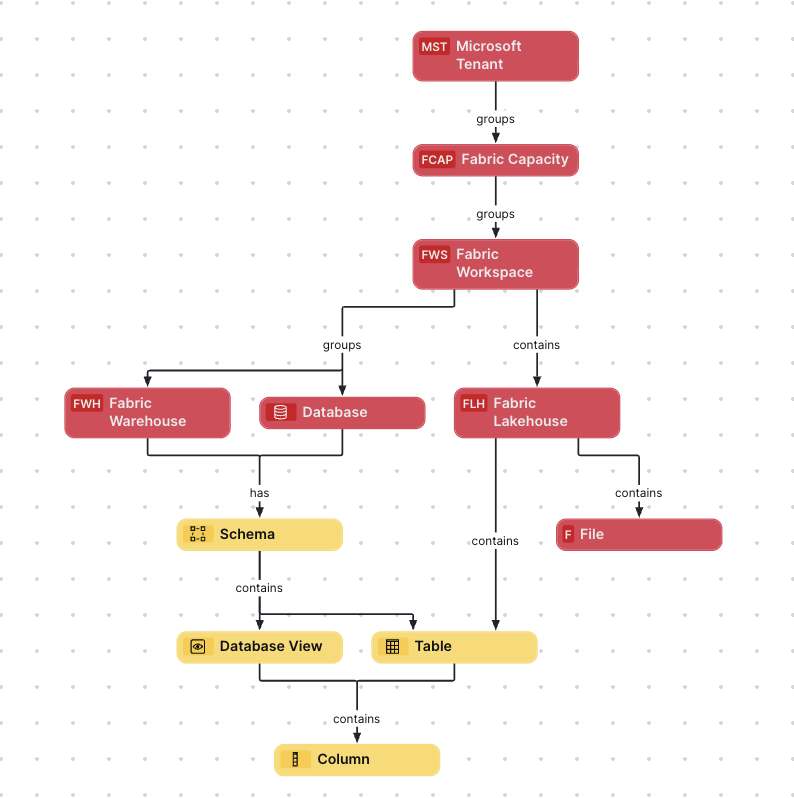
Fabric diagram view
The following image shows the relations between Fabric asset types and the cardinality of the relation types in the assets' assignment. For information on the data that is integrated from Fabric, go to Integrated Microsoft Fabric data.
Steps
- Open the asset page.
- Click the
Diagram tab.
The diagram is shown in the default diagram view. - Click
 to add a new view.
 - Select the Text option below the diagram view name.
The diagram view text editor is shown. - Copy the code from the Show JSON code section below and paste it in the diagram view text editor.
- Click Save.
- Edit the name and description of the diagram view as needed.
{
  "nodes": [
    {
      "id": "Microsoft Tenant",
      "type": {
        "id": "00000000-0000-0000-0000-110000000020"
      }
    },
    {
      "id": "Fabric Capacity",
      "type": {
        "id": "00000000-0000-0000-0000-110000000021"
      }
    },
    {
      "id": "Fabric Workspace",
      "type": {
        "id": "00000000-0000-0000-0000-110000000022"
      }
    },
    {
      "id": "Fabric Warehouse",
      "type": {
        "id": "00000000-0000-0000-0000-110000000024"
      }
    },
    {
      "id": "Database",
      "type": {
        "id": "00000000-0000-0000-0000-000000031006"
      }
    },
    {
      "id": "Fabric Lakehouse",
      "type": {
        "id": "00000000-0000-0000-0000-110000000023"
      }
    },
    {
      "id": "Table",
      "type": {
        "id": "00000000-0000-0000-0000-000000031007"
      }
    },
    {
      "id": "Schema",
      "type": {
        "id": "00000000-0000-0000-0001-000400000002"
      }
    },
    {
      "id": "Column",
      "type": {
        "id": "00000000-0000-0000-0000-000000031008"
      }
    },
    {
      "id": "File",
      "type": {
        "id": "00000000-0000-0000-0000-000000031304"
      }
    },
    {
      "id": "Database View",
      "type": {
        "id": "00000000-0000-0000-0001-000400000009"
      }
    }
  ],
  "edges": [
    {
      "from": "Microsoft Tenant",
      "to": "Fabric Capacity",
      "label": "",
      "style": "arrow",
      "type": {
        "id": "00000000-0000-0000-0000-000000007054"
      },
      "roleDirection": true
    },
    {
      "from": "Fabric Capacity",
      "to": "Fabric Workspace",
      "label": "",
      "style": "arrow",
      "type": {
        "id": "00000000-0000-0000-0000-000000007054"
      },
      "roleDirection": true
    },
    {
      "from": "Fabric Workspace",
      "to": "Fabric Warehouse",
      "label": "",
      "style": "arrow",
      "type": {
        "id": "00000000-0000-0000-0000-000000007054"
      },
      "roleDirection": true
    },
    {
      "from": "Fabric Workspace",
      "to": "Database",
      "label": "",
      "style": "arrow",
      "type": {
        "id": "00000000-0000-0000-0000-000000007054"
      },
      "roleDirection": true
    },
    {
      "from": "Database",
      "to": "Schema",
      "label": "",
      "style": "arrow",
      "type": {
        "id": "00000000-0000-0000-0000-000000007024"
      },
      "roleDirection": true
    },
    {
      "from": "Schema",
      "to": "Table",
      "label": "",
      "style": "arrow",
      "type": {
        "id": "00000000-0000-0000-0000-000000007043"
      },
      "roleDirection": true
    },
    {
      "from": "Table",
      "to": "Column",
      "label": "",
      "style": "arrow",
      "type": {
        "id": "00000000-0000-0000-0000-000000007042"
      },
      "roleDirection": false
    },
    {
      "from": "Fabric Warehouse",
      "to": "Schema",
      "label": "",
      "style": "arrow",
      "type": {
        "id": "00000000-0000-0000-0000-000000007024"
      },
      "roleDirection": true
    },
    {
      "from": "Fabric Workspace",
      "to": "Fabric Lakehouse",
      "label": "",
      "style": "arrow",
      "type": {
        "id": "00000000-0000-0000-0001-002600000001"
      },
      "roleDirection": true
    },
    {
      "from": "Fabric Lakehouse",
      "to": "Table",
      "label": "",
      "style": "arrow",
      "type": {
        "id": "00000000-0000-0000-0000-125000000000"
      },
      "roleDirection": true
    },
    {
      "from": "Fabric Lakehouse",
      "to": "File",
      "label": "",
      "style": "arrow",
      "type": {
        "id": "00000000-0000-0000-0000-000000007060"
      },
      "roleDirection": true
    },
    {
      "from": "Schema",
      "to": "Database View",
      "label": "",
      "style": "arrow",
      "type": {
        "id": "00000000-0000-0000-0000-000000007043"
      },
      "roleDirection": true
    },
    {
      "from": "Database View",
      "to": "Column",
      "label": "",
      "style": "arrow",
      "type": {
        "id": "00000000-0000-0000-0000-000000007042"
      },
      "roleDirection": false
    }
  ],
  "showOverview": false,
  "enableFilters": true,
  "showLabels": true,
  "showFields": true,
  "showLegend": true,
  "showPreview": true,
  "visitStrategy": "completeGraph",
  "layout": "HierarchyTopBottom",
  "maxNodeLabelLength": 50,
  "maxEdgeLabelLength": 30,
  "layoutOptions": {
    "compactGroups": false,
    "componentArrangementPolicy": "topmost",
    "edgeBends": true,
    "edgeBundling": true,
    "edgeToEdgeDistance": 5,
    "minimumLayerDistance": "auto",
    "nodeToEdgeDistance": 5,
    "orthogonalRouting": true,
    "preciseNodeHeightCalculation": true,
    "recursiveGroupLayering": true,
    "separateLayers": true,
    "webWorkers": true,
    "nodePlacer": {
      "barycenterMode": true,
      "breakLongSegments": true,
      "groupCompactionStrategy": "none",
      "nodeCompaction": false,
      "straightenEdges": true
    }
  }
}