Break records are unique sets of metadata associated with a particular type of finding that provide the details of broken records. Depending on your job processing method, they can be archived directly to the data source or exported to a remote file system, where you can then isolate them for further review and remediation outside of Data Quality & Observability Classic.
Archiving break records
The method for archiving break records and the link ID requirements vary depending on whether you run jobs in Pullup or Pushdown.
| Processing method | Archival option | Link ID required? |
|---|---|---|
| Pushdown | Sent to the data source |
Important Optional for rules; required for dupes, outliers, and shapes. |
| Pullup | Sent to remote file system (when configured) |
|
 No
No
For more information about the expected behavior for each processing method, select a tab below.
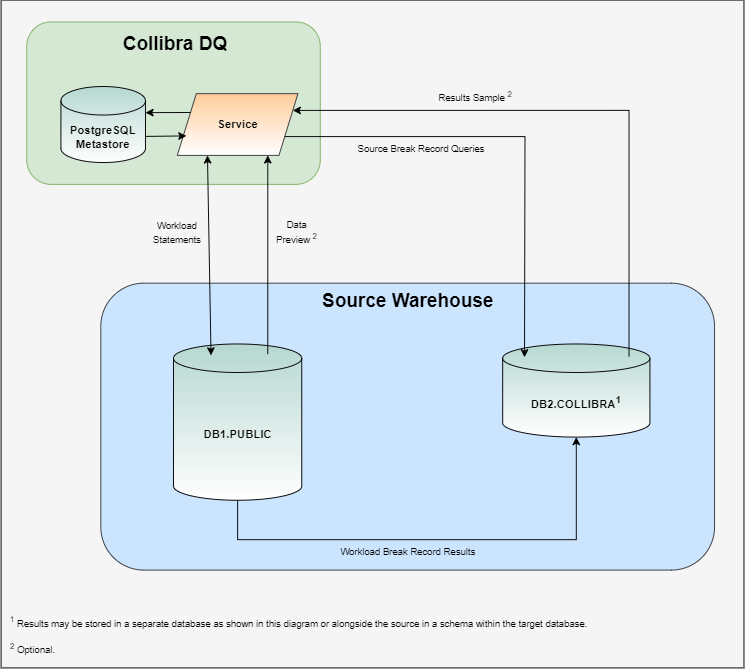
Pushdown uses SQL queries native to the data source in order to connect directly to the source system and submit the data quality workload. This gives Data Quality & Observability Classic the ability to store break records that are typically written to the Metastore in a database or schema specifically allocated for Data Quality & Observability Classic. By archiving break records alongside the database or schema, you can:
- Eliminate network traffic costs for better performance.
- Reduce storage limit restrictions.
- Improve security by generating break records that never leave the source system.
- Enhance your reporting abilities by removing the need to migrate break records from the Metastore to your data source.
- Join datasets against your break records.
- Optionally use a link ID to link broken records to the source record for remediation outside Data Quality & Observability Classic.
Note When Archive Break Records is enabled, a limited number of break records are still stored in the Metastore to power the DQ web application. To prevent break record storage in the Metastore, open the settings modal on the Explorer page of your dataset and turn on Data Preview from Source. This prevents records from leaving your data source and removes any others from the Metastore.
The Archive Break Records component uses a workload statement in the form of a data quality query to generate break records that are pushed into the source system for processing. Instead of returning a result set, the workload statement redirects its output to a table in your data source schema or database that is specifically allocated for Data Quality & Observability Classic.
When a workload is complete, a query is generated and stored in the data source, which allows you to easily access your break records. A results sample of break records may be optionally retrieved and used to generate a limited data preview of break records in the Metastore.
Link IDs and Pushdown jobs
The records written to the data source table include source record linkage details, called link IDs. You can use these link IDs to identify the source system record, and are required to write outliers, shapes, and dupes break records to the source database. However, they are optional when archiving rule break records.
Break record details for rules
There is no need to specify a link ID to archive the break records of rules. Instead, you can follow the normal job creation process without assigning columns as link IDs, enable Archive Break Records, and view the break record output as a nested JSON in the results column of the COLLIBRA_DQ_RULES table in your source database.
The JSON includes all fields selected in the rule query and their values, including all columns from when the rule ran. For example, for a rule with a JOIN operation, the JSON contains all columns from the JOIN, as well as virtual columns if the rule creates them.
Benefits of not using a link ID include:
- Complete break record access: You gain full visibility into each break record, including the entire row and any associated identifying metadata.
- Enhanced consistency: Storage and access of break records remain consistent.
- Flexible remediation: You gain a scalable approach for record remediation outside of Data Quality & Observability Classic.
- Reduced setup: You minimize the setup effort required both before and during the creation of a DQ Job.
Tip Ensure that you follow the best practices of your database for data retention. For example, consider offloading older break records to a data lake or remote file system after a certain period following their initial archival.
Although link IDs for rules are optional, consider assigning a link ID column when archiving the full result of a rule that selects all columns from a very wide dataset, such as one with tens of thousands of columns. The results returned in the JSON are key-value pairs, which can cause the JSON size to grow exponentially. Assigning a link ID column reduces the data stored per break record, minimizes cost impact, and helps prevent storage and out-of-memory issues, especially in certain database environments.
Additionally, when the complete break record is archived without a link ID, there is a risk of exposing PII if it is present. To mitigate this, you may also consider including a link ID column.
Benefits of not using a link ID include:
Important If Data Quality & Observability Classic does not already have write and alter permission to the data source where break records are sent, the Pushdown job will fail when it attempts to write to the results column of the COLLIBRA_DQ_RULES table. As a result, before you run a job with archive break records enabled and no link ID specified, you need to manually run the ALTER statement to insert the results column. This is a one-time requirement.
If you have never run Pushdown jobs or you are using Data Quality & Observability Classic for the first time, you do not need to run the ALTER statement.
For more information, go to ALTER statement requirements for optional link IDs.
| Finding type | Database table | Link ID required? |
|---|---|---|
| Rules | COLLIBRA_DQ_RULES |
*Optional |
The following table shows the contents of the COLLIBRA_DQ_RULES table in your source database.
| Column name | Type | Default | Description |
|---|---|---|---|
| updts | timestamp | default | The timestamp of when the job ran. |
| job_uuid | uuid | NOT NULL | The automatically generated number that uniquely identifies your job. For example, 19745. |
| dataset | varchar | NOT NULL | The name of the dataset. |
| run_id | timestamp | default | The run date of the dataset. |
| rule_name | varchar | NOT NULL | The name of the rule. |
| link_id | varchar |
NOT NULL Note When the "results" column is populated, "link_id" is unspecified. |
The link ID value. For example, if from an NYSE dataset you assign one column called "Symbol" and another column called "Trade Date" as Link IDs, then you might see a value in a format such as DST~|2018-01-18. |
| results | JSON |
NOT NULL Note When a link ID is assigned, "results" is NULL. |
When a link ID is not assigned to a column in your dataset, a JSON file includes all fields selected in the rule query and their values, including all columns from when the rule ran. For example, for a rule with a JOIN, the JSON contains all columns from the JOIN, as well as virtual columns if a rule creates them. |
Break record details for other findings
You can archive break records from the following finding types of Pushdown jobs:
| Finding type | Database table | Link ID required? |
|---|---|---|
| Outliers | COLLIBRA_DQ_OUTLIERS |
|
| Shapes | COLLIBRA_DQ_SHAPES |
|
| Duplicates | COLLIBRA_DQ_DUPLICATES |
|
 Yes
Yes
The records for each of these finding types contain a unique set of metadata associated with the particular break type. When Archive Break Records is turned on, Data Quality & Observability Classic sends this metadata to the break record table in the data source.
Important Link ID is required to archive break records from these finding types.
Select a tab to show the details of the break record tables associated with each finding type.
| Column name | Type | Default | Description |
|---|---|---|---|
| key | long | auto increment | The automatically generated number that identifies your break record. |
| job_uuid | uuid | NOT NULL | The automatically generated number that uniquely identifies your job. For example, 19745. |
| dataset | varchar | NOT NULL | The name of the dataset. |
| id | int | NOT NULL | The job ID associated with the break record. |
| key_column | varchar | NULL | When a key column is assigned, this is the name of that column. |
| key_value | varchar | NULL | When a key column is assigned, this is the value in that column. |
| value_column | varchar | NOT NULL | The name of the column that contains the outlier. |
| value | varchar | NOT NULL | The value of the outlier finding. |
| date_value | date | NULL | When a date column is assigned, this is the date column value. |
| type | varchar | NOT NULL | Indicates whether the outlier finding is categorical or numerical. |
| median | varchar | NULL | The median of the value of a numerical outlier. |
| lb | double | NULL | The lower bound of the values of a numerical outlier. |
| ub | double | NULL | The upper bound of the values of a numerical outlier. |
| confidence | int | NOT NULL | The confidence score of the outlier finding. |
| is_outlier | boolean | NULL | Shows whether a finding is an outlier. |
| is_historical | boolean | NULL | Shows whether a finding is a historical outlier. |
| is_topn | boolean | NULL | Shows whether a finding is a topN value. |
| is_botn | boolean | NULL | Shows whether a finding is a bottomN value. |
| source_date | varchar | NULL | The date when an outlier occurred. |
| frequency | long | NULL | The number of occurrences of an outlier. |
| percentile | double | NULL | The threshold that helps identify extreme outlier values. |
| link_id | varchar | NOT NULL | The link ID value. For example, if from an NYSE dataset you assign one column called "Symbol" and another column called "Trade Date" as Link IDs, then you might see a value in a format such as DST~|2018-01-18. |
| Column name | Type | Default | Description |
|---|---|---|---|
| key | long | auto increment | The automatically generated number that identifies your break record. |
| job_uuid | uuid | NOT NULL | The automatically generated number that uniquely identifies your job. For example, 19745. |
| dataset | varchar | NOT NULL | The name of the dataset. |
| column_name | varchar | NOT NULL | The name of the column with shape findings. |
| shape_type | varchar | NOT NULL | The data type of the shape finding. For example, string. |
| shape_value | varchar | NOT NULL | The column value of the shape finding. |
| shape_count | int | NOT NULL | The number of columns that conform to the shape that Collibra DQ discovered. |
| shape_rate | double | NOT NULL | The percentage a shape conforms to the format that Collibra DQ identifies as normal. |
| shape_length | int | NOT NULL | The format of the shape. For example, "xxx & xxxx" could represent the street "3rd & Main" |
| link_id | varchar | NOT NULL | The link ID value. For example, if from an NYSE dataset you assign one column called "Symbol" and another column called "Trade Date" as Link IDs, then you might see a value in a format such as DST~|2018-01-18. |
Unlike in Pullup mode, when Data Quality & Observability Classic detects a duplicate value in a Pushdown job with link IDs assigned, all columns included in the source query of the row where the break is detected are shown on the Findings page. In Pullup mode, only link ID columns are shown on the Findings page when a duplicate value is detected, because the data_preview Metastore table only stores link ID columns.
| Column name | Type | Default | Description |
|---|---|---|---|
| key | long | auto increment | The automatically generated number that identifies your break record. |
| updts | timestamp | default | The timestamp of when the job ran. |
| job_uuid | varchar | NOT NULL | The automatically generated number that uniquely identifies your job. For example, 19745. |
| dataset | varchar | NOT NULL | The name of the dataset that contains a possible duplicate. |
| run_id | timestamp | NOT NULL | The timestamp of when the job ran. |
| key_id | integer | NOT NULL | A unique identifier for each duplicate record that is unique even for similar duplicates found in other runs. Each time a job run, new key values are created for each duplicate record. |
| dupe1 | varchar | NOT NULL | The name of the column that Collibra DQ identifies as a duplicate value of dupe2. |
| dupe1_link_id | varchar | NOT NULL | The link ID value. For example, if from an NYSE dataset you assign one column called "Symbol" and another column called "Trade Date" as Link IDs, then you might see a value in a format such as DST~|2018-01-18. |
| dupe2 | varchar | NULL | The name of the column that Collibra DQ identifies as a duplicate value of dupe1. |
| dupe2_link_id | varchar | NULL | The link ID value. For example, if from an NYSE dataset you assign one column called "Symbol" and another column called "Trade Date" as Link IDs, then you might see a value in a format such as DST~|2018-01-18. |
| score | integer | NOT NULL | The duplicate score of the column where Collibra DQ detects a potential duplicate. |
The ability to archive the break records of rules from Pullup jobs allows you to automatically export CSV files containing rule break records to external storage containers, such as Amazon S3 buckets.
By offloading break records to cloud storage, you have more control over how you manage the results of your DQ jobs and store data in your preferred supported remote connection. This also helps prevent potential capacity issues in the PostgreSQL Metastore by reducing the risk of overloading the rule_breaks table, which could otherwise lead to database crashes.
You can export break records to the following remote file storage providers:
Important When archive breaking records is enabled, rule break records do not write to the Metastore.
Break record details
You can export the break records of rules on Pullup jobs to your cloud storage service in a CSV file named ruleBreaks.csv. This allows you to manage the records outside of Data Quality & Observability Classic.
When you archive break records from multiple runs in a single day, the newest file remains ruleBreaks.csv. Any subsequent run generates a new file named ruleBreaks[timestamp].csv.
CSV content without a specified link ID
The CSV includes all fields selected in the rule query and their values, including all columns from when the rule ran. For example, for a rule with a JOIN operation, the CSV contains all columns from the JOIN, as well as virtual columns if the rule creates them. The results returned in the CSV represent the full rule result.
Although link IDs for rules are optional, consider assigning a link ID column when you archive the full result of a rule that selects all columns from a wide dataset, such as one with tens of thousands of columns. Assigning a link ID column reduces the data stored per break record and minimizes the cost impact. However, if you archive the complete break record without a link ID, there is a risk of exposing PII.
Benefits of not using a link ID include:
- Complete break record access: You gain full visibility into each break record, including the entire row and any associated identifying metadata.
- Enhanced consistency: Storage and access of break records remain consistent.
- Flexible remediation: You gain a scalable approach for record remediation outside of Data Quality & Observability Classic.
- Reduced setup: You minimize the setup effort required both before and during the creation of a DQ Job.
Tip Ensure that you follow the best practices of your database for data retention. For example, consider offloading older break records to a data lake or remote file system after a certain period following their initial archival.
Export file metadata
The following table shows an example of the rule record metadata included in the export file when you specify a link ID.
| dataset | runId | ruleNm | linkId | name | trdate |
|---|---|---|---|---|---|
| public.sales | Tue Jan 16 00:00:00 UTC 2025 | test_rule | John~|2022-05-01 | John | 5/1/2022 |
| public.sales | Tue Jan 16 00:00:00 UTC 2025 | test_rule | John~|2022-05-02 | John | 5/2/2022 |
| public.sales | Tue Jan 16 00:00:00 UTC 2025 | test_rule | Jane~|2022-05-01 | Jane | 5/1/2022 |
Note When there are multiple link IDs in a break record export file, the system parses them into multiple columns.
When you do not specify a link ID, the linkId column is not present in the export file. Instead, the full rule result is shown, as depicted in the following table.
| dataset | runId | ruleNm | name | trdate | sales |
|---|---|---|---|---|---|
| public.sales | Tue Jan 16 00:00:00 UTC 2025 | test_rule | John | 5/1/2022 | 1500 |
| public.sales | Tue Jan 16 00:00:00 UTC 2025 | test_rule | John | 5/2/2022 | 875 |
| public.sales | Tue Jan 16 00:00:00 UTC 2025 | test_rule | Jane | 5/1/2022 | 527 |