Setting up Collibra DQ on Databricks
This topic provides notebook configuration information specific to Databricks. It is meant to supplement the information provided in Getting started using notebooks with DQ.
Additional settings for Databricks notebooks
-
Set the following property at either the Spark cluster-level or the SparkSession-level:
-
In the Spark Config section of your Databricks cluster, enter the following configuration property as one key-value pair per line:
- If you have your own Spark data source, set the property in the SparkSession. For example:
- (Optional) Update the datasource pool size. This step is necessary if you encounter the
PoolExhaustedExceptionerror when calling DQ APIs. Use the following environment variables:
spark.sql.sources.disabledJdbcConnProviderList='basic,oracle,mssql'spark.sql.sources.disabledJdbcConnProviderList
basic,oracle,mssqlSparkSession.getActiveSession.get.conf.set("spark.sql.sources.disabledJdbcConnProviderList", "basic,oracle,mssql")SPRING_DATASOURCE_POOL_MAX_WAIT=500
SPRING_DATASOURCE_POOL_MAX_SIZE=30
SPRING_DATASOURCE_POOL_INITIAL_SIZE=5For more information on setting up Databricks environment variables, refer to the official Databricks documentation.
Code examples in Databricks
This section provides code samples that you can use in Databricks to perform a variety of tasks in Collibra DQ.
Import Collibra DQ library
import org.apache.spark.sql.SparkSession
import org.apache.spark.sql.functions._
import org.apache.spark.sql.types._
import scala.collection.JavaConverters._
import java.util.Date
import java.time.LocalDate
import java.text.SimpleDateFormat
import spark.implicits._
import java.util.{ArrayList, List, UUID}
// CDQ Imports
import com.owl.core.Owl
import com.owl.common.options._
import com.owl.common.domain2._
import com.owl.core.util.OwlUtils
spark.catalog.clearCache
Bring in customer data from another database
Bring in customer data from a file
val df = (spark.read
.format("csv").option("header", true).option("delimiter", ","
.load(dbfs:/FileStore/nyse.csv")
)
Bring in customer data from a database
val connProps = Map(
"driver" -> "org.postgresql.Driver",
"user" -> "your-username",
"password" -> "your-password",
"url" -> "jdbc:postgresql://abc:1234/postgres",
"dbtable" -> "public.example_data")
//--- Load Spark DataFrame ---//
val df = spark.read.format("jdbc").options(connProps).load display(df)
display(df) // view your data
Specify the location of the DQ metastore
Use the following variables to set up a DQ metastore database location:
val pgHost = "xxxx.amazonaws.com"
val pgDatabase = "postgres"
val pgSchema = "public"
val pgUser = "???????"
val pgPass = "????"
val pgPort = "0000"
Create rules and detect breaks
Note If the rules are already created and assigned to a dataset from the UI, calling owlcheck() automatically executes all the rules associated with the given dataset and there is no need to recreate the rule from notebook.
val dataset = "cdq_notebook_db_rules"
var date = "2018-01-11"

// Options
val opt = new OwlOptions()
opt.dataset = dataset
opt.runId = date
opt.host = pgHost
opt.port = pgPort
opt.pgUser = pgUser
opt.pgPassword = pgPass

opt.setDatasetSafeOff(false) // to enable historical overwrite of dataset

// Create a simple rule and assign it to dataset
val simpleRule = OwlUtils.createRule(opt.dataset)
      simpleRule.setRuleNm("nyse-stocks-symbol")
      simpleRule.setRuleValue("symbol == 'BHK'")
      simpleRule.setRuleType("SQLG")
      simpleRule.setPerc(1.0)
      simpleRule.setPoints(1)
      simpleRule.setIsActive(1)
      simpleRule.setUserNm("admin")
      simpleRule.setPreviewLimit(8)

// Create a rule from generic rules that are created from UI:
val genericRule = OwlUtils.createRule(opt.dataset)
    genericRule.setRuleNm("exchangeRule") // this could be any name
    genericRule.setRuleType("CUSTOM")
    genericRule.setPoints(1)
    genericRule.setIsActive(1)
    genericRule.setUserNm("admin")
    genericRule.setRuleRepo("exchangeCheckRule"); // Validate the generic rule name //from UI
    genericRule.setRuleValue("EXCH") // COLUMN associate with the rule


// Pre Routine
val cdq = com.owl.core.util.OwlUtils.OwlContext(df, opt)
cdq.removeAllRules(opt.dataset)
.register(opt)
.addRule(simpleRule)

// Scan
cdq.owlCheck()
val results = cdq.hoot() // returns object Hoot, not a DataFrame
//See Json Results(Option for downstream processing)
println("--------------Results:----------------\n")
println(results) //optional

//Post Routine, See DataFrame Results (Option for downstream processing)
val breaks = cdq.getRuleBreakRows("nyse-stocks-symbol")
println("--------------Breaks:----------------\n")
display(breaks)

// Different Options for handling bad records
val badRecords = breaks.drop("_dataset","_run_id", "_rule_name", "owl_id")
display(badRecords)

val goodRecords = df.except(badRecords)
display(goodRecords)
Write break records to a Parquet file
// Remove the file if it exists
dbutils.fs.rm("/tmp/databricks-df-example.parquet", true)
breaks.write.parquet("/tmp/databricks-df-example.parquet")
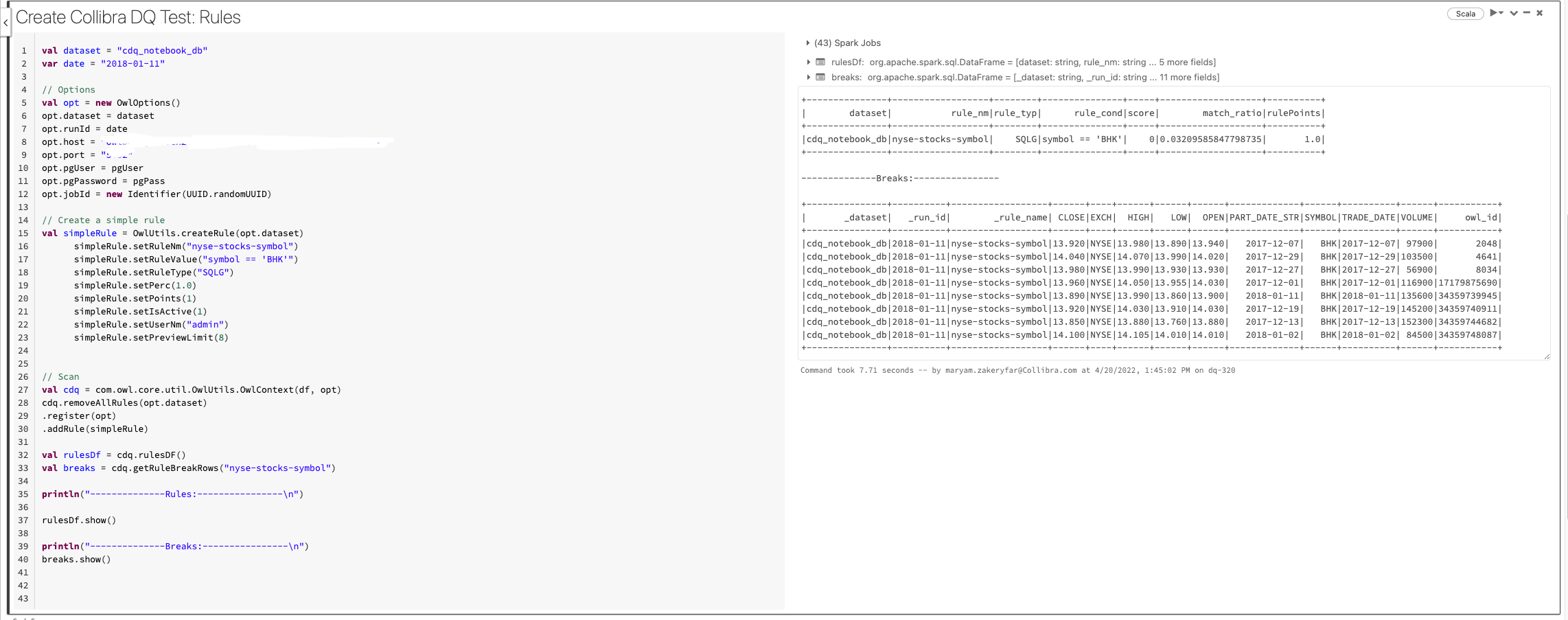
The following image shows the code snippet and the result in Databricks:
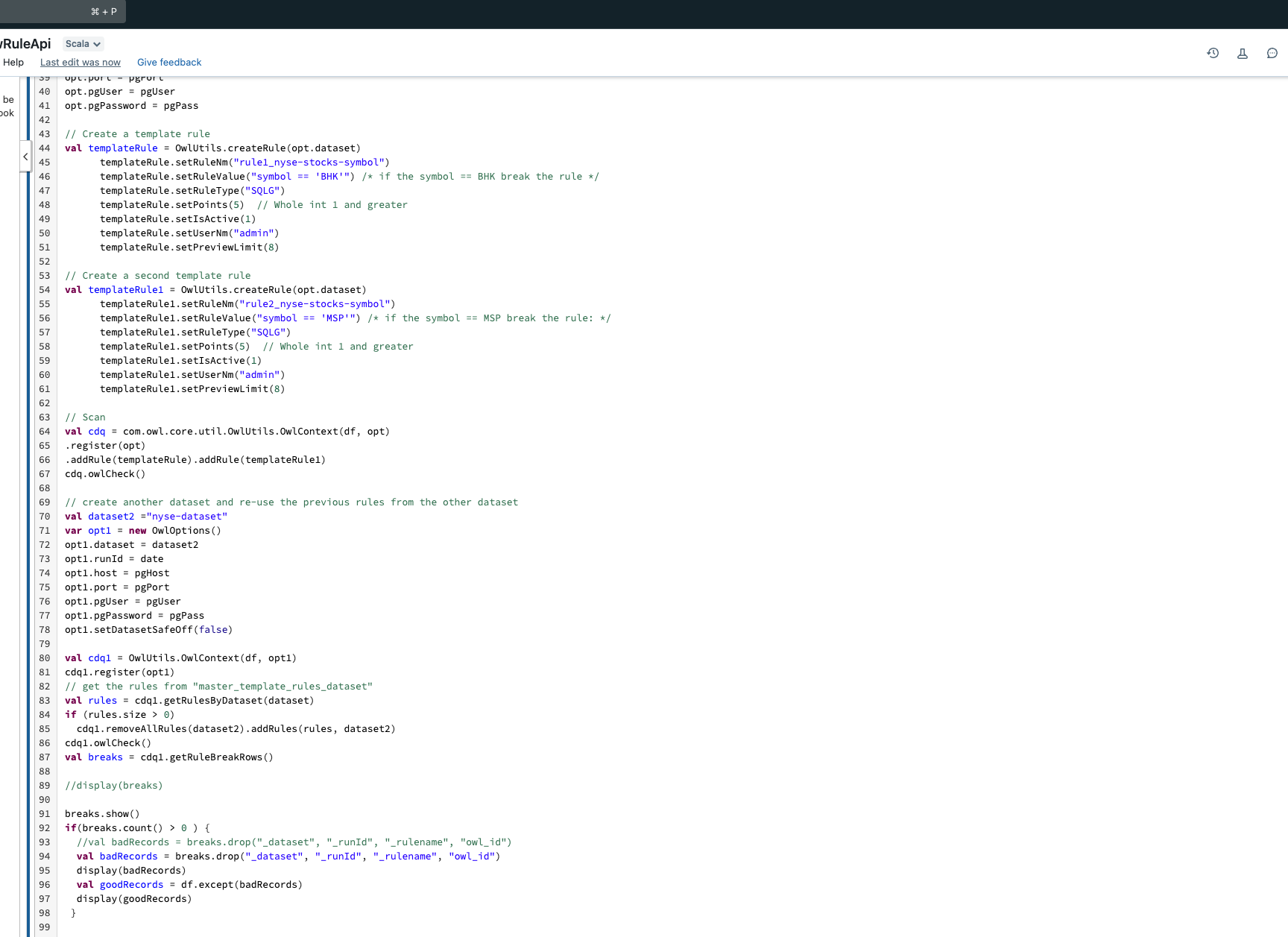
Steps to reassign the rules of one dataset to another via the API.
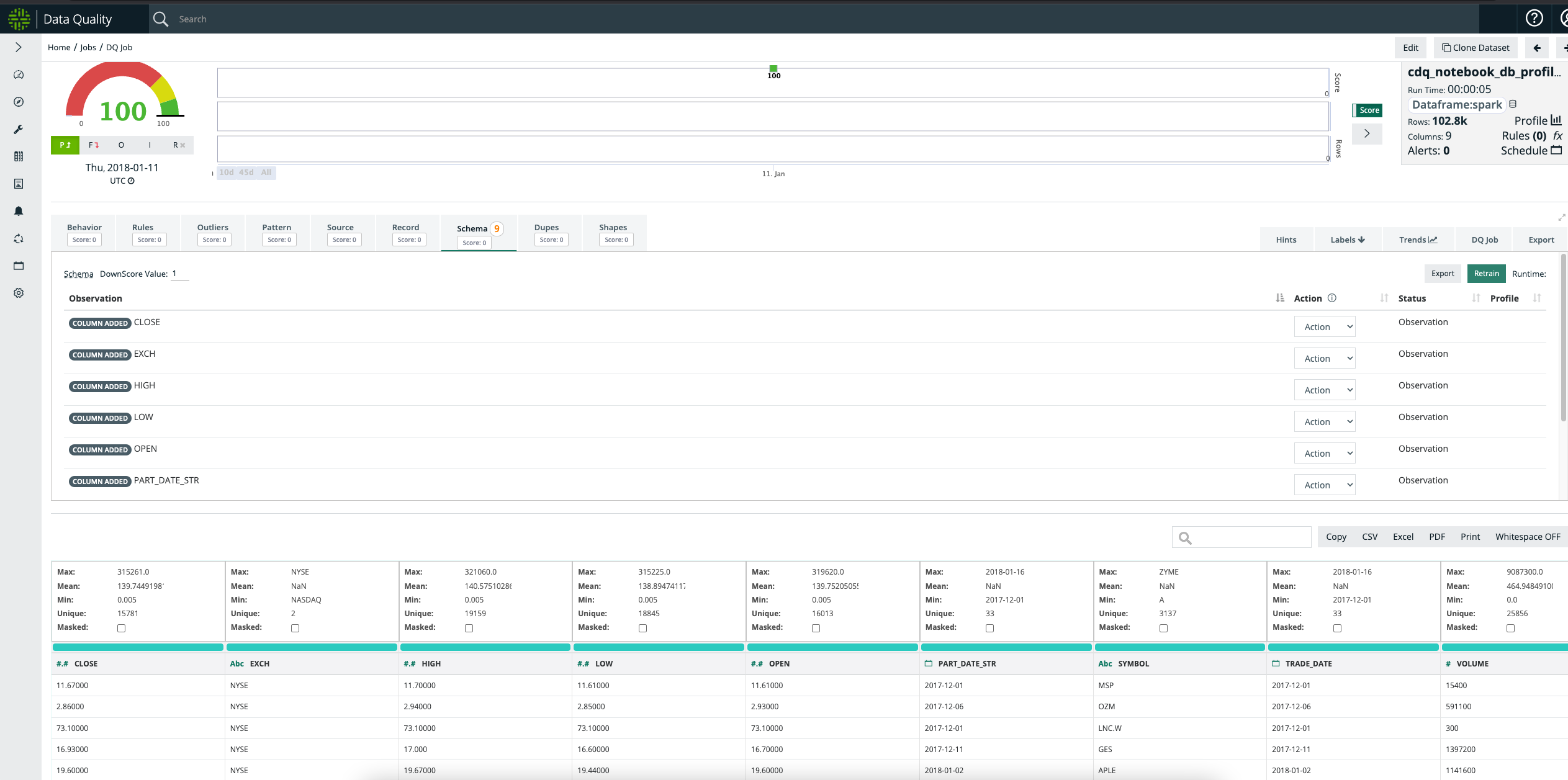
The breaks and the rules can also be viewed on the Findings page of the Collibra DQ web application.
Example Profile job
val dataset = "cdq_notebook_nyse_profile"

val runList = List("2018-01-01", "2018-01-02", "2018-01-03", "2018-01-04", "2018-01-05"
for(runID <- runList {
// Options
val options = new OwlOptions()
options.dataset = dataset
options.host = pgHost
options.port = pgPort
options.pgUser = pgUser
options.pgPassword = pgPass

//Scan
val profileOpt = new ProfileOpt
profileOpt.on = true
profileOpt.setShape(true)
profileOpt.setShapeSensitivity(5.0)
profileOpt.setShapeMaxPerCol(10)
profileOpt.setShapeMaxColSize(10)
profileOpt.setShapeGranular(true)
profileOpt.behaviorEmptyCheck = true
profileOpt.behaviorMaxValueCheck = true
profileOpt.behaviorMinValueCheck = true
profileOpt.behaviorNullCheck = true
profileOpt.behaviorRowCheck = true
profileOpt.behaviorMeanValueCheck = true
profileOpt.behaviorUniqueCheck = true
profileOpt.behaviorMinSupport = 5 // default is 4
profileOpt.behaviorLookback = 5
options.profile = profileOpt

var date = runId
var df_1 = df.where($"TRADE_DATE"===s"$date")

//Scan
val cdq = OwlUtils.OwlContext(df_1, options)
cdq.register(opt)
cdq.owlCheck()
val profile = cdq.profileDF()
profile.show()
}
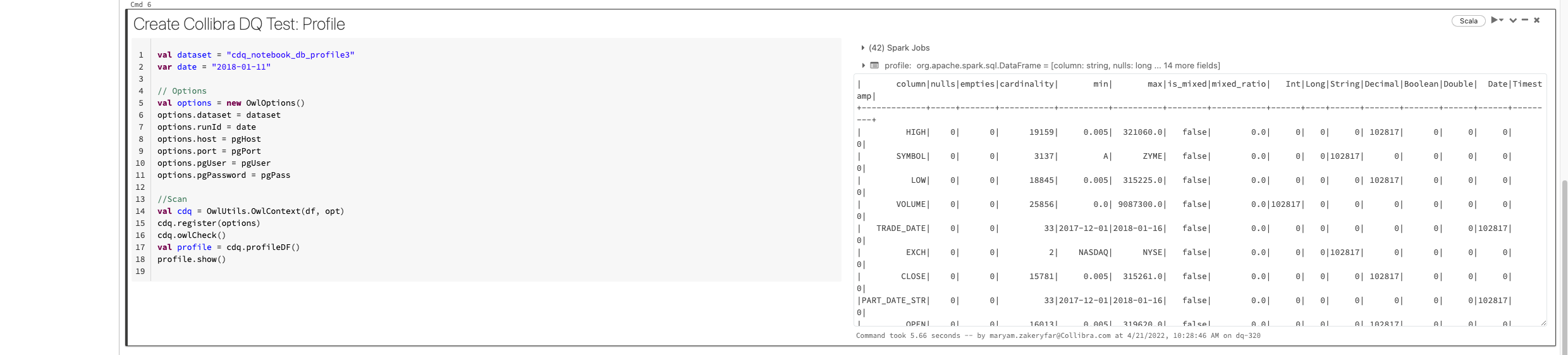
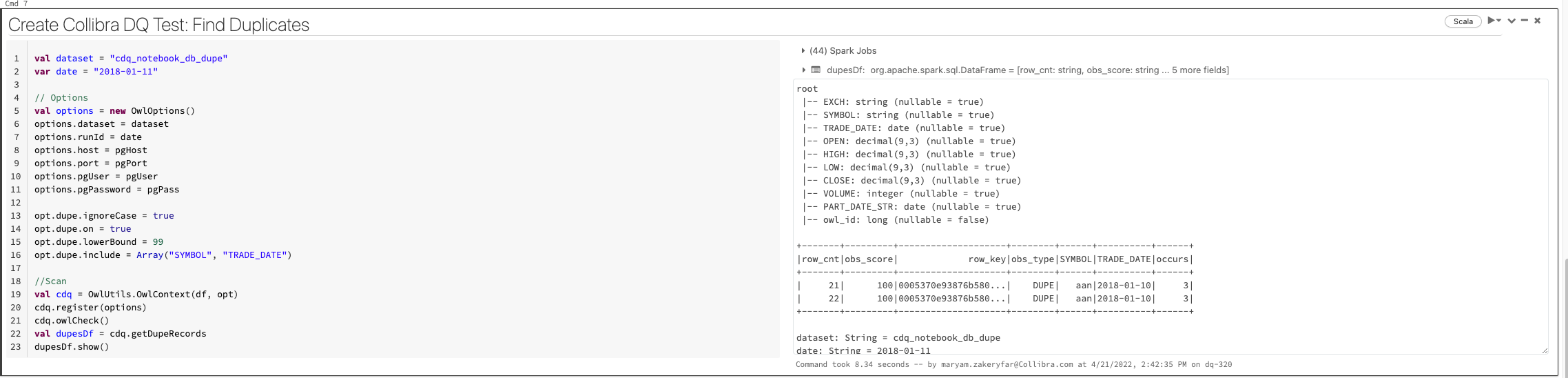
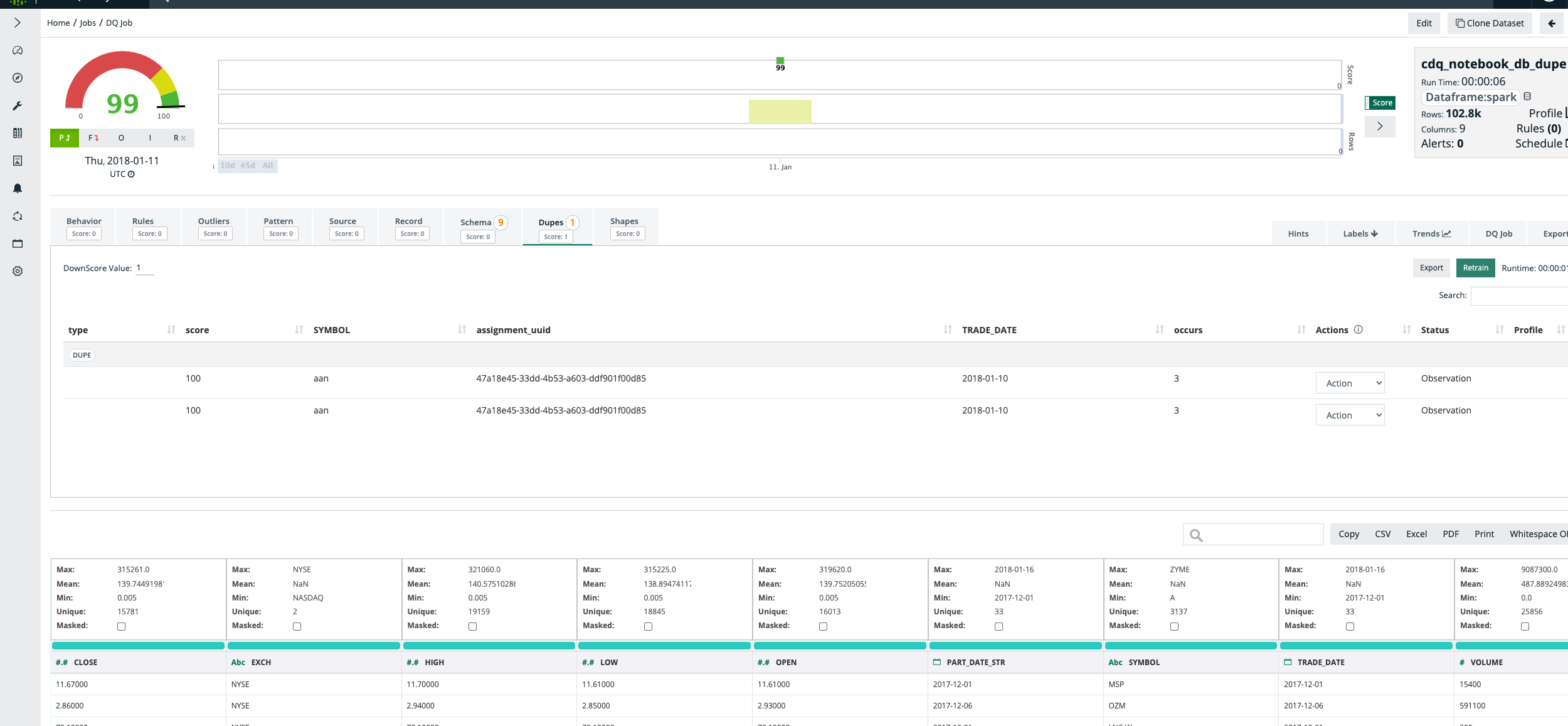
Example duplicate detection job
val dataset = "cdq_notebook_db_dupe"
var date = "2018-01-11"

// Options
val options = new OwlOptions()
options.dataset = dataset
options.runId = date
options.host = pgHost
options.port = pgPort
options.pgUser = pgUser
options.pgPassword = pgPass

opt.dupe.ignoreCase = true
opt.dupe.on = true
opt.dupe.lowerBound = 99
opt.dupe.include = Array("SYMBOL", "TRADE_DATE")

//Scan
val cdq = OwlUtils.OwlContext(df, opt)
cdq.register(options)
cdq.owlCheck()

val dupesDf = cdq.getDupeRecords
dupesDf.show()
Example outlier job
import scala.collection.JavaConverters._
import java.util
import java.util.{ArrayList, List, UUID}

val dataset = "cdq_notebook_db_outlier"
var date = "2018-01-11"

// Options
val options = new OwlOptions()
options.dataset = dataset
options.runId = date
options.host = pgHost
options.port = pgPort
options.pgUser = pgUser
options.pgPassword = pgPass

opt.dupe.on = false

val dlMulti: util.List[OutlierOpt] = new util.ArrayList[OutlierOpt]
val outlierOpt = new OutlierOpt()
outlierOpt.combine = true
outlierOpt.dateColumn = "trade_date"
outlierOpt.lookback = 4
outlierOpt.key = Array("symbol")
outlierOpt.include = Array("high")
outlierOpt.historyLimit = 10
dlMulti.add(outlierOpt)

opt.setOutliers(dlMulti)

val cdq = OwlUtils.OwlContext(df, opt)
        .register(opt)

cdq.owlCheck
val outliers = cdq.getOutliers()
outliers.show
outliers.select("value")
Example ValidateSource job
import com.owl.common.options.SourceOpt
import java.util
import java.util.{ArrayList, List}

var opt = new OwlOptions()
val dataset = "weather-validateSrc"
opt.setDataset(dataset)
opt.runId = "2018-02-23"
clearPreviousScans(opt)
val src = Seq(
  ("abc", true, 55.5, "2018-02-23 08:30:02"),
  ("def", true, 55.5, "2018-02-23 08:30:02"),
  ("xyz", true, 55.5, "2018-02-23 08:30:02")
).toDF("name", "sunny", "feel-like-temp", "d_date")

val target = Seq(
  ("abc", 72, false, 55.5, "2018-02-23 08:30:02"), // true to false
  ("xyz", 72, true, 65.5, "2018-02-23 09:30:02") // 08 to 09
).toDF("name", "temp", "sunny", "feel-like-temp", "d_date")

val optSource = new SourceOpt
optSource.on = true
optSource.dataset = dataset
optSource.key = Array("name")
opt.setSource(optSource)

//scan
val cdq = OwlUtils.OwlContext(src, target, opt)
  .register(opt)
cdq.owlCheck

val breakCountDf = cdq.getSourceBreaksCount()
breakCountDf.show()
Known API Limitations
Collibra DQ activities cannot currently be called independently. DQ Check() function should be called before calling any of the activities. For example, to get the profile DataFrame you should call the following code snippet:
cdq.owlCheck()
cdq.getProfileDF()