You can use the Sensitive Labels Management page in Admin Console to add custom sensitive labels. While working with your data, you can add sensitivity labels at the column-level on the Profile page.
Steps
-
Sign in to Data Quality & Observability (self-hosted) and click
 in the left navigation pane.
 - Click Admin Console.
- Click Sensitive Labels. The Sensitive Label Management page opens.
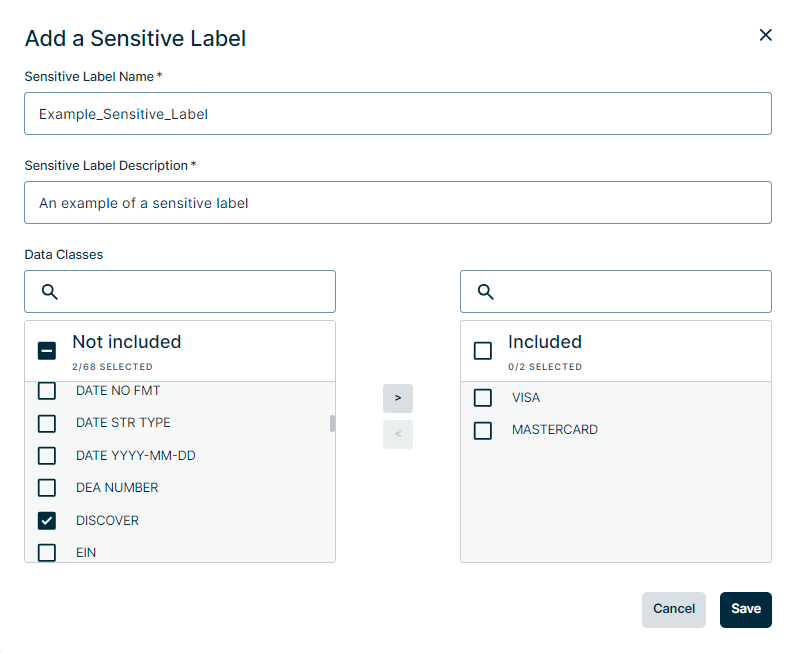
- On the upper-right side of the page, click + Add. The Add a Sensitive Label modal appears.
- In the Sensitive Label Name input field, give the label an easily identifiable name.
- In the Sensitive Label Description input field, give the label a meaningful description.
- Select the Data Class(es) in the Not included box, then click
 to move your selection(s) to the Included box to include Data Classes in your sensitive label. You can also filter the roles in the search fields. Data Classes from OOTB sensitive labels are not displayed in the list and cannot be included in the custom sensitive label.
 Note You can remove Data Classes from the sensitive label by selecting the Data Class from the Included box and then clicking
 .
.
- Click Save.