This recommended method allows you to manage the generation and retrieval of access tokens. Once you have an access token, you can then call the API by including it as an authorization bearer token in the request header. Data Quality & Observability (self-hosted) processes and validates this token and maps the user roles to grant users access to the application.
The SSO for API Usage configuration page is available on the Admin Console under User Management.
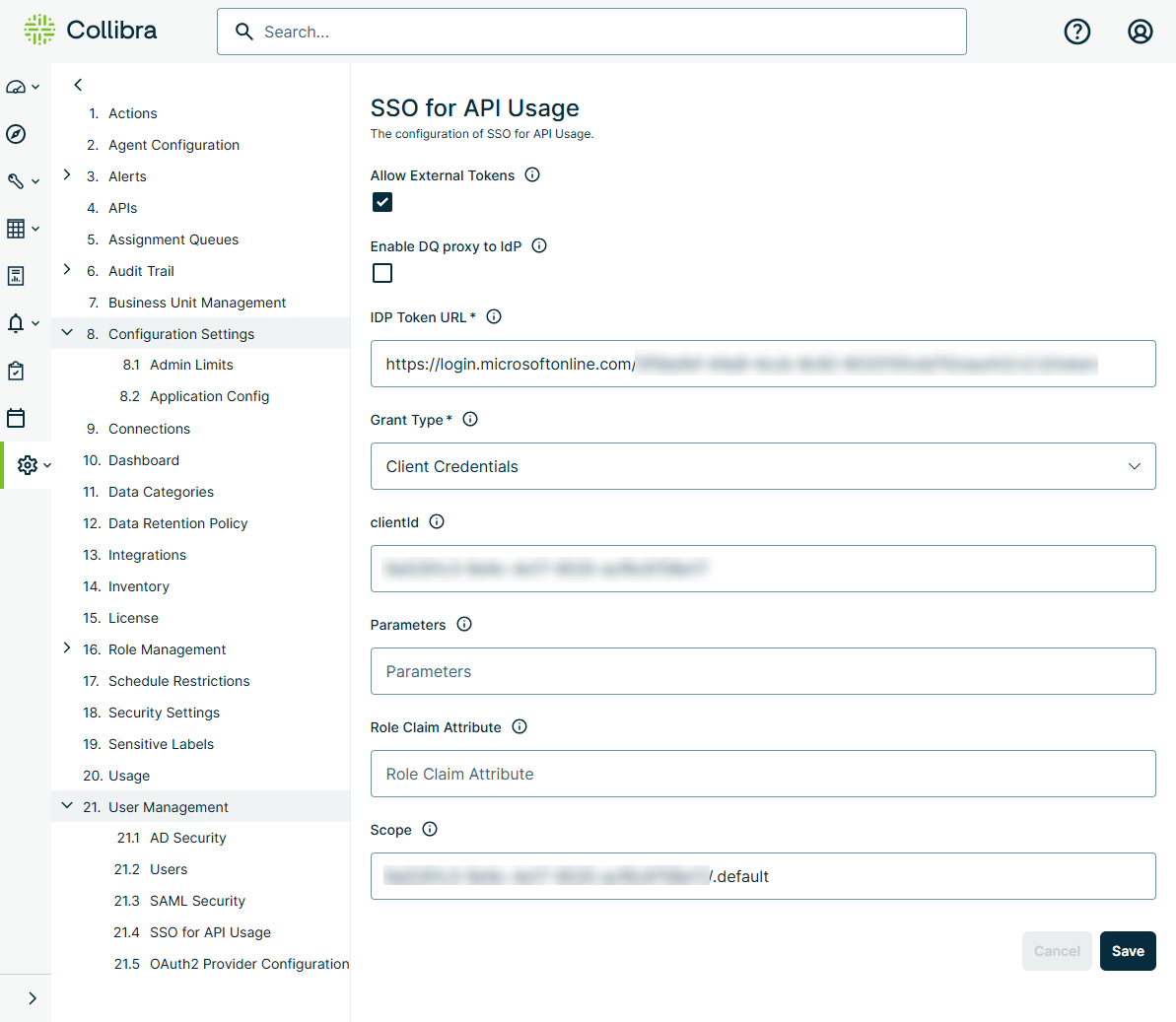
It contains the following settings:
| Field | Description |
|---|---|
| Allow External Tokens | Enables externally managed JWT tokens. |
| Enable DQ proxy to IdP | Instructs DQ Web to request JWT tokens on behalf of the customer. |
| IdP Token URL |
The token endpoint URL of the identity provider (IdP). Example https://<your_domain>/oidc/2/token |
| Grant Type |
The grant type used for authentication. Options are:
|
| clientId | The client ID. Required if Client Credentials is selected in the Grant Type field. To assign permissions to the client ID, open the AD Security page under User Management, click the Mappings tab, and then map the client ID to a role. The client ID displays in the Groups column for the assigned role. The same clientId must also be specified in the aud parameter in the JSON payload of the JWT. |
| Parameters |
Static query parameters that are appended to the call to the IdP. This is typically found in the URL of the IdP and is specific to the IdP implementation. Optional if Client Credentials is selected in the Grant Type field. Example client_id=012345a6-abc1-012a-0ab1-01a23b45cd6789012 |
| Role Claim Attribute |
Attributes in the claims array from the access_token that define where DQ roles and user groups should be mapped. Used only if Password is selected in the Grant Type field. Example params,Groups |
| Scope |
Optional. IdP-specific properties that define the scope of what is returned in the access_token from the OAuth or OIDC request. Typically associated with the token specified in the clientID field. Example openid groups params profile |
Steps
-
Sign in to Data Quality & Observability (self-hosted) and click
 in the left navigation pane.
 - Click Admin Console.
- Click Configuration Settings, then click Application Config. The Application Configuration Settings page opens.
- Set the SSO_API setting to TRUE.
- From the Admin Console treeview menu, click User Management, then API for SSO Usage. The SSO for API Usage page opens.
- Select the Allow External Tokens option to enable the acceptance of externally managed JSON Web Tokens (JWT).
- Set the following properties in the owl-env.sh script:
-
Restart the Data Quality & Observability (self-hosted) web application.
| Property | Description |
|---|---|
export SECURITY_JWT_ALLOW_EXTERNAL=true
|
Enables this globally in Data Quality & Observability (self-hosted), but still requires each tenant to enable this in the Allow External Tokens option from the SSO for API Usage from the User Management section of the Admin Console menu. |
export SECURITY_JWT_EXTERNAL_ROLE_CLAIM_ATTRIBUTE=<claim attribute>
|
Maps to a property in the JWT that holds an array of ROLES that Data Quality & Observability (self-hosted) uses to map users to roles. Not used if Client Credentials is selected in the Grant Type field. |
export SECURITY_JWT_EXTERNAL_USERNAME_PROPERTY=<username>
|
Maps to a property in the JWT that Data Quality & Observability (self-hosted) displays as the username. Not used if Client Credentials is selected in the Grant Type field. |
export SECURITY_JWT_TENANT_PROPERTY=<tenant>
|
Required in multi-tenant environments. This property is included in the JWT claims to identify the Data Quality & Observability (self-hosted) tenant that users are logging into. Not used if Client Credentials is selected in the Grant Type field. |
export SECURITY_JWT_TOKEN_ISSUER=<iss>
|
The issuer of the JWT that is included in the process to validate the token. |
export SECURITY_JWT_TOKEN_JWKPROVIDERURL=<cert endpoint exposed by the IdP>
|
An endpoint of the IdP where the certificates can be retrieved. This property is used to validate the token. You can retrieve the cert endpoint by accessing the oidc/.well-known/openid-configuration endpoint to return the jwks_uri in the response. For example, when you access https://{{subdomain}}.onelogin.com/oidc/2/.well-known/openid-configuration, the response shows the jwks_uri as |
Example of the JSON payload of a JWT
The following is an example of the decoded JSON payload of a JWT:
{
  "sub": "123456789",
  "preferred_username": "example.user",
  "name": "Example User",
  "updated_at": 1234567890,
  "given_name": "Example",
  "family_name": "User",
  "groups": [
    "CollibraAdmin"
  ],
   "tenant": "public",
   "post_logout_redirect_uri": "http://localhost:9000/logout",
   "accountName": "example.user"
  },
  "aud": "012345a6-abc1-012a-0ab1-01a23b45cd6789012",
  "exp": 1234567890,
  "iat": 1234567890,
  "iss": "https://<subdomain>.onelogin.com/oidc/2"
}
In this example, the values used in the owl-env.sh correspond to the JSON payload properties as follows:
| owl-env.sh property | Value |
|---|---|
SECURITY_JWT_EXTERNAL_USERNAME_PROPERTY
|
example.user |
SECURITY_JWT_TENANT_PROPERTY
|
tenant |
SECURITY_JWT_TOKEN_ISSUER
|
https://<subdomain>.onelogin.com/oidc/2 |
In addition, the value aud must use the same client ID specified in the clientid field on the SSO for API Usage configuration page and in the role mappings.
-
Sign in to Data Quality & Observability (self-hosted) and click
in the left navigation pane. - Click Admin Console.
- Click Configuration Settings, then click Application Config. The Application Configuration Settings page opens.
- Set the SSO_API setting to TRUE.
- From the Admin Console treeview menu, click User Management, then API for SSO Usage. The SSO for API Usage page opens.
- Select the Allow External Tokens option to enable the acceptance of externally managed JSON Web Tokens (JWT).
- Set the following properties in the values.yaml file:
-
Restart the Data Quality & Observability (self-hosted) web pod.
 global:
                    web:
                    security:
                    externalJwt:
                    enabled: false
                    externalRoleClaim: "groups"
                    externalUserNamePropName: "accountName"
                    externalTenantPropName: "tenant"
                    externalTokenIssuer: ""
externalTokenJwkProviderURL: ""Example of a JSON payload of a JWT
The following is an example of the JSON payload of a JWT:
{
  "sub": "123456789",
  "preferred_username": "example.user",
  "name": "Example User",
  "updated_at": 1234567890,
  "given_name": "Example",
  "family_name": "User",
  "groups": [
    "CollibraAdmin"
  ],
   "tenant": "public",
   "post_logout_redirect_uri": "http://localhost:9000/logout",
   "accountName": "example.user"
  },
  "aud": "012345a6-abc1-012a-0ab1-01a23b45cd6789012",
  "exp": 1234567890,
  "iat": 1234567890,
  "iss": "https://<subdomain>.onelogin.com/oidc/2"
}
In this example, the values used in the Web ConfigMap correspond to the JSON payload properties as follows:
| Web ConfigMap property | Value |
|---|---|
SECURITY_JWT_EXTERNAL_USERNAME_PROPERTY
|
example.user |
SECURITY_JWT_TENANT_PROPERTY
|
tenant |
SECURITY_JWT_TOKEN_ISSUER
|
https://<subdomain>.onelogin.com/oidc/2 |
aud parameter in the JSON payload.