Admin Limits define the maximum values of parameters passed during the execution of a DQ Job.
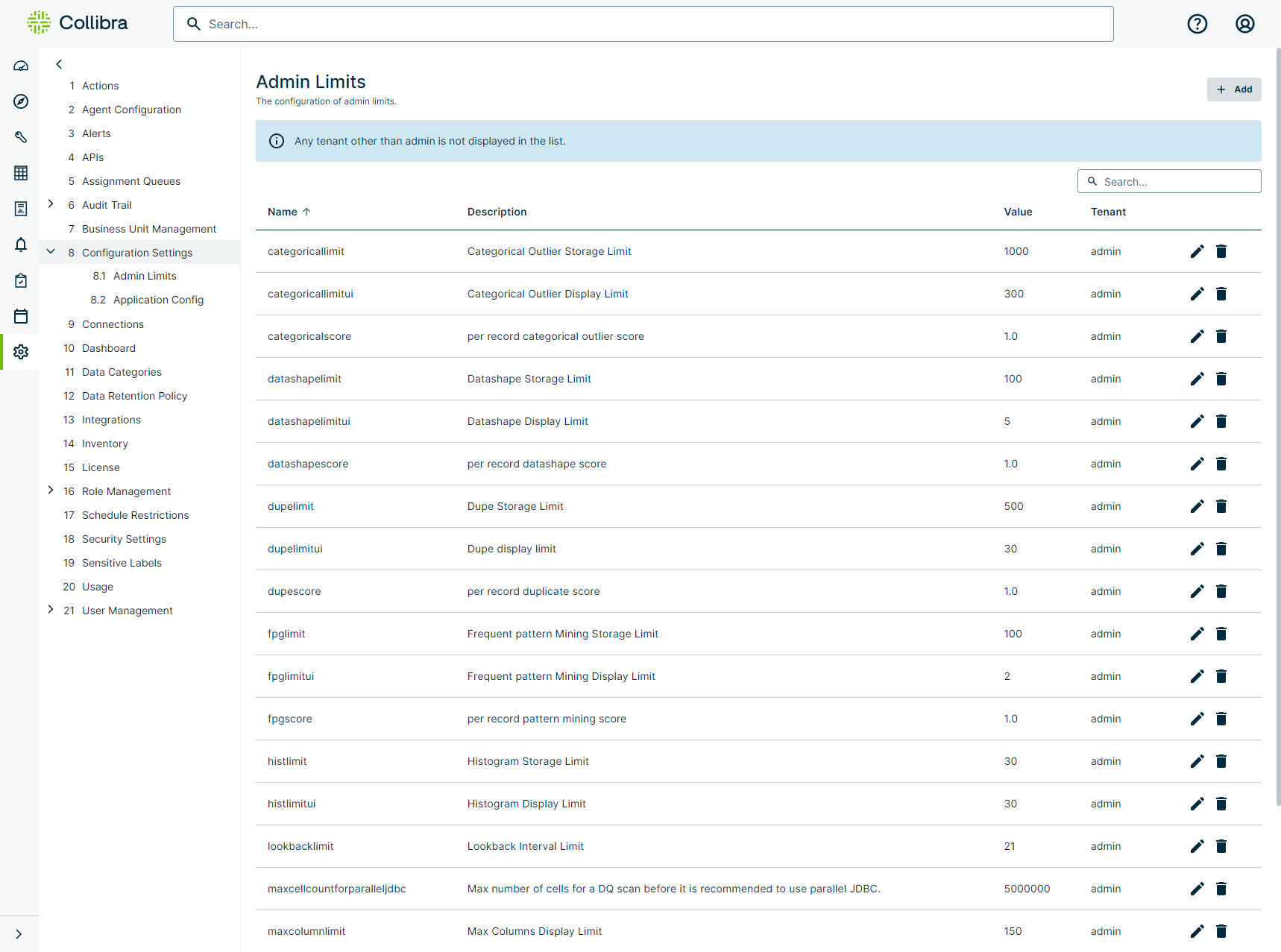
Note You should generally modify the following Admin Limits settings to prevent too much data from being stored in the database. For example, if you set the datashapelimit to 50 and the datashapelimitui to 25, when you run a check, only 50 shape issues get stored in the database and only the first 25 records display in the UI on the Findings page.
The following table shows the available settings on the Admin Limits page.
| Setting | Description |
|---|---|
| categoricallimit | Limit of categorical outlier storage findings that get stored in the database. |
| categoricallimitui | Limit of categorical outlier findings that display in the UI. |
| categoricalscore | Default categorical outlier score, per record. |
| datashapelimit |
Limit of datashape storage findings that get stored in the database. Note You can only enter -1, 0, or a positive number for this limit. You can't save until you enter an allowed value. |
| datashapelimitui | Limit of datashape findings that display in the UI. |
| datashapescore | Default datashape score, per record. |
| dupelimit | Limit of dupe storage findings that get stored in the database. |
| dupelimitui | Limit of dupe findings that display in the UI. |
| dupescore | Default dupe score, per record. |
| exportlimit |
Limit the number of rows that can be exported. A limit of 0 (zero) indicates that no rows can be exported. Note When exporting DQ rules, the limit applies to each rule individually. For example, if there are 5 rules, the limit applies to each rule; not collectively all rules at once. Note This limit does not apply to Archived Break Records, so avoid using them if you need the export limit to apply universally. |
| fpglimit | Limit of frequent pattern mining storage findings that get stored in the database. |
| fpglimitui | Limit of frequent pattern mining findings that display in the UI. |
| fpgscore | Default frequent pattern mining score, per record. |
| histlimit | Limit of histogram storage findings that get stored in the database. |
| histlimitui | Limit of histogram findings that display in the UI. |
| lookbacklimit | Limit of lookback intervals findings that get stored in the database. |
| maxcellcountforparalleljdbc | Maximum number of cells for a DQ scan before it is recommended to use parallel JDBC, which gets stored in the database. |
| maxcolumnlimit | Limit of maximum columns display findings that get stored in the database. |
| maxconcurrentjobs | Maximum number of Pushdown jobs that can run concurrently. |
| maxexecutorcores | Maximum number of executors cores to be set during estimation on a DQ scan, which gets stored in the database. Set the default value at the agent level. |
| maxexecutormemory | Maximum number of executor memory (GB) to be set during estimation on a DQ scan, which gets stored in the database. Set the default value at the agent level. |
| maxfileuploadsize | Maximum allowed temporary file size in MB. The default is 15 MB. |
| maxnumexecutors | Maximum number of executors to be set during estimation on a DQ scan, which gets stored in the database. Set the default value at the agent level. |
| maxpartitions | Maximum number of partitions to be set during estimation of a DQ scan. |
| maxworkermemory | Agent Worker Maximum Memory (WMM) |
| maxworkercores | Maximum cores per worker. |
| minworkermemory | Agent Worker Minimum Memory (WMI) |
| obslimit | Limit of observation storage findings that get stored in the database. |
| obslimitui | Limit of observation storage findings that display in the UI. |
| obsscore | Default observation score, per record. |
| outlierlimit | Limit of outlier findings that get stored in the database. |
| outlierlimitui | Limit of outlier findings that get stored in the database. |
| outlierscore | Default outlier score, per record. |
| partitionautocal | Calculate the number of Spark partitions automatically for optimal performance. |
| passfaillimit | Limit of passing or failing threshold findings that get stored in the database. This value is used when passFailLimit is not set in the dataset definition. |
| pergbpartitions | Per 1 GB memory partitions |
| previewlimit |
Set the maximum number of rows you can preview when you run queries in the Dataset Overview and Rule Workbench. The default value is 250. Important Setting a high previewlimit can strain system resources, potentially causing crashes or unresponsiveness, and can also increase query runtimes, delaying job completion and feedback. |
| rulelimit |
Limits the number of rule break records stored in the metastore for Pushdown jobs. This helps prevent out-of-memory issues when a rule returns a large number of break records. The default value is 1000. This option does not affect Pullup or Pushdown jobs with archive break records enabled. |
| schemascore | Default schema score, per record. |
| scorecardsize | Limit of scorecard size display findings that get stored in the database. |
| sourcedupelimit | Source dupe limit for Pushdown jobs (0 = unlimited) |
| sourceoutlierlimit | Source outlier limit for Pushdown jobs (0 = unlimited) |
| sourceoutputenabled | Source output for Pushdown jobs |
| sourcerulelimit | Source rule limit for Pushdown jobs (0 = unlimited). |
| sourcesampleenabled | Source sample for Pushdown jobs. |
| sourceshapelimit | Source shape limit for Pushdown jobs (0 = unlimited). |
| totalworkers | Total number of workers available. |
| valsrcdisableaq | Disable the Assignment actions (Validate, Invalidate, Resolved) on the Validate Source data model on the Findings page. |
| valsrclimit | Limit of validate source storage findings that get stored in the database. |
| valsrclimitui | Limit of validate source findings that display in the UI. |
| valsrcscore | Default validate source score, per record. |
Note Settings with "score" in their name represent the default score for that setting's type of findings.