Important This feature is available only in the latest UI. However, in the classic UI, you can use standalone Data Marketplace if it has been enabled.
Data Marketplace in Search refers to the Data Marketplace option on the search page. This option allows you to switch to the Data Marketplace search for searching in a curated subset of assets.
The Data Marketplace option is shown on the search page only if you have the Data Marketplace or Catalog global permission, or the Sysadmin global role. This option is selected by default. However, if you clear the Data Marketplace option on the search page, your preference is saved, and the next time you visit the search page, the option remains disabled, reflecting your last selection.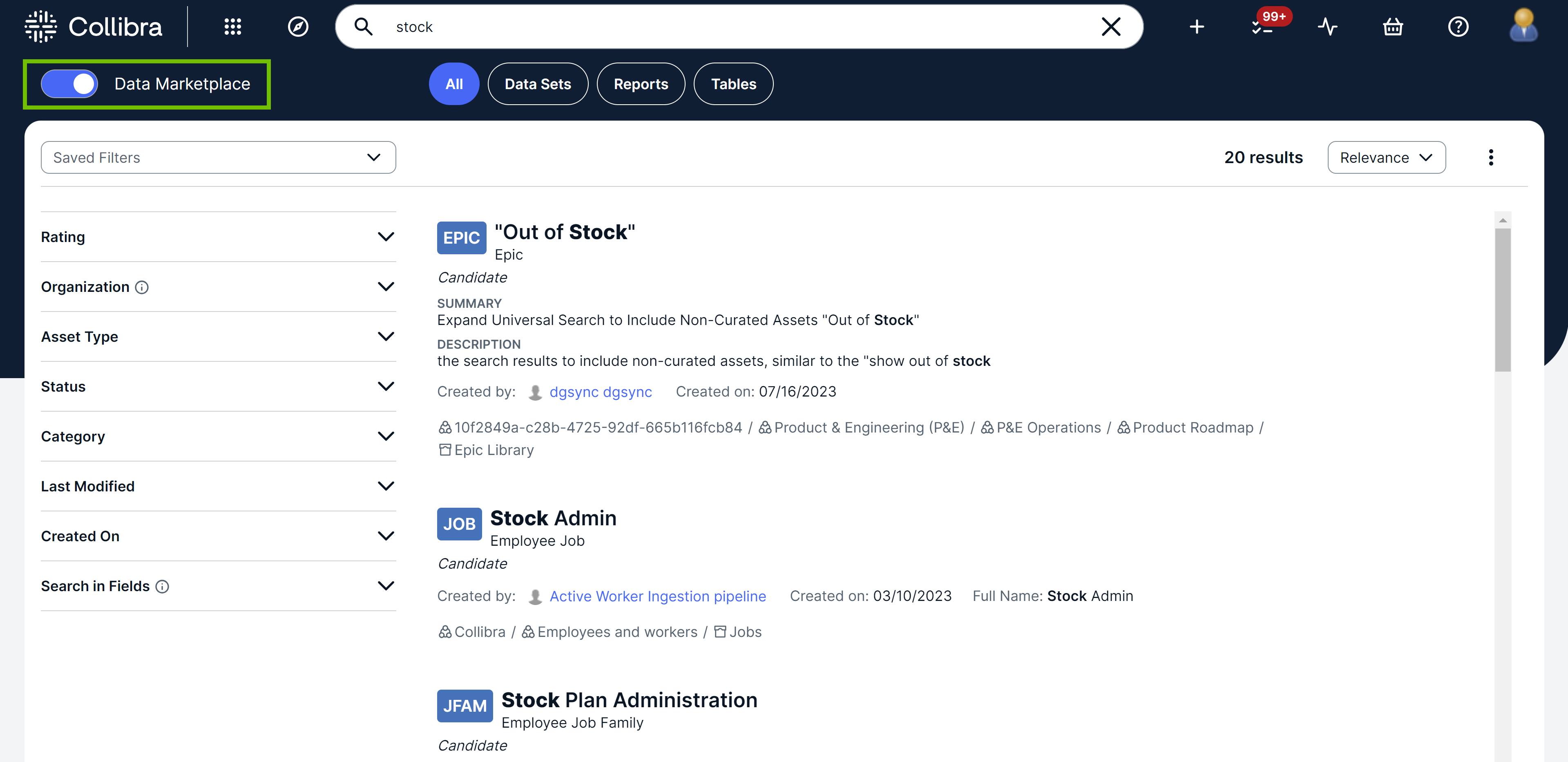
When you select the Data Marketplace option:
- Quick filters such as Reports and Tables appear next to the option. These quick filters, which are configured on the Collibra settings page, allow you to apply a set of filters in a single action.
- Additional filters appear in the facet pane on the left depending on how your administrator has configured the Data Marketplace filter facets. The Search in Fields filter, however, is always shown.
-
 appears next to each search result to open the corresponding asset preview. To see , hover your pointer over the result.
 -
 appears next to each search result to open the corresponding asset in a new tab or to use the workflows available for the asset. These workflows are different from the Data Marketplace actions defined for the asset preview. To see , hover your pointer over the result.