SAP Analytics Cloud is an end-to-end cloud solution that brings together business intelligence, augmented analytics, predictive analytics, and enterprise planning in a single SaaS-based product. It's main function is to achieve data visualization in the cloud, through the creation of data reports.
This topic focuses strictly on SAP Analytics Cloud. To create a technical lineage for SAP Analytics Cloud, go to Create a technical lineage via Edge.
Collibra also provides integrations for SAP Datasphere and SAP HANA.
- For information on SAP Datasphere, go to Working with SAP Datasphere.
- For information on creating technical lineage for SAP HANA, go to Create a technical lineage via Edge and select SAP HANA.
During the SAP Analytics Cloud integration, Edge accesses specified SAP Analytics Cloud data. The metadata is harvested, processed on the Collibra Data Lineage service instance, and then ingested as SAC assets in Collibra Data Catalog. However, Edge does not connect to SAP Analytics Cloud; rather, it connects to SAP Datasphere Catalog. Therefore, before you start the integration, you need to ensure that the SAP Analytics Cloud data that you want Edge to access is up-to-date and published in SAP Datasphere Catalog.
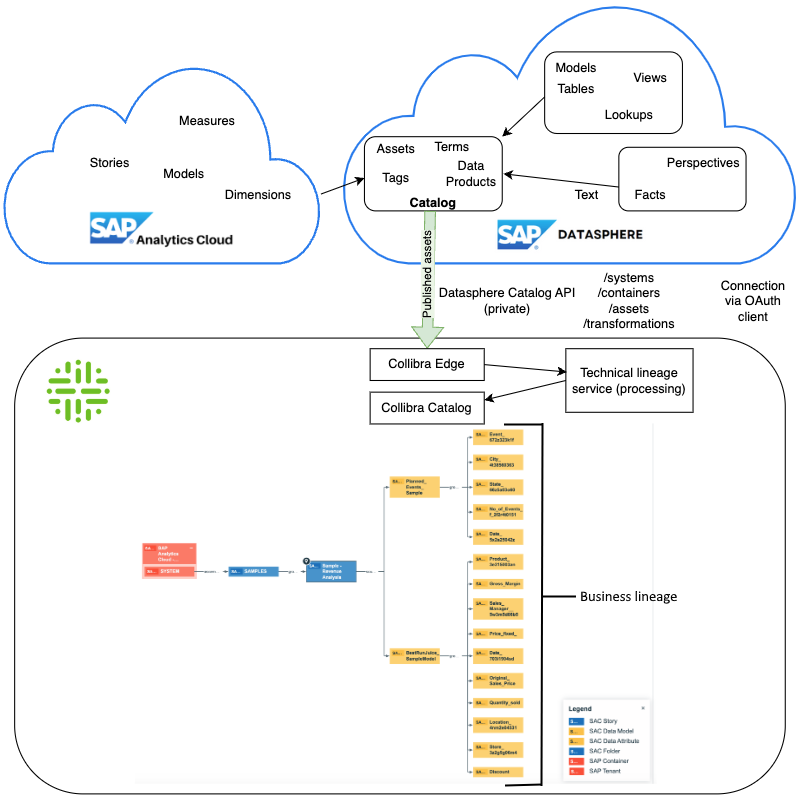
Business lineage for SAP Analytics Cloud
Business lineage is a diagram that includes, among others, relations of the type "Data Element sources / targets Data Element". It is not a separate diagram view, but refers to any diagram that contains that relation type. It allows you to trace data flows between registered databases and, as such, provides a summary of a technical lineage.
Important The SAP Datasphere Catalog API currently does not return sufficient metadata to generate a technical lineage of any real value.
Business lineage is automatically created as part of the technical lineage process.
Business lineage examples
Example 1
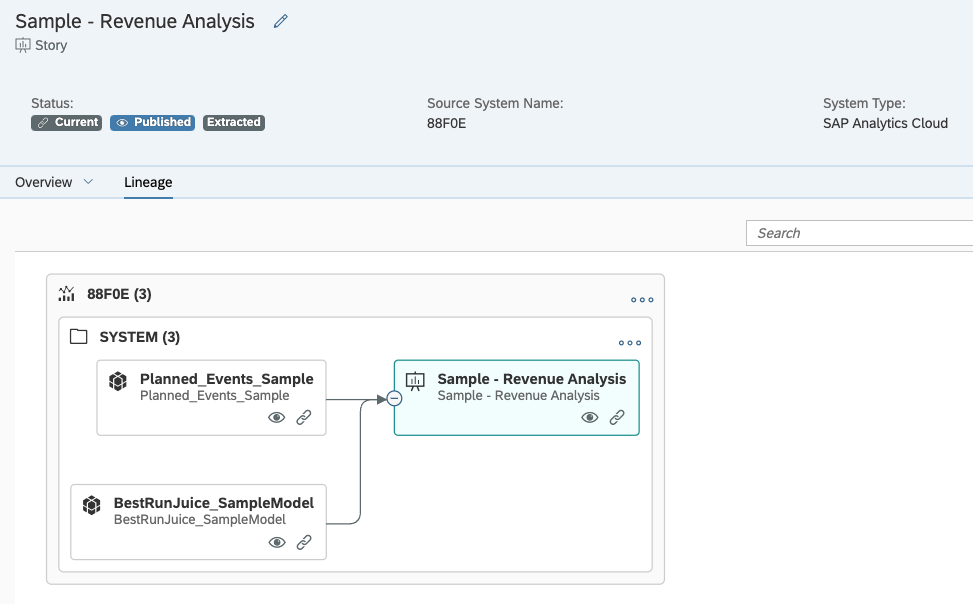
The following image shows an example lineage in SAP Datasphere Catalog. The lineage illustrates the relations between the two upstream data models ("Planned_Events_Sample" and "Best RunJuice_SampleModel") and the story ("Sample - Revenue Analysis") that uses the data from the two data models.
For list of SAP Analytics Cloud terminology and how the terms map to asset types in Collibra, go to BI tool terminology.
In Collibra, these relations are illustrated in the following business lineage. Notice that the perspective is slightly different. Here, the lineage depicts the upstream SAC Story node, which is sourced from the two SAC Data Models. Downstream, we see the SAC Data Attributes that are grouped by the SAC Data Models.

Example 2 - Limitation
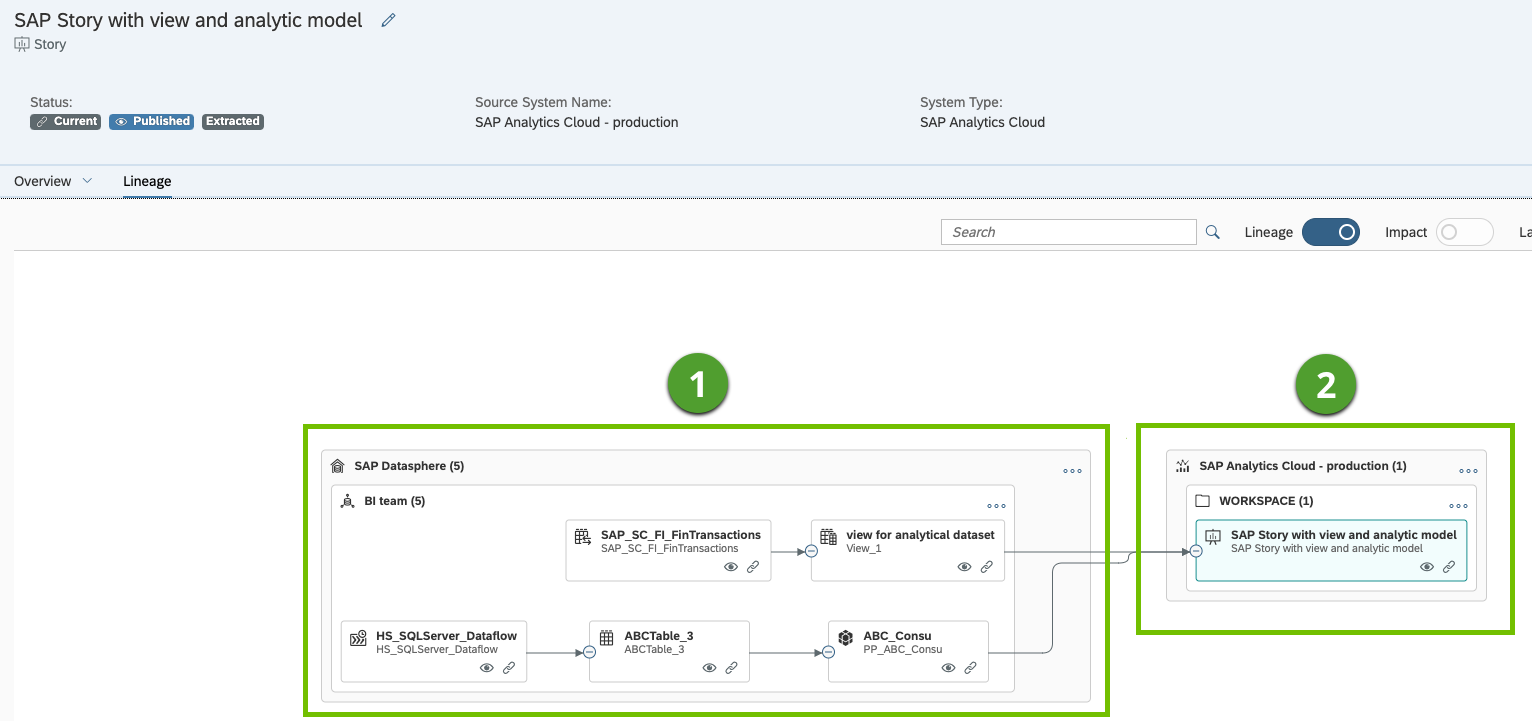
The following example image depicts the lineage of SAP Datasphere assets ( ). Included in the lineage is an SAP Analytics Cloud story asset (
 ). The story is included in the lineage because it has a live connection to SAP Datasphere.
Currently, Collibra Data Lineage cannot show lineage between SAP Datasphere assets and the SAP Analytics Cloud assets. We are working to create the relations necessary to depict this lineage.