|
Getting started with Data Marketplace |
Implementing Data Marketplace |
Data Marketplace for Admins |
Current release highlights
- Save your own personal preconfigured filters.
- Create group-specific filters. You can assign multiple preconfigured filters to a user group.
- Additional configuration options for search filters:
- Easy to change the display name.
- Add tooltips to filters.
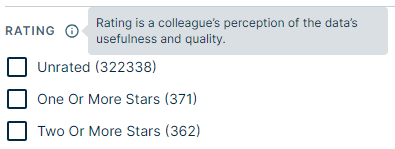
- Define whether a filter should be expanded or collapsed by default.
- If Collibra DQ is integrated in Collibra, you can see data quality global scores for DQ jobs in Table asset previews.
- If an asset has a Definition attribute, we will show the definition in the search result and in the asset preview.
- You have more control of the data basket.
- Show or hide the data basket in your environment.
- The data basket options have move to their own section in the Settings.
- Define which asset types you want to allow in the data basket. By default, the shopping basket allows for reports and data sets.
- Actions that you define for the No Search Results, are now also visible if there are search results.
- A new custom relation index name, can't contain more than 50 characters, and can't longer include
_underscores.
- Collections (Beta): We have improved this Beta feature based on your feedback. You can now:
- Search through your collections.
- Sort collections by creation date, last modified data, and name.
- Sort assets in a collection by time added and name.
- Filter assets based on their asset type via the Composition field.
-
Similar data (Beta): A new feature to show similar Table assets in a Table asset preview.