Important Unified Data Classification is in beta testing. Only activate this feature in your Test environments. Don't enable it in Production environments yet because it's not fully ready.
The Unified Data Classification method provides a set of out-of-the-box data classes. If you want to use an out-of-the-box data class, you can import it and then update it as desired.
Before you begin
You have enabled the Unified Data Classification method.
Required permissions
You have a global role that has the Data Classes > Add global permission.
You have a global role that has the Data Classes > Update global permission.
You have a global role that has the Data Classes > Remove global permission.
Steps
-
On the main menu, click
 , and then click
Stewardship.
, and then click
Stewardship. - Click the Data Classification tab.
- Click Import.
The Import Data Classes dialog box opens listing all the available out-of-the-box data classes and their status. For information on the possible statuses, go to About out-of-the-box data classes. - Select the data classes that you want to import.
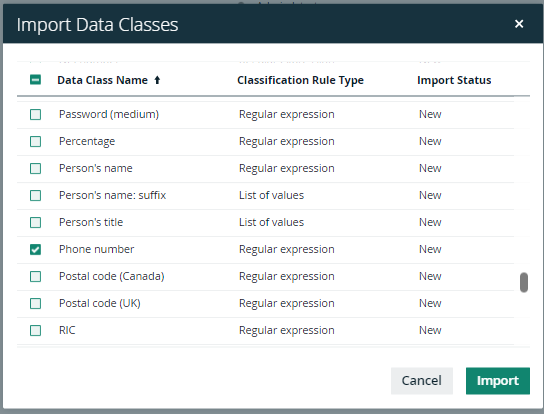
- If you have selected existing data classes that are reported as changed, confirm the import action.
- Click Import.
The selected data classes are imported and become available. Any selected, existing data classes are updated with the out-of-the-box classification rules. For more details, go to About out-of-the-box data classes. You can update the imported data class completely based on your needs.
Note Existing classifications are not affected by this process.
What's next?
Go to some examples