Review Rule assets
Business Stewards and Owners can configure review rules to trigger the review of assets of specified asset types. There are two types of review rules:
Note These two asset types are child asset types to the parent asset type Review Rule, which is a child of parent asset type Governance Asset.
When the configured conditions are met:
- A Review Request asset is automatically created.
- A task is assigned to the Business Steward, to prompt a review of the related asset.
Review Rule assets can be:
- Created by clicking
 in the main menu.
 - Configured by editing a packaged Review Rule asset.
- Selected during the asset onboarding process, in which case a relation is created between the newly proposed asset and the Review Rule asset.
As shown in the following image, the conditions upon which a review is triggered are stored as attributes in the respective asset.
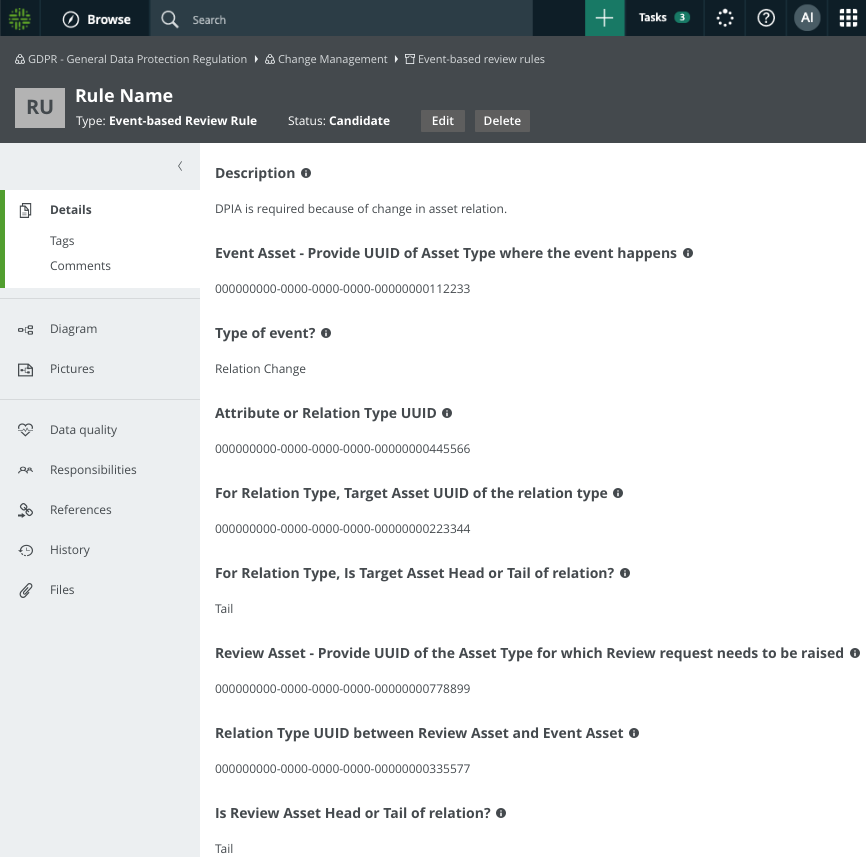
Packaged review rule assets