When you ingest MicroStrategy metadata in Data Catalog, Collibra Data Lineage automatically creates a technical lineage.
To view the technical lineage, click the Technical lineage tab on the asset page of any of the following asset types:
- Table
- Column
- MicroStrategy Data Attribute
- MicroStrategy Report
The Technical lineage tab is only shown if you have the Data Catalog global role with the Catalog and Technical lineage global permissions.
Note If you ingest MicroStrategy for the first time or if you change your geolocation or cloud provider, you have to restart the DGC service before you can see the technical lineage.
Technical lineage graph
The technical lineage graph shows relations of the type "Data Element targets / sources Data Element" between BI assets and other data objects in the data flow, for example Column assets or MicroStrategy Data Attribute assets. These relations are created during the MicroStrategy ingestion process as a result of automatic stitching.

Note When harvesting MicroStrategy, report attributes are not returned by the API. Therefore, for a given report, Collibra Data Lineage creates a dummy report attribute. This dummy report attribute is identified in the technical lineage by an asterisk (*), as shown in the following example image. Links are drawn from all data attributes in the data set that were used to create the report, to the dummy report attribute.
UUIDs in the MicroStrategy technical lineage
Collibra Data Lineage uses unique full names to create a technical lineage and stitch objects within the technical lineage. Full names in Collibra are constructed in accordance with the hierarchy of data objects in MicroStrategy, for example:
- Server > Project > Folder > Report > Data Entity > Data Attribute
- Server > Project > Folder > Dossier > Data Entity > Data Attribute
- Server > Project > Folder > Document > Data Entity > Data Attribute
In Collibra, every node in this hierarchy must have a unique name. However, in MicroStrategy, the names of data objects do not have to be unique. As such, if MicroStrategy data objects in a technical lineage hierarchy have the same full name, Collibra Data Lineage adds the UUIDs of the corresponding assets to the names in the technical lineage, to maintain uniqueness.
In the following example image, the names of the assets Priority, Opened and Active in the technical lineage have been appended with their UUIDs.
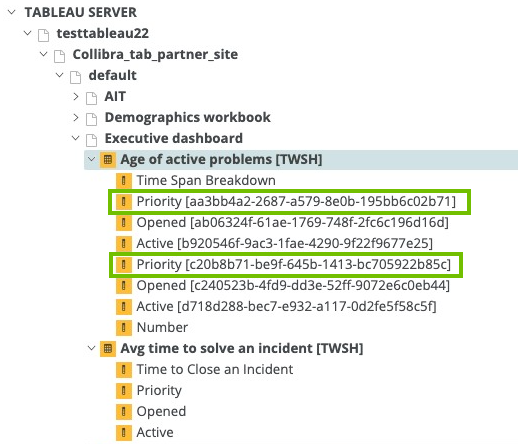
- UUIDs are not added to the names of the assets themselves; they are only added to the names of the data objects in the technical lineage.
- The UUID is always part of the full name of an asset, regardless of whether or not it is a duplicate.
To keep Collibra Data Lineage from adding UUIDs to the names of the data objects in a technical lineage, ensure that the names of all data objects in MicroStrategy are unique.
Sources tab page
The Sources tab page shows the transformation details that were analyzed and processed on the Collibra Data Lineage service instance and the results of this analysis. The success rate of the analysis indicates how complete the technical lineage is.
Example
The following image shows that you have created a technical lineage for two data sources. SAP HANA has a success rate of 83%. When you use the transformation logs to investigate the errors, you see that the Collibra Data Lineage service instance couldn't process some elements of the SAP HANA metadata, for example because they are not supported or because there is an issue in the configuration file.
