When you ingest Tableau metadata in Data Catalog, a technical lineage for Tableau Data Attribute assets is automatically created.
Permissions
If you have a Data Catalog global role with the Catalog and Technical lineage global permissions, you can see the technical lineage of Tableau assets by clicking on the Technical lineage tab on the asset page of any of the following asset types:
- Table
- Column
- Tableau Data Attribute
- Tableau Worksheet
Technical lineage graph
The technical lineage graph shows relations of the type "Data Element sources / targets Data Element" between Tableau assets and other data objects in the data flow, for example between a Column asset and a Tableau Data Attribute asset. These relations are created during the Tableau ingestion process as a result of automatic stitching.
Note If you use a Tableau <source ID> configuration file and don’t specify a value for the relevant collibraSystemName property, the designation “UNDEFINED” will be shown in the technical lineage.
Note If you use custom SQL that is not supported by the Tableau metadata API, the technical lineage might not be complete. For complete information, see the Tableau documentation on Tableau Catalog support for custom SQL and Tableau Lineage and custom SQL connections.
Example
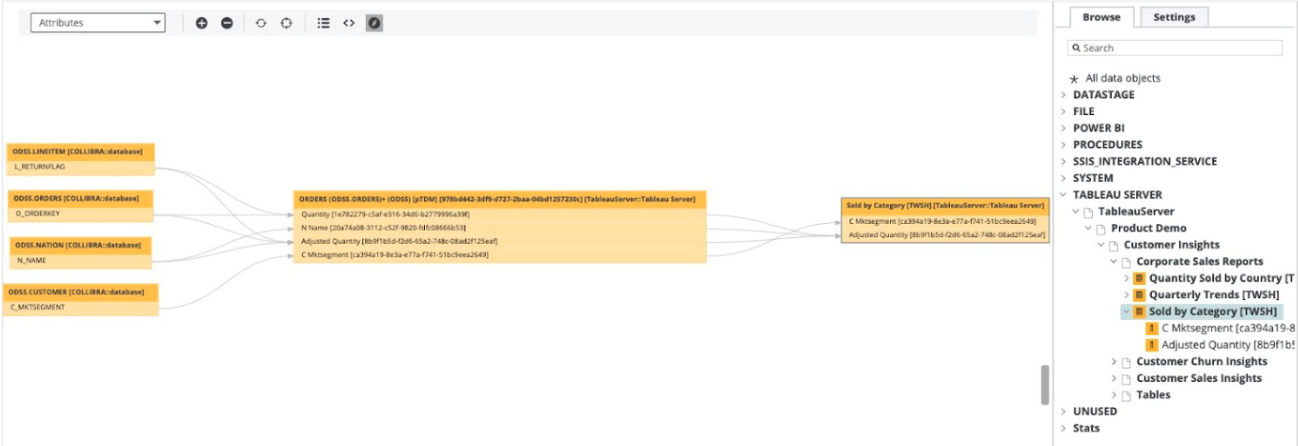
The following technical lineage shows how data flows from a PostgreSQL data source to Tableau. It shows relations of the type "Data Element sources / targets Data Element" between the Column assets of the database and Tableau Data Attribute assets in Tableau. For example, Column asset L_RETURNFLAG has a relation of the type "Data Element sources / targets Data Element" to the Tableau Data Attribute assets Quantity and Adjusted Quantity.
UUIDs in the Tableau technical lineage
Collibra Data Lineage uses unique full names to create a technical lineage and stitch objects within the technical lineage. Full names in Collibra are constructed in accordance with the hierarchy of data objects in Tableau, for example:
- Server > Site > Project > Workbook > Worksheet > Field
- Server > Site > Project > Workbook > Data Model > Column
In Collibra, every node in this hierarchy must have a unique name. However, in Tableau, the names of data objects do not have to be unique. As such, if Tableau data objects in a technical lineage hierarchy have the same full name, Collibra Data Lineage adds the UUIDs of the corresponding assets to the names in the technical lineage, to maintain uniqueness.
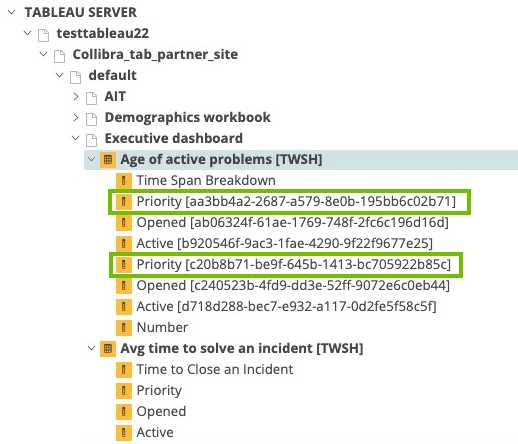
In the following example image, the names of the assets Priority, Opened and Active in the technical lineage have been appended with their UUIDs.
- UUIDs are not added to the names of the assets themselves; they are only added to the names of the data objects in the technical lineage.
- The UUID is always part of the full name of an asset, regardless of whether or not it is a duplicate.
How to resolve UUIDs in names in a technical lineage
To keep Collibra Data Lineage from adding UUIDs to the names of the data objects in a technical lineage, ensure that the names of all fields and columns in Tableau are unique.
Generally, Tableau doesn't allow you to create two fields or columns with the same name. However, hierarchy fields and non-hierarchy fields can have the same name. Duplication of names can also happen if:
- A Tableau worksheet is using two different data sources that have columns with the same name.
- You create a virtual connection that contains multiple data sources that have columns with the same name.
- There are multiple data sources in Tableau with the same name.
Sources tab page
The Sources tab page shows, for each Tableau data source and Tableau Worksheet, the transformation and calculation rules that the Collibra Data Lineage service analyzed and processed, and the results of the analysis. It also shows the TECHLIN VIEW query definitions, based on custom SQL queries.
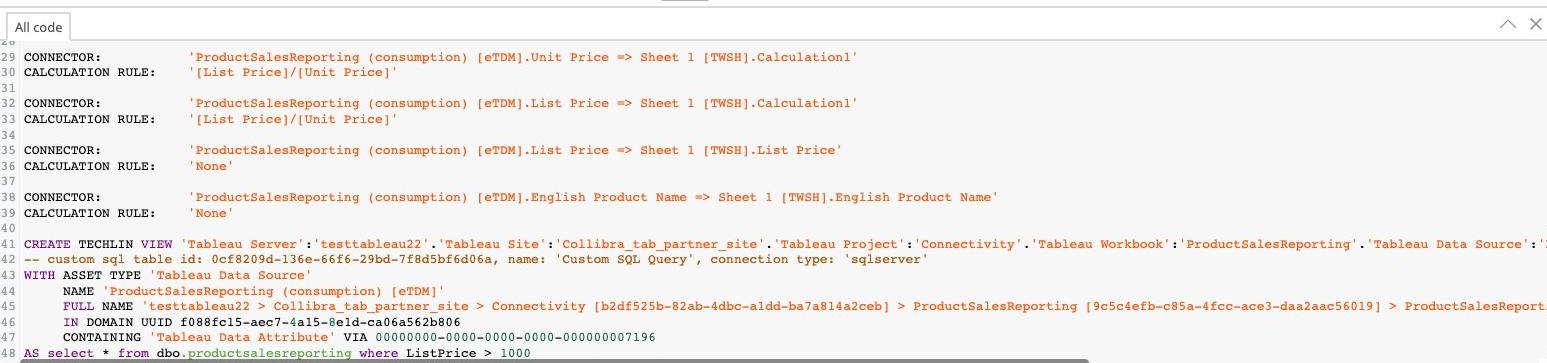
If a parameter is used in a Tableau worksheet, it is shown in the worksheet source code, for example:
PARAMETERS: 'parameter1'.
If a parameter is used in a calculation rule, it is also shown under the Tableau data source for data sources in the calculation rule, for example:
CALCULATION RULE: '[List price]/[parameter1]'
The success rate of the analysis indicates how complete the technical lineage is. There are a few limitations that prevent the Collibra Data Lineage service from processing all Tableau metadata.
Important The Collibra Data Lineage service might not be able to process all complex Tableau metadata. This means that the success rate of a Tableau ingestion might not be 100%.
Error codes
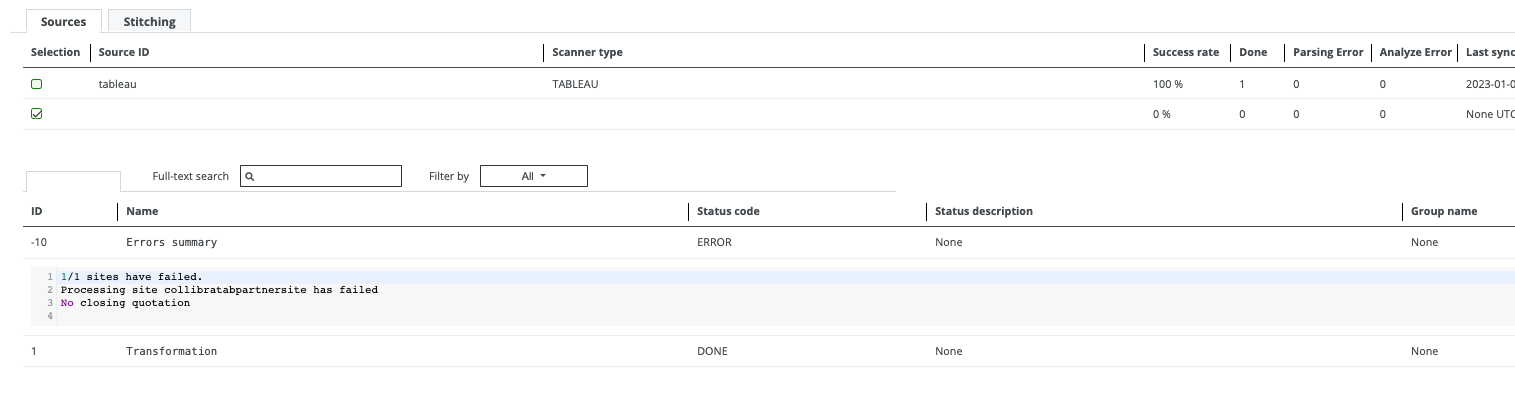
The Errors summary represents a summary of all errors per Tableau site. Currently, processing stops after the first error is identified during the processing of the site. In a future version of Collibra, processing will continue after the first error.
Warning codes
Warning codes indicate:
- Issues that might affect the technical lineage, but do not stop the processing.
- Issues that you can resolve.

| Element | Description |
|---|---|
| ID | The warning ID number. |
| Name |
The name of the warning. Possible values are:
|
| Status code |
The status label. The value is always WARNING. |
| Status description |
Identifies a grouping of warnings. Warnings of the same type (meaning they have the same group name and name) are grouped together in "parts" of up to 100 warnings. Example In this example, there are 250 Configuration > Invalid Collibra system names warnings, grouped into parts 1, 2 and 3: |
| Group name |
The type, or category, of warning. Possible values are:
|

The following table shows the complete set of warning codes, by group and name.
| Group name | Name | Description |
|---|---|---|
|
Missing content |
Empty name |
Raised during the processing of databases, tables, columns, worksheets and dashboards. Contains the following lines:
Indicates that the Example for a database:
{
  "data": {
    "databasesConnection": {
      "nodes": [
        {
          "id": "DATABASE_ID",
          "name": null,
           ...
Note The |
|
Missing content |
Parent database not found |
Raised during the processing of tables. Contains the line:
Indicates that the parent database for a table with Possible causes:
{
  "data": {
    "tablesConnection": {
      "nodes": [
        {
          "id": "TABLE_ID",
          "database": {
             "id": "DATABASE_ID"
          }
          ...
|
|
Missing content |
Parent project not found |
Raised during the processing of projects, workbooks and published data sources. Contains the following lines:
Indicates that the parent project of a project, workbook, or published data source was not found in the previously processed projects. Possible causes:
Example for a workbook:
{
  "workbooks": {
    "workbook": [
      {
        "project": {
           "id": "PROJECT_ID"
        },
        "id": "WORKBOOK_ID",
        ...
Example for a published datasource: To identify the
{
  "data": {
    "datasourcesConnection": {
      "nodes": [
        {
          "__typename": "PublishedDatasource",
          "id": "DATASOURCE_ID",
          "luid": "DATASOURCE_LUID"
          ...
Then, in the data returned by the REST API, reference the
{
  "datasources": {
    "datasource": [
      {
        "id": "DATASOURCE_LUID",
        "project": {
          "id": "PROJECT_ID",
          ...
Example for a project:
{
  "projects": {
    "project": [
      {
        "id": "PROJECT_ID",
        "parentProjectId": "PARENT_PROJECT_ID",
        ...
Project is not skipped in this case. The new parent project is created with name |
|
Missing content Mismatched ID |
Parent workbook not found |
Raised during processing of worksheets, dashboards, REST-only views and embedded data sources. Contains the following lines:
Indicates that the parent workbook of a worksheet, dashboard or view with a specified ID was not found in the previously processed workbooks. Possible causes:
Example for a worksheet:
{
  "data": {
    "sheetsConnection": {
      "nodes": [
        {
          "id": "WORKSHEET_ID",
          "workbook": {
            "luid": "WORKBOOK_ID"
          ...
Example for a dashboard:
{
  "data": {
    "dashboardsConnection": {
      "nodes": [
        {
          "id": "DASHBOARD_ID",
          "workbook": {
            "luid": "WORKBOOK_ID"
          ...
Example for an embedded data source:
{
  "data": {
    "dashboardsConnection": {
      "nodes": [
        {
          "id": "DASHBOARD_ID",
          "workbook": {
            "luid": "WORKBOOK_ID"
          ...
Note Use the |
|
MIssing content |
Worksheet not found |
Raised during the processing of dashboards. Contains the line: Indicates that a worksheet with a given ID was not found in the previously processed worksheets.
{
  "data": {
    "dashboardsConnection": {
      "nodes": [
        {
          "id": "DASHBOARD_ID",
          "sheets": [
            {
              "id": "WORKSHEET_ID"
            },
          ...
Possible cause: |
|
Mismatched ID |
REST datasource not found |
Raised during the processing of published data sources.
Contains the line:
Indicates that a data source with
{
  "data": {
    "datasourcesConnection": {
      "nodes": [
        {
          "__typename": "PublishedDatasource",
          "id": "DATASOURCE_ID",
          "luid": "DATASOURCE_LUID"
          ...
During processing, information returned by the metadata API and the REST API is combined. Collibra Data Lineage then looks to the This only applies to published data sources, as embedded data sources are assigned to workbooks, not projects. |
|
Missing content |
Datasource not found |
Raised during the processing of embedded data sources. Contains the line:
Indicates that an embedded data source with
{
  "data": {
    "datasourcesConnection": {
      "nodes": [
        {
          "__typename": "EmbeddedDatasource",
          "id": "EMBEDDED_DATASOURCE_ID",
          "upstreamDatasources": [
            {
              "id": "PUBLISHED_DATASOURCE_ID",
              ...
Possible cause: |
|
Missing content |
Field relation not found |
Raised during the processing of data source fields. Contains the lines:
Indicates that a field with a given
{
  "data": {
    "datasourcesConnection": {
      "nodes": [
        {
          "id": "DATASOURCE_ID",
          "fieldsConnection": {
            "nodes": [
              {
                "__typename": "DatasourceField",
                "remoteField": {
                  "id": "FIELD_ID"
                ...
Possible cause: An embedded datasource has a calculated field that is not mapped to any published data source field. This can occur:
|
|
Missing content |
Multiple datasources |
Raised during the processing of custom SQL queries. Contains the line: Indicates that a query with The warning is caused by the fact that there is no direct relation between the query and the data source. The algorithm tries to find the best data source, based on a comparison of the list of query columns and the data source columns. To verify this, do the following:
The data source found for this query (meaning |
|
MIssing content |
Datasource not found |
Raised during the processing of custom SQL queries. Contains the line:
Indicates that query with
{
  "data": {
    "tablesConnection": {
      "nodes": [
        {
          "__typename": "CustomSQLTable",
          "id": "QUERY_ID",
          "columnsConnection": {
            "nodes": [
              {
                "id": "COLUMN_ID",
                ...
|
|
Missing content |
Query parsing error |
Raised during the processing of custom SQL queries. Contains the line:
Indicates that there is an issue when deriving column names from a query for a custom SQL with
{
  "data": {
    "tablesConnection": {
      "nodes": [
        {
          "__typename": "CustomSQLTable",
          "id": "QUERY_ID",
          "query": "QUERY"
Custom SQL is still processed as |
|
Configuration |
Invalid Collibra system names |
Raised during the processing of the Contains the lines:
|
|
Configuration |
Invalid hostname mapping |
Raised during the processing of the Contains the line: |