Before you can use the lineage harvester, you need to download it and install it. You can download the lineage harvester from the Collibra Community downloads page.
Tip
- Install the lineage harvester close to your data source or on the same server.
- The lineage harvester uses port 443.
Prerequisites
- You have purchased the Power BI metadata connector and lineage feature.
- You have Collibra Data Intelligence Cloud 2020.11 or newer.
- You meet the minimum system requirements.
- You have added Firewall rules so that the lineage harvester can connect to:
- The host names of all databases in the lineage harvester configuration file.
- All Collibra Data Lineage service instances within your geographical location:
- 15.222.200.199 (techlin-aws-ca.collibra.com)
- 18.198.89.106 (techlin-aws-eu.collibra.com)
- 13.228.38.245 (techlin-aws-sg.collibra.com)
- 54.242.194.190 (techlin-aws-us.collibra.com)
- 51.105.241.132 (techlin-azure-eu.collibra.com)
- 20.102.44.39 (techlin-azure-us.collibra.com)
- 35.197.182.41 (techlin-gcp-au.collibra.com)
- 34.152.20.240 (techlin-gcp-ca.collibra.com)
- 35.205.146.124 (techlin-gcp-eu.collibra.com)
- 34.87.122.60 (techlin-gcp-sg.collibra.com)
- 35.234.130.150 (techlin-gcp-uk.collibra.com)
- 34.73.33.120 (techlin-gcp-us.collibra.com)
Note The lineage harvester connects to different instances based on your geographic location and cloud provider. If your location or cloud provider changes, the lineage harvester rescans all your data sources. You have to allow all Collibra Data Lineage service instances in your geographic location. In addition, we highly recommend that you always allow the techlin-aws-us instance as a backup, in case the lineage harvester cannot connect to other Collibra Data Lineage service instances.
Steps
- Download the newest lineage harvester.
- Unzip the archive. You can now access the lineage harvester folder. The lineage harvester folder name is unique per version.
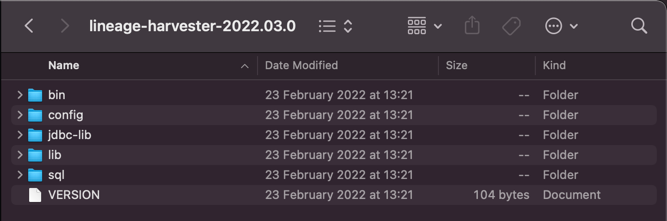
- Start the lineage harvester to create an empty lineage harvester configuration file by entering the following command:
- Windows:
.\bin\lineage-harvester.bat
- For other operating systems:
chmod +x bin/lineage-harvesterand thenbin/lineage-harvester
An empty configuration file is created in the config folder.
- Windows:
The lineage harvester is installed automatically. You can check the installation by running
./bin/lineage-harvester --help.What's next?
You can now prepare the lineage harvester configuration file.