Enable or disable workflows
You can enable or disable workflows from the workflow definitions table or from the individual workflow definition pages.
You must have the Sysadmin global role or a global role that has at least the Workflow Administration global permission to perform this action.
Enable or disable a workflow from the workflow definitions table
-
On the main menu, click
 , and then click
 Settings.
The Settings page opens. - In the tab pane, click Workflows → Definitions.
- At the end of the row, click
 or
or  to respectively enable or disable a workflow.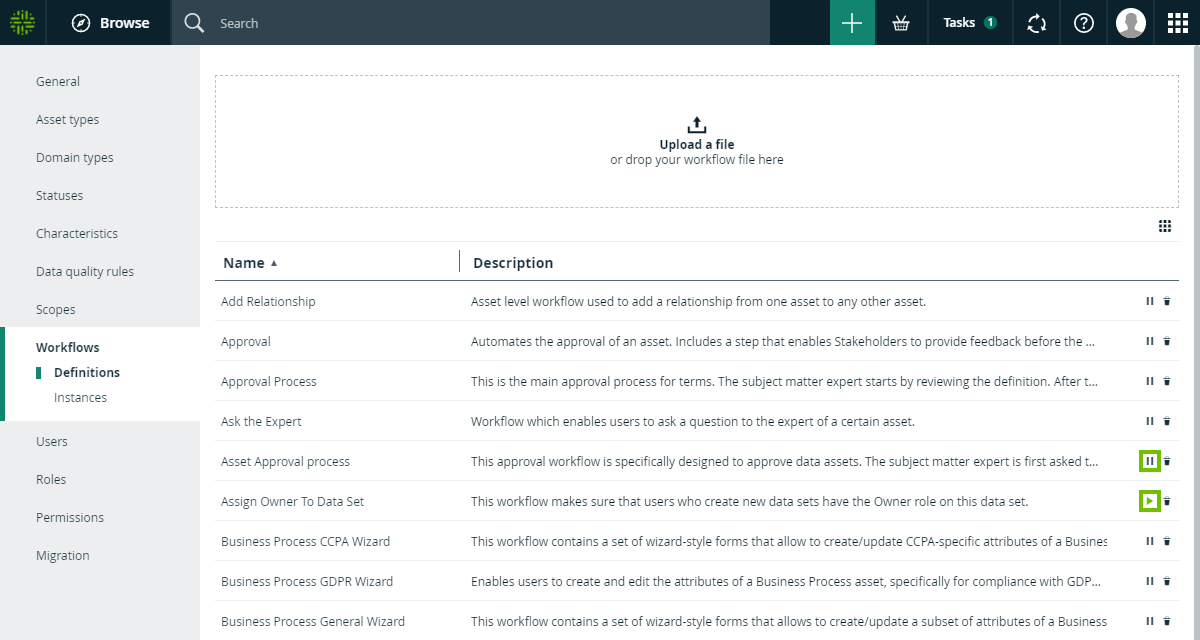
Enable or disable a workflow from the workflow definition page
-
On the main menu, click , and then click
Settings.
The Settings page opens. - In the tab pane, click Workflows → Definitions.
- Click the workflow you want to enable or disable.
- At the right of the title bar, click or to respectively enable or disable a workflow.
