Asset proposal
In this phase of the asset onboarding process, users progress through a series of workflow forms, to create a new asset and add characteristics to the asset.
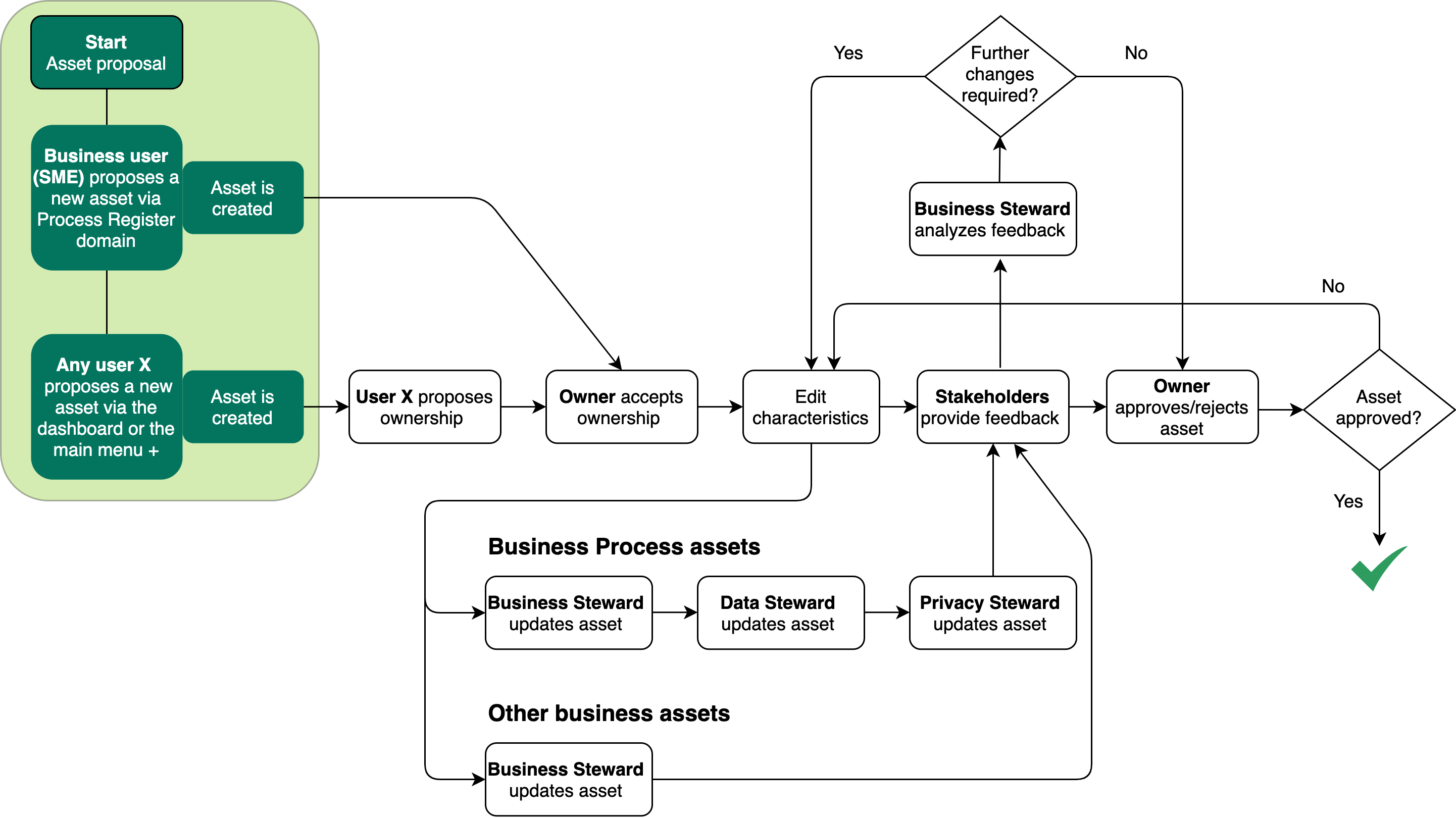
The following are a few examples of asset proposal workflows:
- New Business Process
- Risk Wizard
- Start PIA
- Remediation Action Wizard
Who can start these workflows?
By default, any user can start a workflow; however, you can edit the workflow configuration options to restrict the right to certain resource roles on the parent asset. For example, you can restrict the right to start a workflow to the Owner or Business Steward resource roles.
Some workflows for the creation of assessment assets, for example the Legitimate Interest Assessment workflow, can only be started by the Owner or the Business Steward for the related Business Process asset.
When a user starts an asset proposal workflow, that user is assigned the responsibility of Stakeholder for the newly created asset.
The default domains
When you start an asset proposal workflow, an asset is created in the default domain. You can specify a new default domain for such assets.
In the ownership proposal workflow, the user proposes a long-term domain for the asset. If ownership is accepted in the ownership acceptance workflow, the asset is moved to the proposed domain.
Note Collibra Data Intelligence Cloud can be configured to allow for multiple assets with identical names in a single domain. However, this is not allowed in the data privacy-specific default domains, where all asset names must be unique.
Canceling the asset proposal
Asset proposal can be canceled anytime before the asset has been approved; however, there is currently no automated cancellation procedure. The user can simply exit the relevant workflow. The Business Steward for the domain in which the newly created asset resides can then delete the asset.

Output and status evolution
The following table shows the status evolution, based on the possible conditions.
| Condition | The status of the asset... |
|---|---|
| A user starts an asset proposal workflow. | Is New. |
| The asset proposal workflow is complete. | Becomes Candidate. |
- Start a workflow to propose a new asset:
For asset types... Start the workflow via... - Business Process
- The Privacy Dashboard.
- The Invite to Business Process Register workflow.
- Data Set
- Technology Asset
- Data Sharing Agreement
- Risk
- Remediation Action
- Remediation Plan
- Compliance Self Assessment (CSA)
- The Data Protection Dashboard.
- Privacy Impact Assessment (PIA)
- Data Protection Impact Assessment (DPIA)
- Legitimate Interest Assessment (LIA)
- Complete the workflow forms. There are no mandatory fields in the workflow forms. The objective here is to create the asset. In the characteristics management phase of the onboarding process, the various stewards are called on to develop the asset in accordance with their areas of expertise.