Asset change management process summary
This section provides an example overview of the asset change management process.
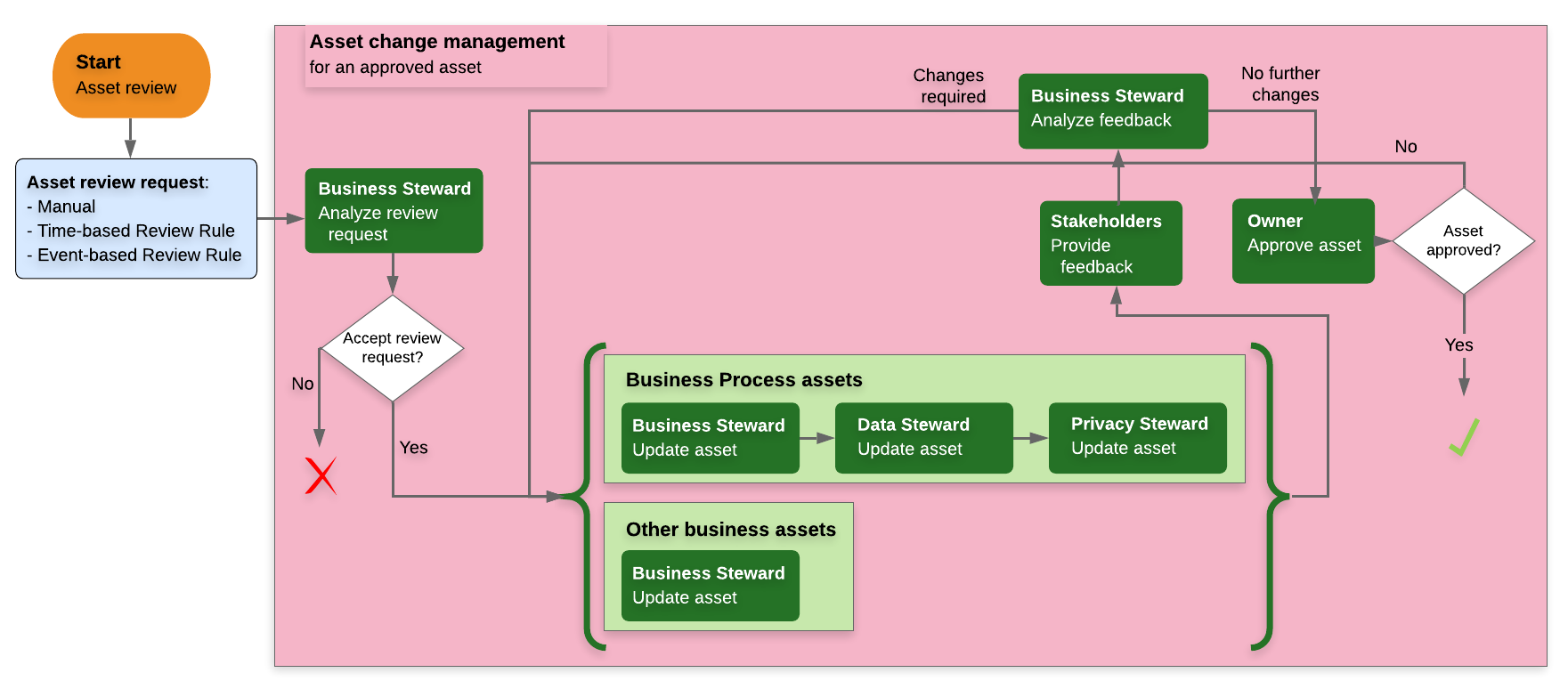
Note Assessment assets assess a situation at a specific moment in time. As such, their characteristics cannot be updated. If an assessment asset is deemed to be outdated, a new assessment asset is required. The new assessment asset is either an entirely new asset or a copy of a previous assessment asset. In the latter case, the asset inherits all of the characteristics from the previous assessment asset, which are then updated and eventually approved. At that point, the status of the previous assessment asset becomes Obsolete.
A review request is triggered
Let's suppose a review request is triggered for one of your Business Process assets. In this case:
- A Review Request asset is created.
The Review Request asset is related to the Business Process asset by the relation type [Asset] impacts / is impacted by [Issue] - The Review Request Handler workflow is triggered and the Business Steward and Owner for the Business Process:
- Are notified via email.
- Receive tasks in their respective My Tasks pages.
The Review Request asset is reviewed
The Business Steward or Owner reviews the details of the Review Request asset and decides whether or not changes to the Business Process asset are warranted.
| Condition | What's next? |
|---|---|
| Changes are warranted. |
|
| Changes are not warranted. |
|
