Review Rule assets
Business Stewards and Owners can configure review rules to trigger the review of assets of specified asset types. There are two types of review rules:
Note These two asset types are child asset types to the parent asset type Review Rule, which is a child of parent asset type Governance Asset.
When the configured conditions are met:
- A Review Request asset is automatically created.
- A task is assigned to the Business Steward, to prompt a review of the related asset.
Review Rule assets can be:
- Created by clicking
 in the main menu.
 - Configured by editing a packaged Review Rule asset.
- Selected during the asset onboarding process, in which case a relation is created between the newly proposed asset and the Review Rule asset.
As shown in the following image, the conditions upon which a review is triggered are stored as attributes in the respective asset.
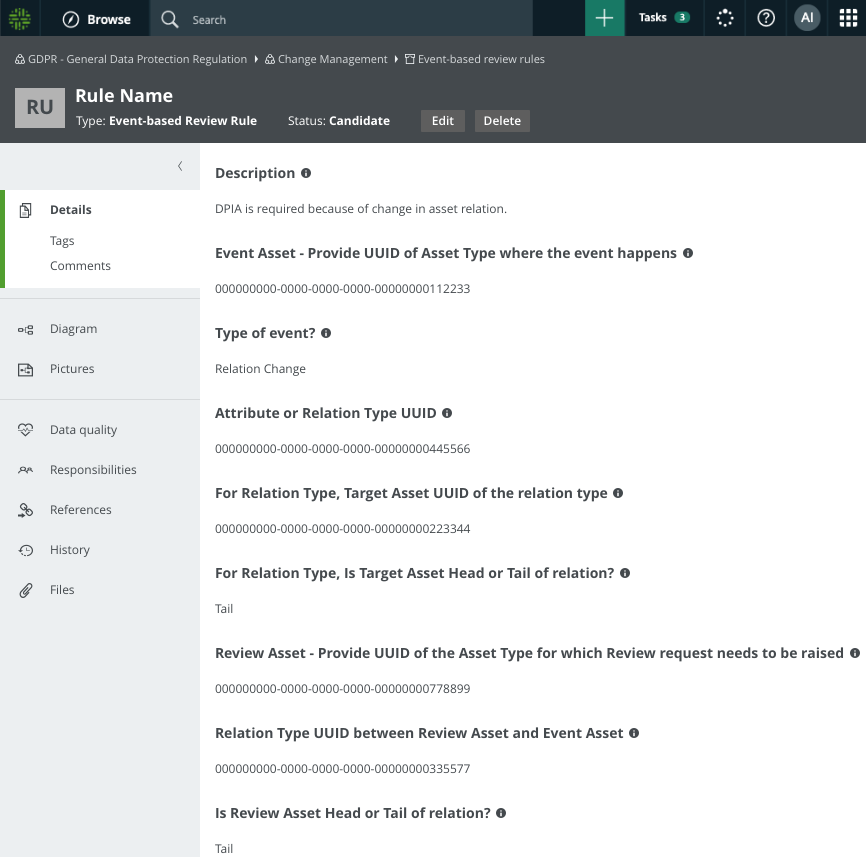
Packaged review rule assets
Collibra Data Privacy comes with packaged Time-based and Event-based Review Rule assets, which you can configure to suit your needs. They are stored in their respective domains, in the Asset Change Management subcommunity of the Data privacy building blocks community.