Schedule a schema refresh
You can refresh a schema manually, but you can also create a schedule to refresh a schema on a regular basis.
You can only create a refresh schedule for schemas of databases that are registered as a data source, not from CSV or Excel files.
Tip You can schedule the refresh during the data source registration process or afterwards via the Schema asset.
- To enable a scheduled schema refresh, you have to save the credentials in the configuration of a data source registration.
- The refresh schedule uses Quartz Cron expressions.
- If you use the schema for Tableau stitching, you have to restitch after each schema refresh to make sure that all relations are up-to-date.
Prerequisites
- You have registered a data source.
- You have a global role with the Catalog global permission, for example Catalog Author.
- You have a role with the following resource permissions on the community:
- Asset: add
- Attribute: add
- Domain: add
- Attachment: add
Note These permissions are always necessary when registering a data source.
Schedule the refresh during the data source registration process
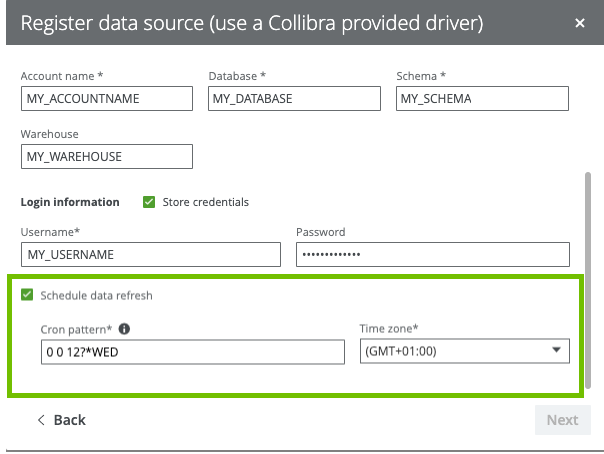
You can create the refresh schedule when you register a data source.
When you register a Snowflake data source in Collibra Data Intelligence Cloud, you can create a refresh schedule by selecting Schedule data refresh. You can then enter the CRON pattern 0 0 12?*WED to refresh every Wednesday at 12:00:00 PM.
Schedule the refresh via the Schema asset
You can create the refresh schedule when you refresh the schema of a registered data source via the Schema asset.
- Open the Schema asset.
-
On the main menu, click
 , and then click
 Catalog.
The Catalog Home opens. - In the submenu, click Data Dictionary and select the All Schemas view.
- Click the schema that you want to refresh.
Tip You can also use the Collibra Data Intelligence Cloud search function to look up your schema.
-
On the main menu, click
- In the view bar, to the right, click Actions → Refresh.
The Refresh Schema dialog box appears.Tip If Catalog experience is disabled, the More menu is shown instead of Actions.
- In the Login information section, check Store credentials and enter the username and password you use to access your data source. Your credentials are used to automatically connect to your data source and refresh the metadata in Collibra Data Intelligence Cloud.
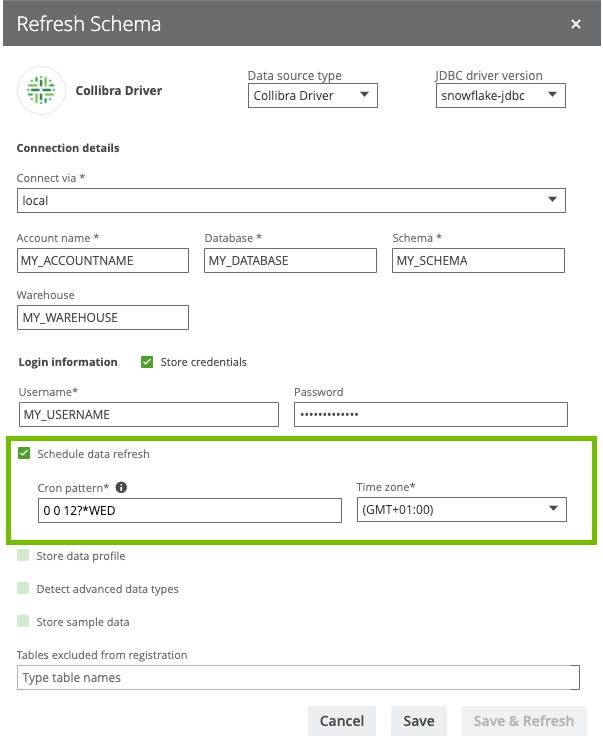
- Select Schedule data refresh.
- Enter the required information.
Option Description Cron pattern Schedule of the data refresh as a Quartz Cron pattern.
Warning If you create an invalid Cron pattern, Collibra Data Intelligence Cloud stops responding.
Time zone The time zone of the database. - Click Save.
When you refresh a schema of a registered data source, you can create a refresh schedule by selecting Schedule data refresh. You can then enter the CRON pattern 0 0 12?*WED to refresh every Wednesday at 12:00:00 PM.