Supported Power Query M functions
Power Query is a data transformation and preparation engine. It uses a scripting language called Power Query M formula language—also known as M—for all transformations.
M is considered a "mashup" language. The Power Query engine filters and combines data from supported data sources. The "mashed up" data is then expressed using M. M is used by Power BI. It is not relevant to other integrations in Collibra.
The Collibra Data Lineage service performs lexical and syntax analysis of M. With regard to syntax analysis, the Collibra Data Lineage service instances currently support the following functions.
For complete information on these functions, see the Microsoft documentation on accessing data functions.
-
Backend-accessing data functions that impact the lineage diagram
- AmazonRedshift.Database
- Csv.Document
- Databricks.Contents
- Excel.Workbook
- File.Contents
- GoogleBigQuery.Database
- Odbc.DataSource
- Odbc.Query
- Oracle.Database
- PostgreSQL.Database
- Snowflake.Database
- Sql.Database
- Sql.Databases
- Sybase.Database
- Web.Contents
-
Transformations that impact the lineage diagram
- Replacer.ReplaceText
- Replacer.ReplaceValue
- Table.AddColumn
- Table.AddIndexColumn
- Table.CombineAdditional information
If Collibra Data Lineage can’t determine the column names in a source file or database, but the PowerBI column names are known and there is only one source file or database, then corresponding database/file columns are created and technical lineage is preserved. However, if column names can’t be determined and there are multiple source files or databases, as is the case when the Table.Combine function is used, then it’s not possible to know which source column corresponds to the Power BI column. This results in an error and the technical lineage is broken.
To resolve this issue, a dummy column with the value “*” is created in the source table and the Power BI table:

This preserves the technical lineage at the table level: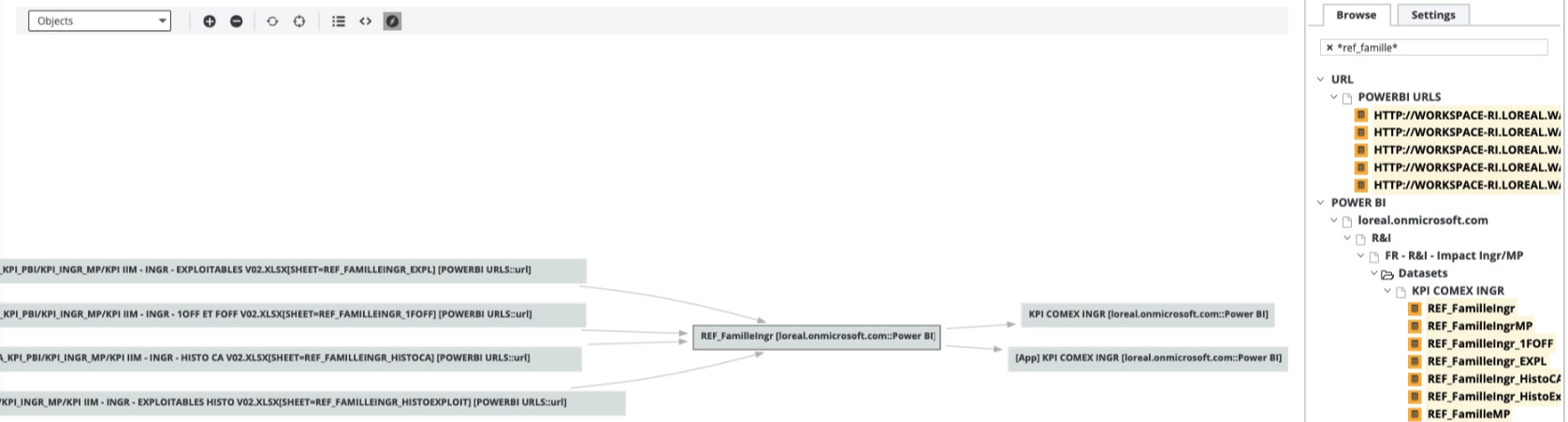
- Table.DuplicateColumn
- Table.ExpandTableColumn
- Table.FromRecords
- Table.FromRows
- Table.NestedJoin
- Table.PromoteHeaders
- Table.RemoveColumns
- Table.RenameColumns
- Table.ReorderColumns
- Table.ReplaceValue
- Table.SelectColumns
- Table.SplitColumn
- Table.Unpivot
- Table.UnpivotOtherColumns
- Table.TransformColumnNames
- Value.NativeQueryNote Query parameters are supported. Core parameters are not supported.
-
Transformations that don't impact the lineage diagram
- Table.AddKey
- Table.AlternateRows
- Table.Buffer
- Table.Distinct
- Table.ExpandListColumn
- Table.FillDown
- Table.FillUp
- Table.FindText
- Table.FirstN
- Table.InsertRows
- Table.IsEmpty
- Table.LastN
- Table.MaxN
- Table.MinN
- Table.Range
- Table.RemoveFirstN
- Table.RemoveLastN
- Table.RemoveMatchingRows
- Table.RemoveRows
- Table.RemoveRowsWithErrors
- Table.Repeat
- Table.ReplaceErrorValues
- Table.ReplaceKeys
- Table.ReplaceMatchingRows
- Table.ReplaceRows
- Table.ReverseRows
- Table.SelectRows
- Table.SelectRowsWithErrors
- Table.Skip
- Table.Sort
- Table.TransformColumns
- TableTransformColumnTypes
- Table.First
- Table.Last
- Table.Max
- Table.Min
- Table.SingleRow
-
Unsupported transformations
Note Using unsupported transformations can cause parsing errors.
- Table.FromRecords
- SharePoint.Tables
- Folder.Files
- PowerBIRESTAPI.Navigation
- DB2.Database
- Table.ExpandRecordColumn
- Table.Group