Feedback on Automatic Data Classification
When Collibra predicts data classes for a column, the information is visible in the Data Classification column in the Table and Column asset pages. 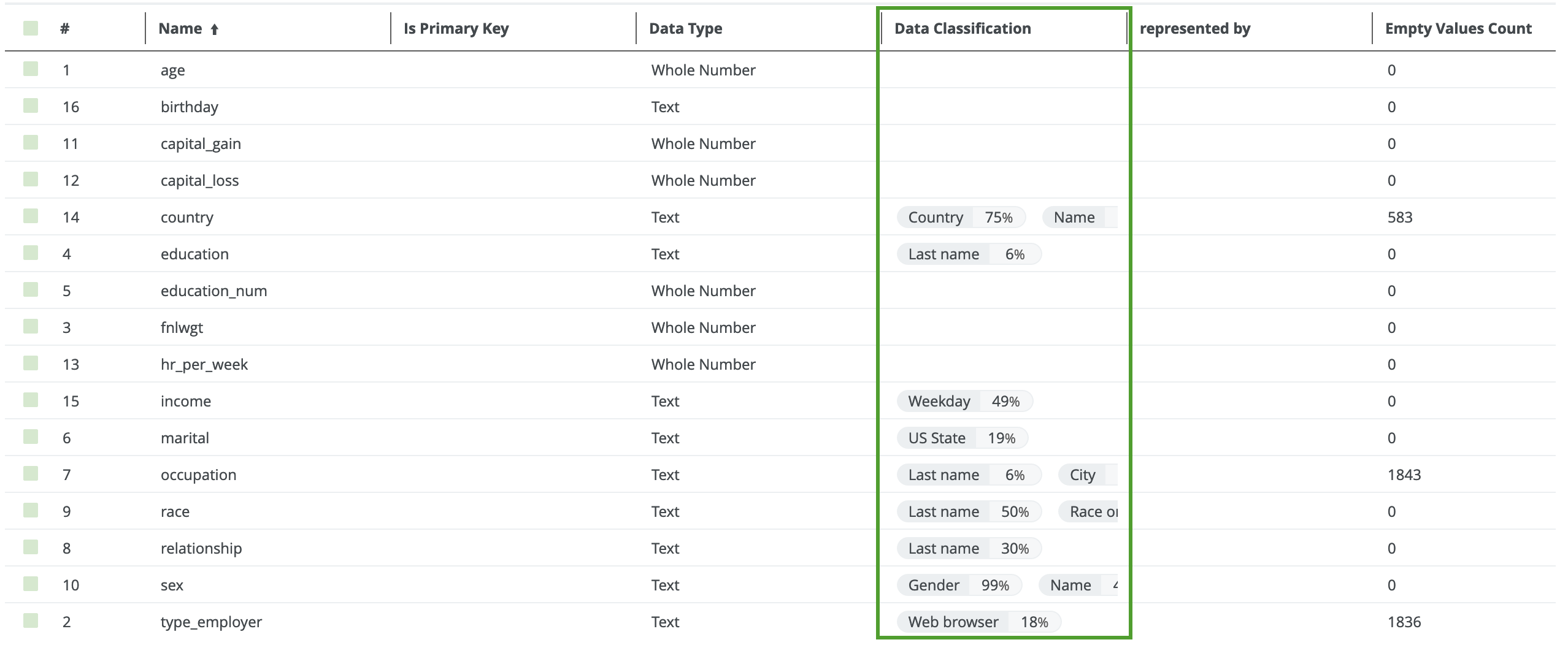
- If no data classes are suggested for a column, Automatic Data Classification could not predict the data class.
- Sometimes multiple data classes can be suggested.
- The percentage next to the data class indicates the confidence level of the prediction.
You can send feedback by accepting or rejecting the data classes, or by adding a user-defined class.
To improve future predictions of the Cloud Data Classification Platform, it is really important to send feedback.
Sending feedback
Sending feedback is the act of accepting or rejecting the data classes that are predicted.
- Reject data class: The data class is removed from the column.
The Data Classification Platform classification model no longer uses the sample data. - Accept data class: The data class is added to the column.
The sample data is permanently added to the Cloud Data Classification Platform classification model to improve future data class predictions.
To accept or reject a data class, hover over the data class and click the appropriate icon.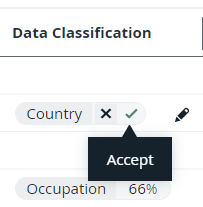
For the Cloud Data Classification Platform, sending feedback is important. Without the feedback, the Cloud Data Classification Platform cannot retrain. Accepting a data class is more valuable than rejecting.
Creating user-defined classes
When columns cannot be classified, you can create your own data classes.
- Avoid duplications. Always check the list of proposed classes before creating a new data class.
- Avoid vague data classes.
- Avoid mixed data classes and accept the best applicable one.
The Cloud Data Classification Platform uses this new information to retrain the platform and improve the predictions in the future.