Create a data protection standard
Data protection standards create a layer of protection by masking data wherever they appear. Create a data protection standard to get started using Collibra Protect.
Steps
- In Collibra Protect, go to the Data Protection Standards tab.
- Click the green Create a Data Protection Standard button.
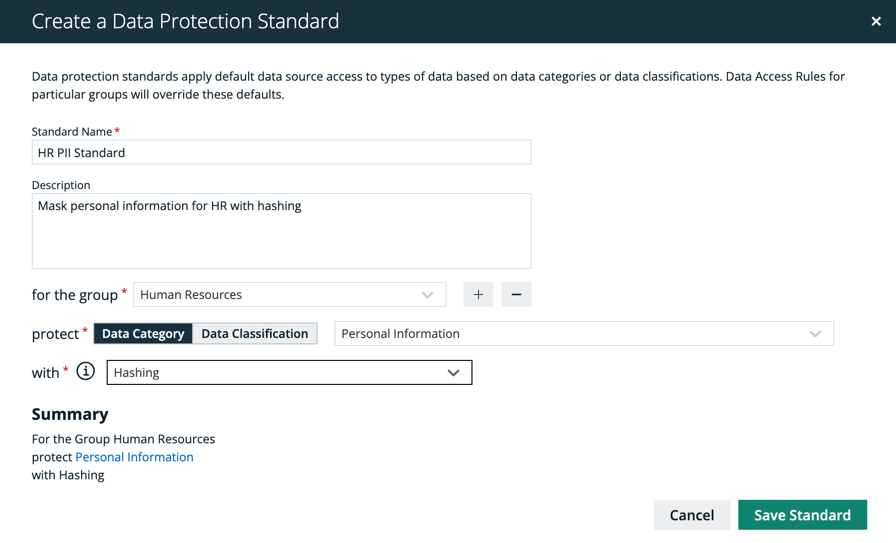
The Create Data Protection Standard dialog box appears. - Enter the required information. It is important to note that when selecting assets, user permissions are defined in Collibra. If an asset is not visible for you, it will not appear as an option in the drop down menus.
Field Description Standard name Name of the standard being created. Description (optional)
Description of the standard.
Group Group(s) for which the standard is created. Data Category / Data Classification A data category or data classification to apply the protection on. Masking Masking option for the standard.
Note Click to learn more about the masking options for standards.Note Click the plus sign to add more to each field where applicable. For example, after selecting a group, click
 to add another group into the standard, and click
  to delete a selected group. When entering the required information, you can view the selections you made in the Summary section.
 - Click the green Save Standard button. The saved data protection standard appears in the standards table.