Tableau general troubleshooting
The following messages and issues can appear when you run the lineage harvester, view a technical lineage or upload the new relations to Data Catalog via Collibra Data Lineage.
|
Problem |
Solution | ||||||
|---|---|---|---|---|---|---|---|
|
You get connectivity issues with a 401001 error code. Unfortunately, 401001 is a very general error code, returned by a Tableau API, that can refer to many issues, including but not limited to the following:
|
Ensure that the user/token that you intend to use to ingest Tableau assets can authenticate to your Tableau APIs via the command line, from the server on which you intend to install and run the lineage harvester. You can test your ability to authenticate by making the signin API call, using a cURL command. You can also try checking the login request that the lineage harvester is sending to the Tableau server. For complete information and guidance on how to test your ability to connect to the Tableau server and authenticate, see Test connectivity with the Tableau server. |
||||||
|
The lineage harvester does not connect to hosts using a proxy server. |
Technical lineage does not support proxy server authentication, but you can connect to a proxy server. For complete details, including the necessary commands, see Connecting to a proxy server. |
||||||
| You get a TCP timeout error. |
To avoid TCP timeout errors, try configuring the Linux TCP keepalive setting:
|
||||||
| The designation "UNDEFINED" is shown in the technical lineage. | If you are using a Tableau <source ID> configuration file, ensure that you have specified a value for the relevant collibraSystemName property. |
||||||
|
You get the following error message or a similar certificate error:
|
This message appears when the proxy server sends an unexpected certificate to the lineage harvester or when the default Java truststore is empty or outdated. First update Java and rerun the lineage harvester to see if that resolves the issue. If the same error message is shown, try the following: On Windows
Note In the following example commands, we refer to the techlin-gcp-us server. You should refer to the correct CollibraData Lineage server in the geographic location of your Collibra Data Intelligence Cloud environment.
On Linux
Note
|
||||||
| You get an external system ID mapping error |
The error message looks similar to the following:
PROCESSING ERROR: "syncer.domain.DgcSyncError: java.lang.Exception: Unexpected DGC job status: ERROR
Error message: {
"type" : "MESSAGE",
"message" : "A mapping for the external system id 'd0f3a21a2324fa117112409bdea6ade7' and resource '59cf9293-fca1-4f78-99ab-31c150a23626' already exists."
}
Caused by: java.lang.Exception: Unexpected DGC job status: ERROR
Error message: {
"type" : "MESSAGE",
"message" : "A mapping for the external system id 'd0f3a21a2324fa117112409bdea6ade7' and resource '59cf9293-fca1-4f78-99ab-31c150a23626' already exists."
}"
Please create a support ticket and provide your answers to the following two questions.
Note Refer to the example error message above and replace the IDs of the external system and the mapped resource with those in the error message you received.
|
||||||
|
If you are using Collibra Data Intelligence Cloud 2021.11 or older, you have to add all Tableau attributes in the operating model to a scope and create a scoped assignment before you ingest Tableau via the lineage harvester. |
Show me how to add attributes to a scope and create a scoped assignment
Prerequisites
Steps
Warning After you've created the scoped assignment, do not change the assignment itself. The sole purpose of the scoped assignment is to ingest read-only attributes for which you normally need a system user.
Note If you ingest Tableau metadata in a Collibra version 2021.09 or older, you must also manually create two new relation types and add them to the Tableau <source ID> configuration file.
|
||||||
|
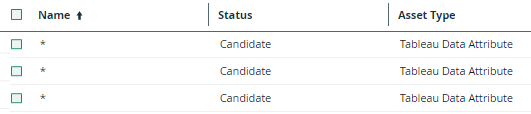
In Collibra, the name of a Tableau Data Attribute name is an asterisk (*).
|
If you ingest a Tableau dataset that doesn't have any attributes, an asterisk (*) is shown as the Tableau Data Attribute asset name in Collibra. |
 , then
 Settings