The metadata harvesting process
Collibra uses Power BI REST APIs to harvest Power BI metadata.
To enable the lineage harvester to access metadata in Power BI workspaces, you must add the workspaces to a Power BI Premium dedicated capacity and have the correct configurations in Microsoft Azure.
Note There are some limitations to the metadata harvesting process. Make sure you understand these limitations before you start the harvesting process.
The content in this topic differs according to the authentication method.
Overview of the metadata harvesting process with username / password authentication

|
Step |
Description |
|---|---|
|
1 |
The lineage harvester uses the username, password and application ID to access the Power BI APIs. These APIs retrieve basic Power BI metadata, for example metadata in the Power BI tenant or server and reports. |
|
2 |
The lineage harvester uses Power BI API calls to retrieve more specific metadata, for example Power BI columns and lineage. Important The following are prerequisites for this step:
|
Note Make sure that all necessary dedicated capacities are running and accessible to the lineage harvester. If not, creating assets for Power BI data sets and your technical lineage may fail.
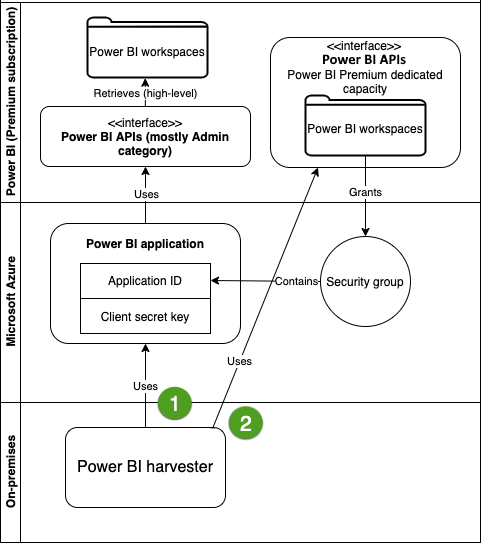
Overview of the metadata harvesting process with service principal authentication
|
Step |
Description |
|---|---|
|
1 |
The lineage harvester uses the application ID and the client secret key of the Azure Active Directory application to access the Power BI APIs. These APIs retrieve basic Power BI metadata, for example metadata in the Power BI tenant or server and reports. |
|
2 |
The lineage harvester uses Power BI API calls to retrieve more specific metadata, for example Power BI columns and lineage. Important The following are prerequisites for this step:
|
Note Make sure that all necessary dedicated capacities are running and accessible to the lineage harvester. If not, creating assets for Power BI data sets and your technical lineage may fail.