Technical lineage Browse tab pane

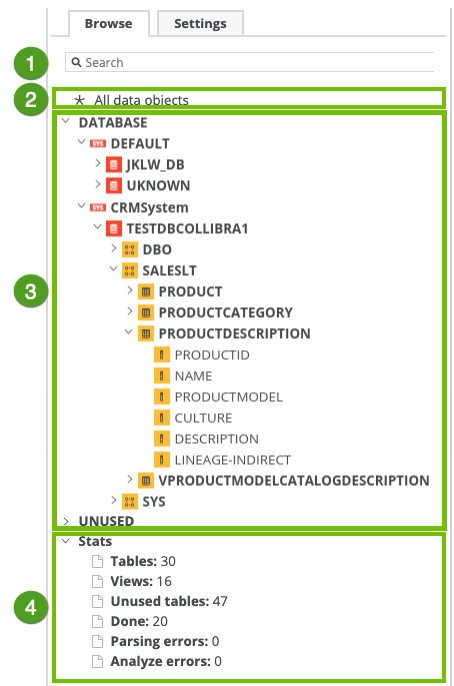
The Browse tab pane allows you to navigate to and search for a specific data object within the technical lineage tree.
No

Name Description

Search
  • A search field that you can use to find a specific data object.
  • All data objects
  • A link to the complete technical lineage, showing all data objects in your data sources.
  • Navigation tree

    A navigation tree in which you can search for specific data objects and visualize them in your technical lineage. The data objects are grouped by node type and have the following structure: system (if applicable) > database > schema > table > column.

    Note The list of data objects contains all systems, databases, schemas, tables and columns that were collected from the data sources by the lineage harvester. If available, it also shows the technical lineage of BI sources, for example Power BI and Looker. In that case, the structure follows the existing structure in the BI source metadata.

    Stats
  • Statistics that show which information is or is not visualized in the technical lineage. The statistics contain the following data:
    • Tables: the amount of tables that are shown in the technical lineage.
    • Views: the amount of views that are shown in the technical lineage.
    • Unused tables: the amount of tables in your data source that are not shown in the technical lineage.
      Tip This metric is hidden when there are no unused tables.
    • Unused views: the amount of views in your data source that are not shown in the technical lineage.
      Tip This metric is hidden when there are no unused views.
    • Done: the amount of queries that were processed successfully.
    • Parsing errors: the amount of queries with invalid or unidentified syntax.
    • Analyze errors: the amount of columns that are not linked to a table.