Edit an approved asset as a Business Steward
There are three means by which to trigger the review of an approved asset. In each case:
- A Review Request asset is created.
- A task is assigned to the Business Steward of the relevant asset.
- The Review Request Handler workflow is started.
The Business Steward reviews the details of the request and accepts or rejects the Review Request asset.
But what if a Business Steward wants to edit an approved asset? The Update asset directly workflow enables Business Stewards to start the asset change management process, without creating Review Request assets, assigning tasks to themselves to approve, or triggering the Review Request Handler workflow.
Starting the Update asset directly workflow
Any Business Steward can start this workflow by clicking Start update workflow on the asset page of the relevant approved asset.
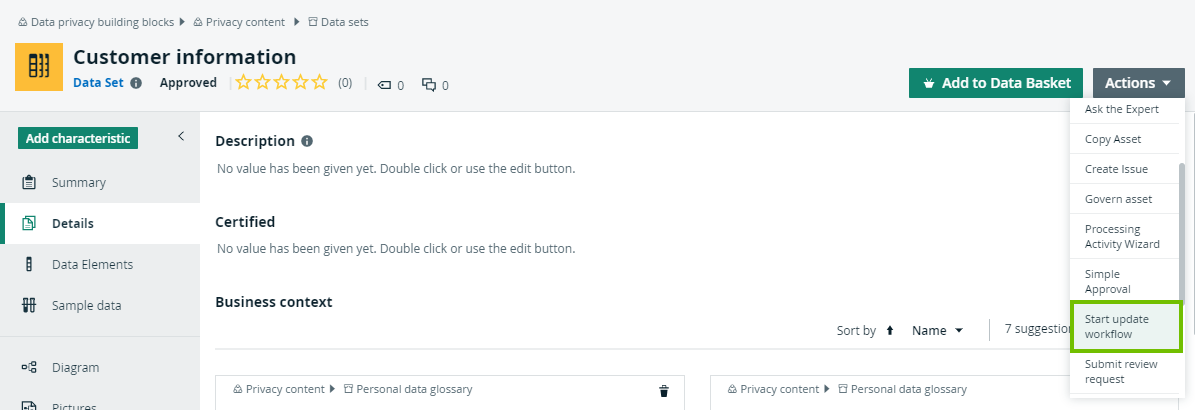
This triggers the Characteristics management phase of the asset change management process.
- For Business Process assets, the Business Steward, Data Steward and Privacy Steward are prompted, in succession, to edit the asset in accordance with each users area of expertise.
- For other business assets, such as Risk and Technology assets, only the Business Steward is prompted to edit the asset.
Applicable asset types
Applicable asset types are the following:
- Business Process
- Data Set
- Technology Asset
- Data Sharing Agreement
- Risk
- Remediation Plan
- Remediation Action
- Privacy Impact Assessment (PIA)
- Data Protection Impact Assessment (DPIA)
- Legitimate Interest Assessment (LIA)
- Compliance Self Assessment (CSA)
Note Remember that assessment assets cannot be edited. If an assessment asset is deemed to be outdated or inaccurate, a new assessment asset is required. If a Business Steward clicks Start update workflow on the asset page of an assessment asset, the respective workflow to create a new assessment asset will start.