Resolve a schema refresh conflict when tables are added and deleted at the same time
When you refresh a schema, the ingestion process detects conflicts if the data source has the following changes at the same time:
- A table has been removed.
- A table has been added.
In the following example, the original schema Postgre contains the table Employee and the table CompanyList. A new table Schools has been added to the schema and the table CompanyList has been deleted. After refreshing the schema, refresh conflicts appear for the added table and the deleted table, as shown in the following image: 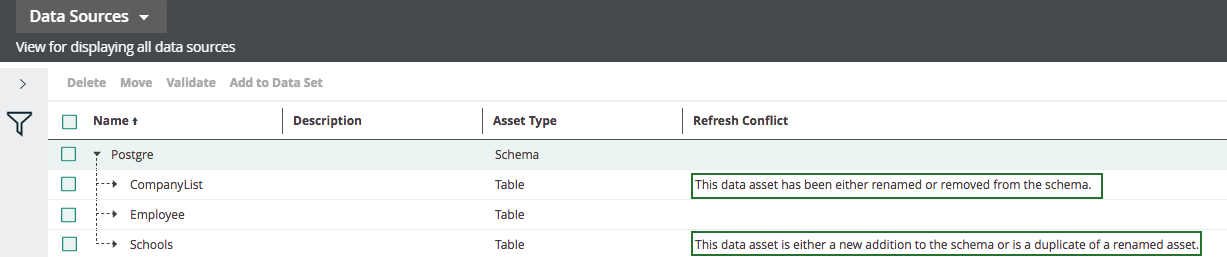
You have to manually resolve the conflicts before you continue. It is not possible to refresh a schema when there are conflicts.
Note You have to add the Refresh Conflict column to the table if it is not there already.
Steps
-
In the main menu, click
 , then
  Catalog.
The Catalog Home opens.
The Catalog Home appears. - In the submenu, click Data Sources.
- Select the deleted table and all its contained columns, in this example, CompanyList.
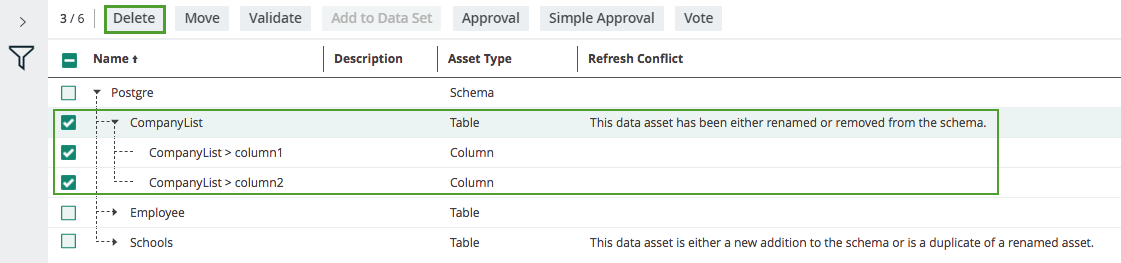
- Above the table, click Delete.
- Click Yes to confirm the deletion.
- Click the name of the added table, in this example, Schools.
The table asset page appears. - In the Refresh Conflictsection, hover over the refresh conflict message and click
 on the right-hand side.
- Click Yes to confirm the deletion of the Refresh Conflict attribute.
What's next?
You can now safely refresh the schema with the data source.