Register content and Add Database pages
When you register a data source via Edge, you first register content and then add a database to the JDBC connection. You perform these steps on two different pages:
Register content page
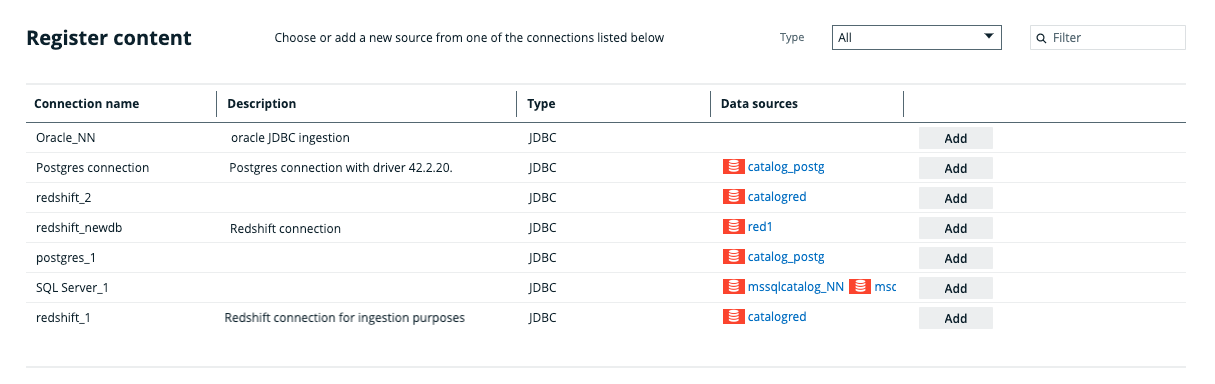
The Register content page shows the data sources that are connected to Data Catalog via Edge. From this page, you can register the data sources to create assets that represent the content of these data sources.
| Column | Description |
|---|---|
| Connection name | The name of the connection to the data source. |
| Description | The description of the connection to the data source. |
| Type | The type of connection. For example, JDBC |
|
Data sources |
The name of the database that is already registered in Data Catalog. If the column is empty, the connection doesn't have a database yet. Tip If you click the name of the asset, you are automatically redirected to the Database asset page. If the name of the asset is grayed out, you don't have permission to go to the asset's page. |
|
<Action button> |
An Add button. Click this button to add a connection to a database and register the data source. All added databases are listed in the data sources column. |
Add Database page
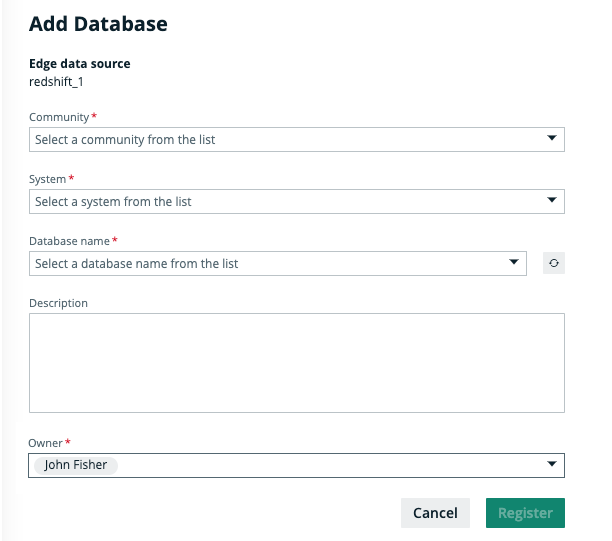
On the Add Database page you can select a community, a System asset, a database from your data source that you want to ingest and the owner of the data.
| Field | Description |
|---|---|
| Community | The name of the parent community in which the assets will be created. |
|
System |
The name of the System asset. After you registered the database, a relation of the type Technology Asset groups / is grouped by technology Asset is created between the System asset and the Database asset. |
|
Database name |
The name of the database in the data source to which you created a JDBC connection. The drop-down menu automatically shows which databases exist in your data source. You can refresh the list by clicking The name will also be the name of the Database asset that is created as result of registering a data source via Edge. |
| Description |
A description of the data source. |
|
Owner |
The owner of the data in the created community. By default, the current user is selected. |
 next to the drop-down menu.