Push down sampling
Push down sampling means that the task of creating the data sample is delegated to the data source itself. This can be done using dynamic SQL query, if the data source supports data sampling.
The data source creates the sample from randomly selected data and transfers it to the Jobserver
Push down sampling drastically increases the performance of sampling.
Enabling push down sampling
- Via Jobserver
- Via Edge
Push down sampling is not used by default. In order to use push down sampling, do the following:
|
Step |
When |
Description |
|---|---|---|
| 1 | Manage the driver |
Add the pushDownSampling connection property. |
| 2 | Register your data source |
Follow the usual steps to register a data source, but include the following options:
|
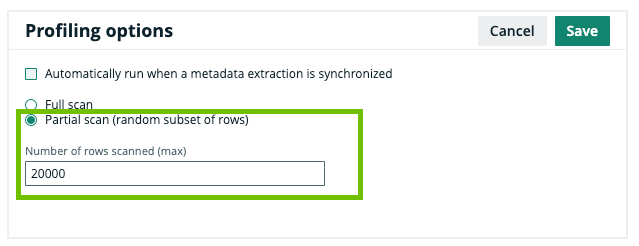
Push down sampling is an option you can select when profiling and classifying a registered data source. To enable push down sampling, do the following:
|
Step |
When |
Description |
|---|---|---|
| 1 | Register a data source via Edge. |
Follow the usual steps to register a data source via Edge. |
| 2 | Profile and classify synchronized metadata. |
On the Profiling and Classification tab of a Database asset's Configuration tab page, do the following:
|
Supported data sources
Not all data sources support push down sampling. Currently, you can use push down sampling for the following data sources:
- Amazon Redshift
- Databricks
- Exasol
- Google BigQuery
- Oracle
- PostgreSQL
- Snowflake
- SQL server
- Teradata
Push down sampling currently is a beta feature for the following data source:
- Apache Hive