Automatic data classification via Edge
Edge classifies your data when you register a data source using Edge, synchronize one or more schemas and trigger the profiling and classification job. Edge profiles and classifies the data on the Edge site itself and only sends the profiling results and classification suggestions to Collibra Data Intelligence Cloud. You can accept or reject the predicted data class of each column or add your own new classes. Automatic data classification can predict multiple data classes for a column. In this case, if the prediction is accurate, you can accept multiple data classes for the column.
Limitations
- Automatic data classification via Edge is only available for customers using Collibra Data Intelligence Cloud.
- Out of the box, automatic data classification can predict a limited set of data classes. You can create user-defined data classes, but when you synchronize the data source in Data Catalog, the data classes will be removed.
- Currently, data classification on Edge does not retrain the classification model to improve future classification predictions.
- English is the only supported language, but automatic data classification can run on data in other languages as well.
- Automatic data classification needs profiling data to be able to predict the data classes. Data classification is performed automatically after the profiling process on an Edge site. That means that you can only classify columns of data sources registered in Data Catalog via an Edge site that has the JDBC profiling capability.
Automatic data classification flow
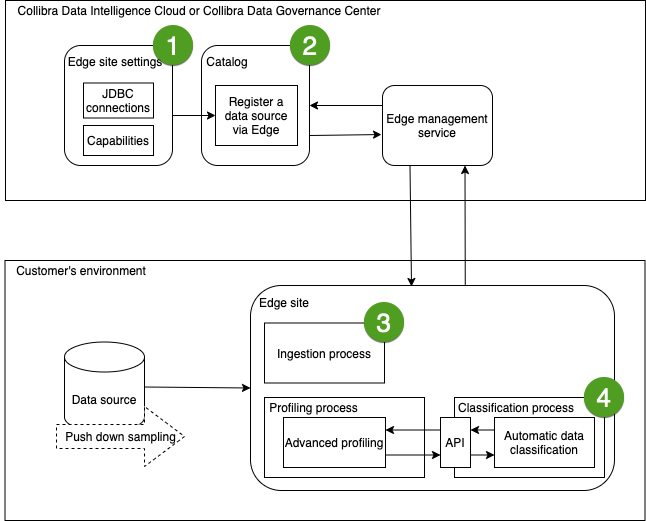
In the following schema, you can see the different steps of an automatic data classification flow via Edge.
|
Step |
Description |
|---|---|

|
You create an Edge site with a JDBC connection, a JDBC ingestion capability and a JDBC profiling capability. |
|
|
|

|
On the Configuration tab page of the registered database's asset page, you synchronize one or more schemas. Data Catalog then triggers Edge to initiate the synchronization job. |

|
After the synchronization job is finished, you open the Profiling and classification tab and click Run profiling and classification. Data Catalog then triggers Edge to initiate the profiling and classification job. Edge sends the profiled data and the data class suggestions to Collibra Data Intelligence Cloud. Sensitive data is automatically anonymized before the metadata is sent to Collibra. |

Tip You can also automatically trigger the profiling and classification job after synchronizing a schema.