Compliance Self Assessment
The Data Protection Officer is responsible for monitoring the organization’s compliance with GDPR. The compliance self assessment helps the Data Protection Officer with this responsibility.
When starting the Compliance Self Assessment workflow, the Business Steward or Data Protection Officer selects the Party asset to which the assessment applies. Later in the workflow, Remediation Plan assets and Remediation Action assets can also be linked to the assessment.
Starting the workflow
To start this workflow, click Compliance Self Assessment (CSA), on the Data Protection Dashboard.
Relevant resource roles
| Action | Relevant role |
|---|---|
|
Start the workflow. |
Any user |
| Carry out the assessment by responding to the statements of compliance in the applicable checklists. | Business Steward |
| Act as a mandatory reviewer of the Compliance Self Assessment asset. | Privacy Steward |
|
Act as an optional reviewer of the Compliance Self Assessment asset. |
Owner, Data Protection Officer |
| Approve or reject the asset. | Owner |
Compliance checklists and scoring
A compliance score is derived from the Business Steward's responses to a list of predefined statements of preparedness, developed from a template provided by the Information Commissioner's Office (ICO). The following is one such statement: "Your business has conducted an information audit to map data flows."
The statements are grouped into the following seven checklists:
- Controller's checklist
- Processor's checklist
- Information security checklist
- Direct marketing checklist
- Records management checklist
- Data sharing and subject access checklist
- CCTV checklist
For each statement, there are four possible responses. The Business Steward can also choose to not respond to a statement. The following table shows the scoring impact of each scenario:
| Response | Scoring value |
|---|---|
|
|
100% |
|
|
50% |
|
|
0% |
|
Not applicable. |
Statements marked as "Not applicable" are not taken into account for the scoring. |
|
(No response) |
0% |
- This workflow is designed to highlight important compliance considerations and the scoring is provided to help you track your progress regarding these considerations. No real judgment, legal or otherwise, can be made based on the score.
- Most of the statements in the wizard are followed by a free-text field prompting you to justify your response to the previous statement. The text is recorded as an attribute on the Compliance Self Assessment asset page. The text you enter has no bearing on your score.
- Although each statement in a checklist is an important consideration in your compliance efforts, the workflow will not be blocked if responses have not been provided for every statement. You can submit the Compliance Self Assessment asset for approval at any time. Ultimately, it is up to the Data Protection Officer to review the asset and the Owner to approve or reject the asset, based on the information provided via the checklists.
Based on the Business Steward's responses:
- A score is calculated per checklist.
- A total score is calculated.
Score per checklist
The score for each checklist is an average of the scores, per statement responded to, in a given checklist. If there are n statements per checklist and m statements are marked as "Not applicable", the score is calculated as follows:

- 1 statement is marked "Successfully implemented".
- 1 statement is marked "Partially implemented or planned".
- 3 statements are marked "Not applicable".
- For 5 statements, no response is provided.
The score for the checklist is the following: (1*100)+(1*50)+(3*0)+(5*0) / (10 statements - 3 marked 'Not applicable") = 150 / 7 = 21.43%
Total score
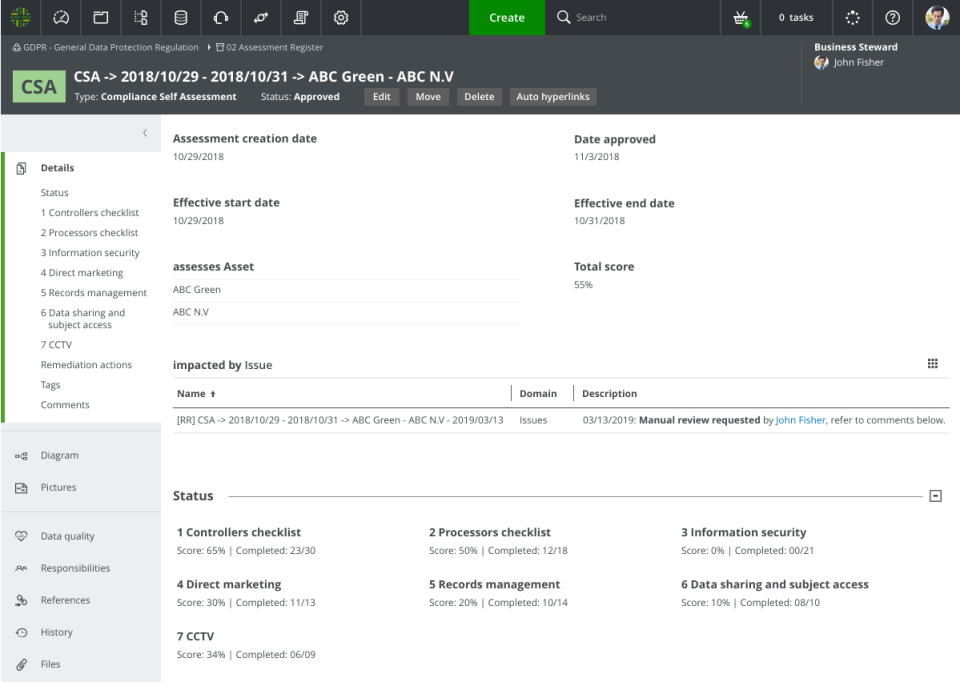
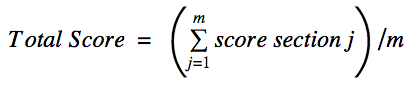
The total score is an average of the scores for each checklist. The total score is stored as an attribute on the Compliance Self Assessment asset.
If there are m sections, the total score is calculated as follows:
Naming convention of the Compliance Self Assessment asset
The name of the Compliance Self Assessment asset is a concatenation of the following:
- CSA
- " -> "
- Start date, formatted as: “yyyy/mm/dd”
- " - "
- End date, formatted as: “yyyy/mm/dd”
- " -> "
- List of the Parties in scope, separated by " - "
For example, CSA -> 2018/10/29 - 2018/10/31 -> ABC Green - ABC N.V..
Navigating the Compliance Self Assessment workflow
A central component of this workflow is the compliance self assessment menu.
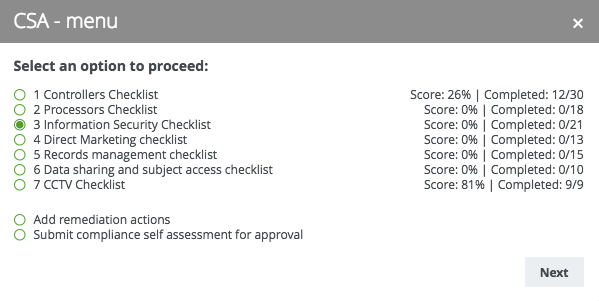
The statements specific to each checklist are grouped by subject area, for example "Individuals' rights" and "Accountability and Governance", and presented in a progression of workflow forms. The compliance self assessment menu:
- Is shown after the user has progressed through all of the forms of any given checklist.
- Helps you to navigate through the various sections of the workflow.
- Shows your current score for each section, how many questions you've answered and the total number of questions in the section.
- Allows you to:
- Add Remediation Action and Remediation Plan assets, and free-text justification for doing so.
The Compliance Self Assessment asset and any added Remediation Action and Remediation Plan assets are related via the relation type [Assessment] resulting remediations / remediates [Remediation Plan]. The justification text is shown on the Compliance Self Assessment asset page. - Submit the Compliance Self Assessment asset for approval.
- Add Remediation Action and Remediation Plan assets, and free-text justification for doing so.
Compliance Self Assessment asset page