Power BI Report Server operating model
The harvester collects Power BI Report Server metadata and sends it to the Collibra Data Lineage server. Collibra processes the metadata and creates new Power BI assets and relations in Data Catalog. You can see them on the asset page overview or visualize them in a diagram or in a technical lineage.
- The assets have the same names as their counterparts in Power BI Report Server. You cannot edit Full names and Names in Data Catalog.
- Assets ingested from Power BI Report Server are called Power BI assets in Data Catalog. Do not confuse these assets with assets ingested from Power BI Service.
- Asset types are only created if you have all specific Power BI Report Server and Data Catalog permissions.
- All Power BI assets are created in the same domain.
- Relations that were manually created between Power BI assets and other assets via a relation type in the Power BI Report Server operating model, are deleted after synchronizing the Power BI metadata.
Power BI Report Server metadata overview
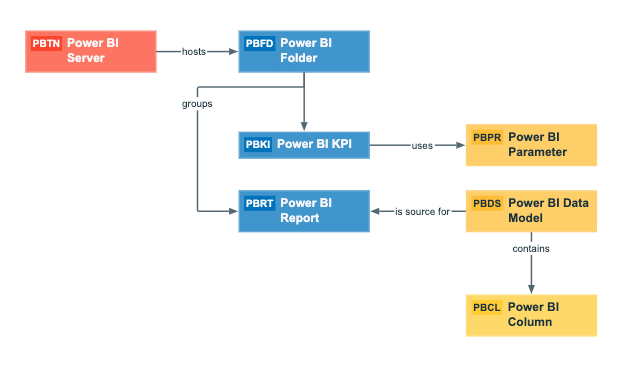
The following image shows the relations between Power BI asset types.
Harvested metadata per asset type
This table shows the harvested Power BI Report Server metadata for assets of each Power BI asset type, assuming you have the necessary subscriptions and configurations for a full ingestion.
| Asset type | Harvested Power BI Report Server metadata in Data Catalog |
|---|---|
| Power BI Column |
|
| Power BI Data Model |
|
|
Power BI Folder |
|
|
Power BI KPI |
|
| Power BI Parameter |
|
| Power BI Report |
|
| Power BI Server |
|
Example of ingested Power BI Report Server metadata
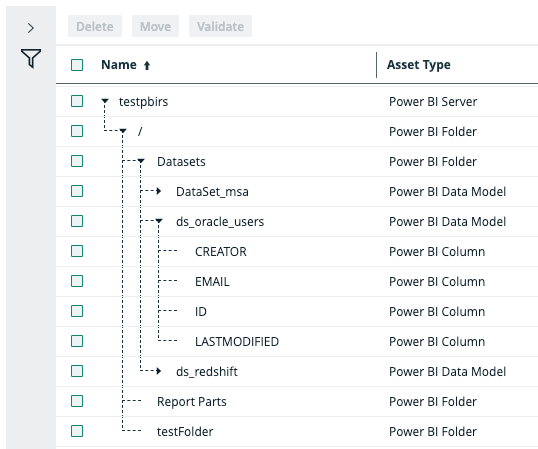
The following image shows an example structure after Power BI Report Server ingestion.