Configuration variables
Configuration variables are the process variables listed in the Variables section of the workflow definition page in Collibra, where you can edit them. These are usually variables that don’t change often but that you may want to configure after you deploy the workflow. By using configuration variables, you don't need to modify the workflow definition file or ask the initiator of the workflow for input every time the workflow starts.
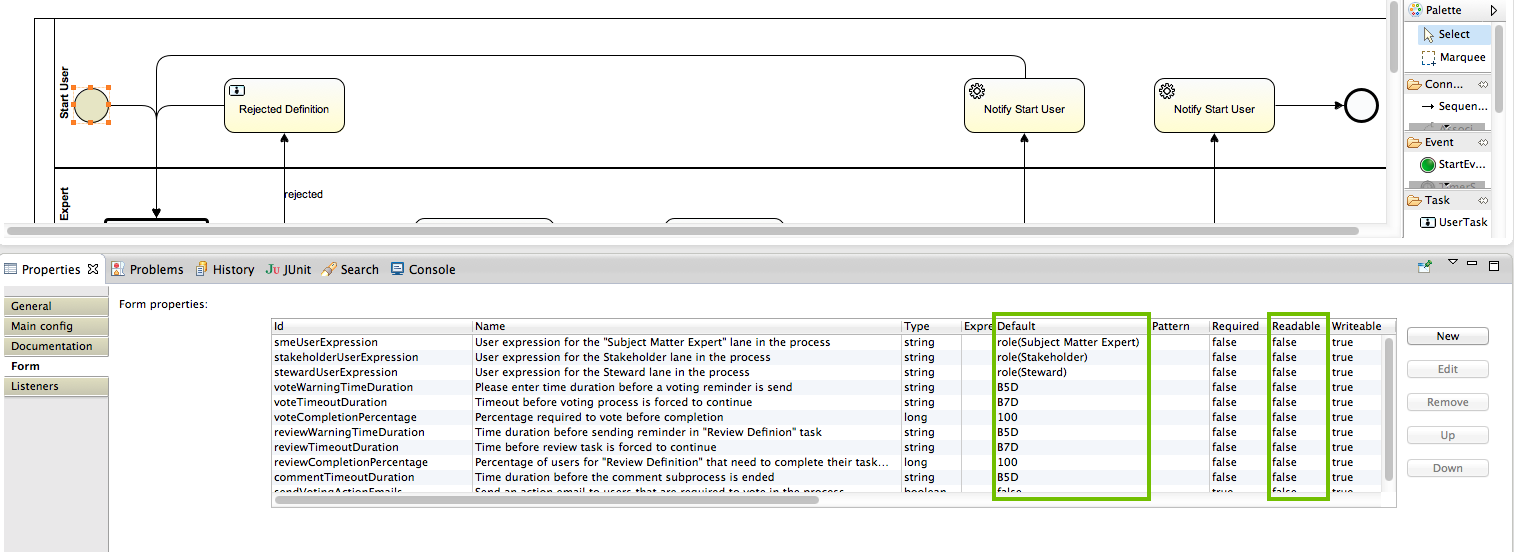
You can create configuration variables in your workflow definition file by adding start form variables with the following properties:
- Readable: Set this to false. The variable no longer appears in a start form dialog box but on the workflow definition page.
- Default: You must provide a default value for these variables. They are considered essential for the workflow progress and because the workflow initiator cannot see them in the start form dialog box, they must have an initial value. Collibra does not accept workflow definitions that have configuration variables without a default value.
If you want to assign a fixed value to a process variable at the start of the workflow that cannot be modified on the workflow definition page, set the Writeable property to false. You can use and change the value of the variable throughout your workflow the same as any other process variable.
Note If you redeploy a workflow, the configured variables remain the same. If you delete a workflow and then deploy it again, the variables revert to the default values.
