View permissions
A view permission is the right to see a resource and its children. It determines which users can see and work with which resources. You assign a view permission to users or user groups on domain or community level. Consequently, only these users can see the resources and their children, including the assets.
Understanding view permissions
By default, all users can see all resources. You can tell that there are no view permissions if Unrestricted view permissions is in the View permissions section of the resource's Responsibilities page.
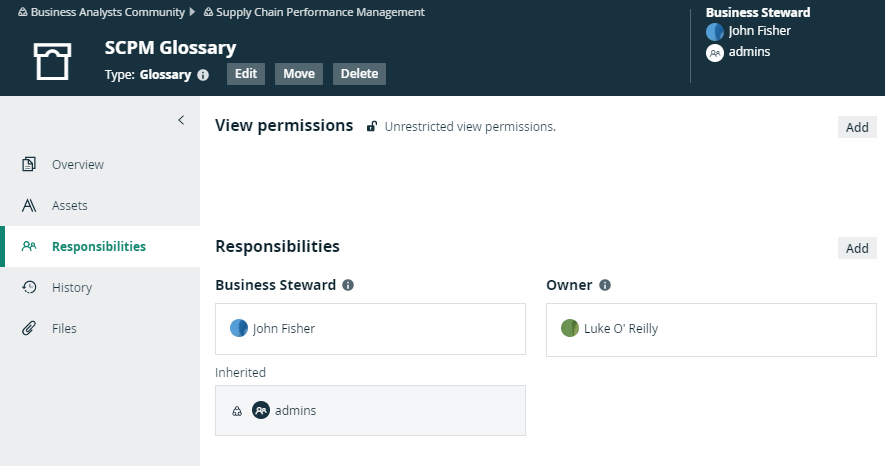
If you add users or user groups to the view permissions of a resource, only those users or groups can view the resource and its children.
All child resources inherit the view permissions from parent resources. Once you have added users or user groups to the view permissions of a resource, you cannot create view permissions for any of its child or parent resources.
You can recognize inherited view permissions by their gray background.
- A user with the System Administration global permission, for example via the Sysadmin global role can see all views in Collibra, even if they are not shared.
- A user with the Manage all views permission can see only views that are shared.
Impact of view permissions on responsibilities
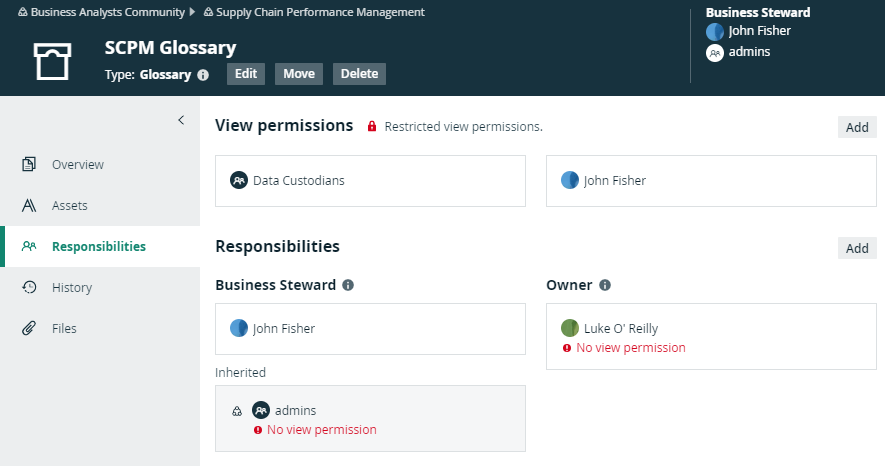
View permissions affect responsibilities. If a user has a responsibility for a certain resource, but does not have view permission, that user cannot act upon that responsibility. The responsibility becomes inactive, due to the lacking view permission.
To activate the responsibility, you have to create the view permission for this resource or a parent resource.
In the example below, Luke O'Reilly is the Owner of the SCPM Glossary domain, but he does not have the view permission to see the domain. As a consequence, he cannot see the assets or act on his responsibility. On the Responsibilities page, his responsibility shows an error message to clearly show that there is a problem. You can solve the problem in one of the following ways:
- Create a view permission for Luke.
- Add Luke to the user group that has a view permission.
- Delete all view permissions, so that everyone can see the assets.
- Delete Luke's responsibility as Owner and pick another person for that role.