Before you install Collibra DGC
Before you start the installation of Collibra Data Governance Center, follow these steps:
- Download the installer from the Collibra Downloads page.
- Linux: dgc-linux-5.7.10-0.sh
- Windows: dgc-windows-5.7.10-0.zip
- Save the installer on each server that is used to run Collibra DGC.
- On Linux servers:
- Make the installer executable:
chmod a+x dgc-linux-5.7.10-0.sh - Set the locale to en_US.UTF8.
- Ensure that the user account that will perform the installation or upgrade has execute access on /tmp.
- Make the installer executable:
- On Windows Server 2012 R2, install all the latest updates and patches.
- On Windows, extract the installer ZIP archive.
Important The target directory to extract the ZIP archive cannot contain spaces.
Note
On Linux systems without a graphical user interface, the installation wizard remains identical but you need your keyboard to make selections.
In the next image, you can see a snippet of the wizard:
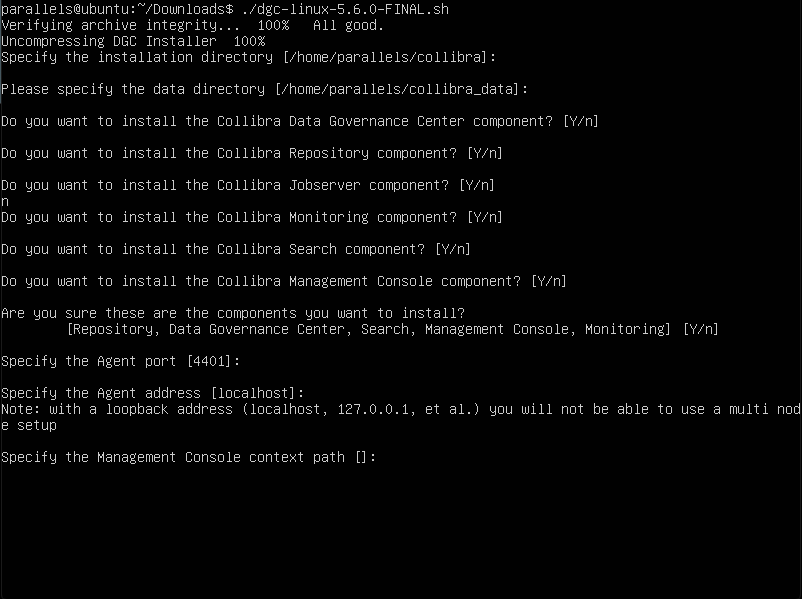
On Linux systems without a graphical user interface, the installation wizard remains identical but you need your keyboard to make selections.
- Default values are displayed between square brackets, for example for the Installation directory. Press Enter to accept the default value or enter a new value.
- If there is a yes or no question, the upper-case character is the default selection. Press Enter to select the default value.
In the next image, you can see a snippet of the wizard:
