Automatic hyperlinking
In Collibra, every asset is a potential "target" of a hyperlink. If the name of an asset is mentioned somewhere in a text attribute of another asset, that mention automatically gets a hyperlink to the corresponding asset. Collibra keeps all hyperlinks up to date when you edit your data.
You can enable or disable automatic hyperlinking at the different levels:
- Environment: Contact Collibra support if you want to enable or disable automatic hyperlinking in your entire environment.
- Domain: If automatic hyperlinking is enabled in Collibra Console, you can enable or disable it on the domain level. Because every asset is a possible target, automatic hyperlinking can lead to an excessive amount of hyperlinks, which can negatively affect performance. Therefore, by default, automatic hyperlinking is disabled for all domains. However, you can enable it.
- Individual assets: An asset may have a common word as its name, for example, "is", "a", "or" or "and". When that happens, you don't want hyperlinks to this asset because it would lead to a lot of useless hyperlinks. Therefore, you can exclude such assets from automatic hyperlinking.
Note If there are assets with identical names, they are all shown in a pop-up when you click the link. Then, you can click one to open its asset page.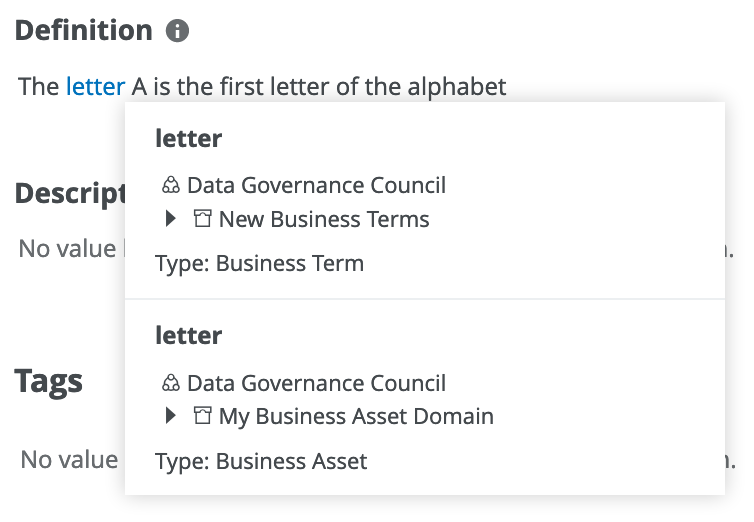
After importing data or after a backup has been restored, Collibra triggers a rebuild of the automatic hyperlinks. You can also rebuild the hyperlinks manually.
Tip By default, automatic hyperlinking is not case sensitive. For example, an asset 'Nato' will also be hyperlinked if it is mentioned as 'NATO', and vice versa.
