Characteristics management
The characteristcs management phase figures in both the asset onboarding process and the asset change management process.
In this workflow, the Owner, Business Steward, Data Steward and Privacy Steward can, in turn, edit the characteristics of the asset.
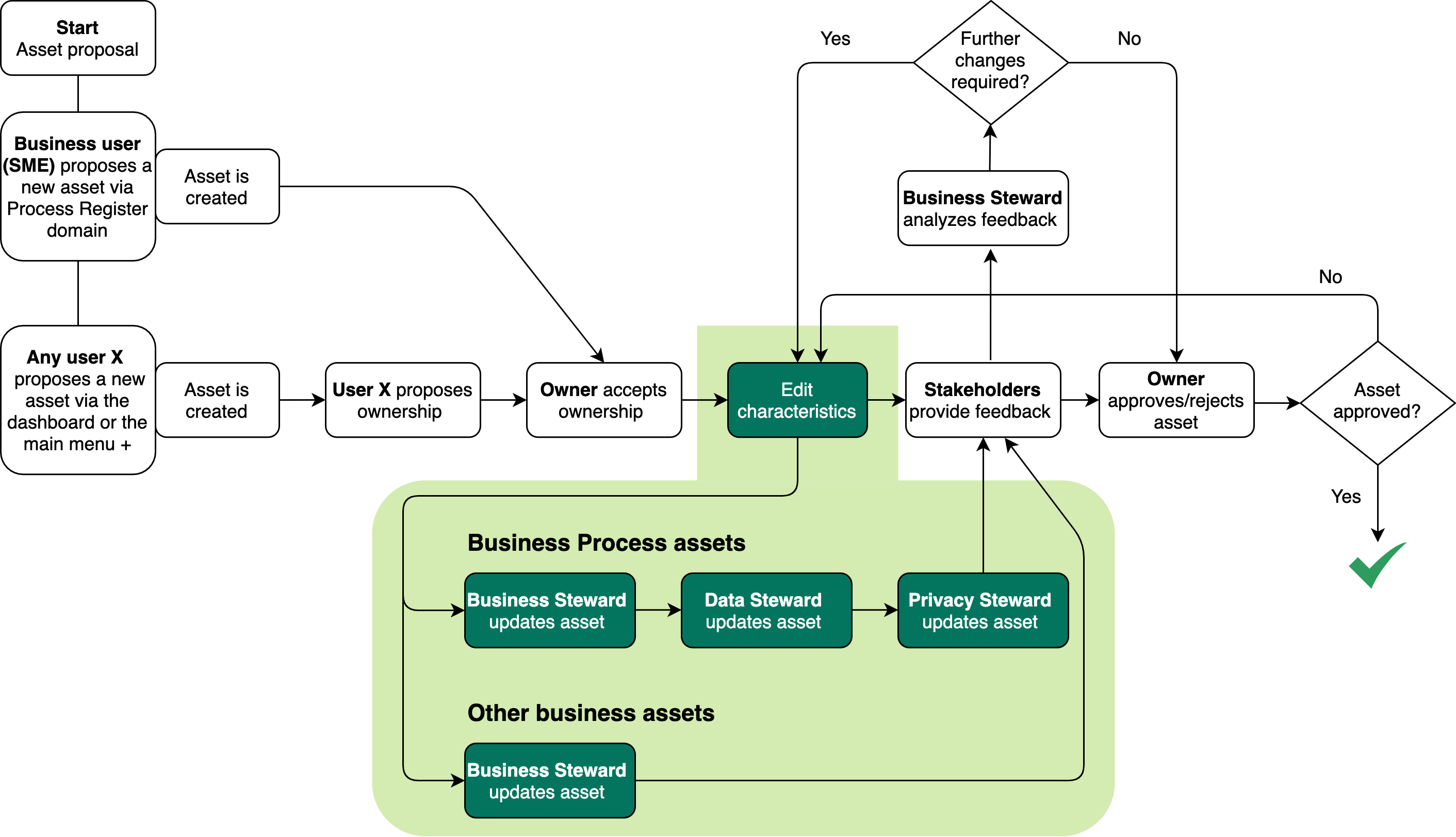
If the Business Steward or Owner for the proposed domain accepts ownership via the ownership acceptance workflow, they receive a task prompting them to either:
- Edit the characteristics of the proposed asset.
- Go directly to the asset approval workflow.
The Business Steward decides to edit the characteristics
Note This is the entry point for editing an approved asset, when a Business Steward clicks the Start update workflow button on the asset page of the relevant asset.
The Business Steward clicks the task in My Tasks and starts the relevant workflow.
- For Business Process assets, the Business Steward, Data Steward and Privacy Steward are prompted, in succession, to edit the asset in accordance with each users area of expertise.
- For other business assets, such as Risk and Technology assets, only the Business Steward is prompted to edit the asset.
When the relevant stewards have completed the workflow, the Owner for the asset receives a task to accept or reject the changes.
- If the Owner accepts the changes, the asset approval workflow is automatically triggered.
- If the Owner rejects the changes, the Business Steward can either:
- Re-run the workflow and further edit the characteristics.
- Start the asset approval workflow.
Note Although we recommend that you use workflows to manage the editing of assets, the Business Steward and Owner can always edit assets directly via the relevant asset pages. Doing so does not trigger further review of the asset or the approval workflow.
The Business Steward decides to not edit the characteristics
In this case, the Business Steward starts the asset approval workflow, and the Owner or Data Protection Officer receives a task to approve the asset.
Output and status evolution
The following table shows the status evolution, based on the possible conditions.
| Condition | The status of the asset... |
|---|---|
|
Before any action is taken. |
Is Ownership accepted. |
| The Business Steward starts the workflow to edit the characteristics of the asset. | Remains Ownership accepted. |
|
The stewards complete the workflows to edit the characteristics of the asset. |
Becomes Approval pending. |
| The Business Steward skips the characteristics management workflow and starts the asset approval workflow. | Becomes Waiting for feedback. |
