Automatic data classification via the Data Classification platform
When you register a data source, you have the option to store a data profile and sample data. These options are required if you want to classify columns in the data set.
The Data Classification platform predicts the data classes of selected columns and sends them back to Collibra Data Intelligence Cloud, where you confirm or reject the suggested data classes. The Data Classification Platform uses your feedback to retrain the platform and improve future data classifications.
Warning If you want to use the Data Classification platform, request it via your Collibra contact or create a support ticket.
Limitations
-
Automatic data classification via the Data Classification platform is a cloud service. Only if your on-premises environment can reach the cloud service, you can use data classification.
- Out of the box, automatic data classification can predict a limited set of data classes. However, you can create user-defined data classes to increase its prediction quality.
- The only supported language for data classes is English.
- Automatic data classification needs sample data and profiling data to be able to predict the data classes.
Note You can create sample data and profiling data by registering a data source and choosing to create sample data and profiling data or by importing the data via an import API.
- Automatic data classification only works for columns of data sources that are
Automatic data classification flow
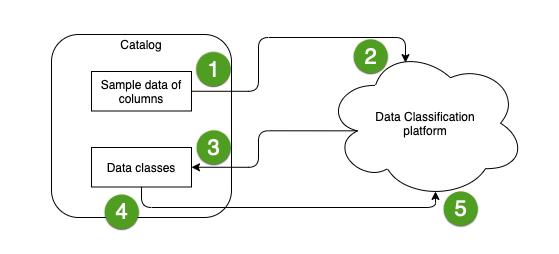
In the following schema, you can see the different steps of an automatic data classification flow.
|
Step |
Description |
|---|---|

|
You select the columns that you want to classify and send their sample data to the Data Classification platform. |

|
The Data Classification platform predicts the data classes of the columns. |

|
The Data Classification platform sends the data classes to Collibra. |

|
You accept or reject the predicted data class of each column or add your own new classes. The Data Classification platform might predict multiple data classes for a column. In this case, if the prediction is accurate, you can accept multiple data classes for the column. |

|
Your selections are sent to the Data Classification platform. The Data Classification platform stores your selections, along with the associated sample data, to retrain the Classification Model and improve future classification predictions. |
